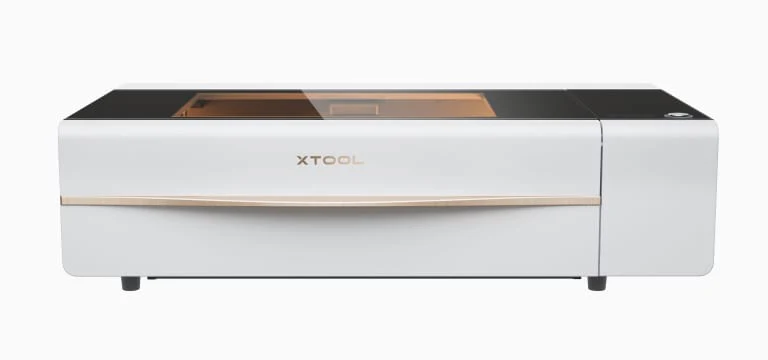
The xTool P2 is a powerful 55-watt CO2 desktop laser cutter that stands out with unique features like curved engraving and automated AI batch engraving. CNET called it a potential Glowforge killer, and reviewer Chris Garrett was impressed by its capabilities after just a day of testing. The machine comes fully enclosed with built-in fume extraction and air assist, making it safer to operate. It's designed for users who need robust performance for thicker materials or faster engraving speeds. However, it requires a significant initial setup with distilled water and antifreeze, and its large footprint may not suit all workspaces.

Full review
Power and Performance
Professional reviewers from CNET noted that this increased wattage allows for faster cutting speeds and the ability to process thicker materials, with the machine capable of cutting through 20mm acrylic and 18mm solid wood in a single pass. The P2's laser precision is rated at 0.01mm, which is excellent for detailed work, and it achieves maximum engraving speeds of up to 600mm/s. However, some early adopters like those in the Maker Hacks community reported that while the machine's raw power is impressive, it requires careful setup and calibration to achieve optimal results. The machine's performance is particularly notable when compared to the xTool M1, which uses a diode laser system and lacks the cutting power of the P2's CO2 system. Reviewers noted that the P2's power makes it ideal for professional crafters and small business owners who need to handle a wide range of materials efficiently.
TechRadar's initial review highlighted the P2's ability to cut through materials that would typically require multiple passes or specialized equipment. The machine's 55W CO2 laser tube is capable of producing a focused beam with a spot size of 0.15×0.2mm, which allows for both precise cutting and detailed engraving. The xTool P2 also features an automatic height detection system that adjusts the Z-axis to maintain focus on curved surfaces, a feature that sets it apart from many competitors. This capability was particularly praised by reviewers who tested the machine with irregular materials such as wine barrel staves. However, some users reported that the initial setup process, including aligning the mirrors and adding distilled water with antifreeze, required more time and technical knowledge than expected. The machine's performance is also dependent on proper ventilation and fume extraction, which the P2 includes built-in, but some users noted that the exhaust system could be improved for quieter operation during extended use.
Build Quality and Design
According to The Handymans Daughter, who tested the machine for over six months, the P2's construction feels solid and well-built, though its size and weight make it a challenging setup for those with limited space or mobility. The machine's design includes a fully enclosed laser chamber with an automatic locking lid for safety, which is a key feature for preventing accidental exposure to the laser beam. The P2's packaging was well-designed, with robust cardboard and internal foam protection that prevented any damage during shipping, as noted by users in the Maker Hacks community. The machine's internal components, including the laser tube and mirror alignment system, were described as requiring careful handling during setup, with some users reporting that the initial mirror alignment process was more complex than anticipated.
The xTool P2's design includes several unique features that distinguish it from other laser cutters on the market. The curved surface engraving capability, which automatically adjusts the Z-axis height to maintain focus on uneven surfaces, was particularly praised by reviewers. Additionally, the machine features dual 16MP cameras that aid in autofocus and material thickness measurement, which streamlines the laser settings process. The P2 also includes a built-in water-cooling system with a capacity of 1.4 liters and an air assist system with adjustable power ranging from 15-150Kpa. The inclusion of these features, along with the optional conveyor feeder system and rotary accessory, makes the P2 a versatile tool for various crafting projects. However, some users noted that the machine's large footprint and weight make it less suitable for small workshops or those with limited space, and the setup process, while straightforward, requires more time and attention to detail than many competitors.
Software and Interface
Reviewers from Pineapple Paper Co. noted that while XCS is intuitive and user-friendly, it lacks some of the advanced features found in competing software like LightBurn. The software includes a grid array function that allows users to create test cards for different materials, which is particularly helpful for beginners. However, some users reported that the camera-based batch processing feature, which maps patterns to multiple workpieces automatically, had issues recognizing certain materials, such as silver tags against silver honeycomb. The software's interface is designed to be simple for beginners but also offers enough customization for experienced users. The machine also supports LightBurn compatibility, which provides more advanced features for those who prefer third-party software. Some reviewers noted that while XCS is sufficient for basic tasks, it lacks the advanced automation and batch processing capabilities found in more professional-grade software solutions.
The software's ability to handle curved surface engraving and auto height detection was a standout feature, as noted by reviewers from Unique Creations By Anita. These features are exclusive to the XCS software, which means that users who want to take full advantage of the P2's capabilities must use the manufacturer's software. The P2 also includes a live view of the work surface, which allows users to see exactly where they are placing their designs. This feature was particularly appreciated by users who work with uneven surfaces or need precise placement. However, some users reported that the software's camera system, while helpful, could be improved for better recognition of materials and objects, especially in low-light conditions. The software's interface is generally considered to be straightforward, but some users noted that it could benefit from more detailed tutorials or a more intuitive workflow for advanced features.
What Reviewers Loved
The Handymans Daughter highlighted the machine's impressive cutting capabilities, noting that it could handle materials up to 20mm thick, which is significantly more than what most desktop lasers can manage. The curved surface engraving feature was also a major point of praise, as it allows users to engrave on irregular surfaces without the need for additional accessories. The P2's automatic height detection system, which adjusts the Z-axis to maintain focus on curved surfaces, was particularly appreciated by reviewers who tested it with materials such as wine barrel staves. Additionally, the machine's dual 16MP cameras were noted for their ability to aid in autofocus and material thickness measurement, streamlining the laser settings process. The inclusion of built-in fume extraction and air assist systems was also a significant advantage, as it eliminates the need for external ventilation systems and makes the machine safer to use in enclosed spaces.
The xTool P2's versatility was another major selling point, with reviewers from Pineapple Paper Co. noting that it can handle a wide range of materials, from wood and acrylic to leather and glass. The machine's ability to work with both cutting and engraving tasks in a single device was particularly appreciated by users who want to maximize their productivity. The optional accessories, including the conveyor feeder system and rotary accessory, were also praised for their ability to expand the machine's capabilities. The P2's large working area of 23.6×12 inches and 26.7×14.1 inches bed size were noted as significant advantages for users who work with large materials or need to process multiple items simultaneously. The machine's built-in cooling system and air assist power were also highlighted as important features that contribute to its reliability and performance, especially during extended use.
Where It Falls Short
The machine's large size and weight make it challenging to move and set up, particularly for users with limited space or mobility. The Handymans Daughter noted that the initial setup process, including adding distilled water with antifreeze and aligning the mirrors, required more time and technical knowledge than expected. Some users reported that the machine's exhaust system, while effective, could be improved for quieter operation during extended use. The software, while functional, lacks some of the advanced features found in competing software like LightBurn, which can be a limitation for experienced users who require more automation and batch processing capabilities. The camera-based batch processing feature, while innovative, had issues recognizing certain materials, such as silver tags against silver honeycomb, which limited its effectiveness in some scenarios.
Another significant concern raised by reviewers was the machine's price point, which is considerably higher than many competing options. The xTool P2 10W is priced around $5,000, which puts it in a premium category and may be prohibitive for casual users or those on a tight budget. The need for distilled water and antifreeze, which must be added before the machine can be used, was also a point of frustration for some users who found the process cumbersome. Additionally, while the P2's build quality is solid, some users noted that the machine's internal components, particularly the laser tube, require careful handling during setup and maintenance. The machine's reliance on specific software for some of its advanced features, such as curved surface engraving and auto height detection, was also seen as a limitation by users who prefer more flexibility in their workflow.
Who It's Best For
The machine's 55W CO2 laser and ability to cut through thick materials make it ideal for users who work with a wide range of materials, including wood, acrylic, leather, and glass. The curved surface engraving feature and automatic height detection system are particularly beneficial for users who work with irregular surfaces or need to process multiple items simultaneously. The machine's large working area and optional accessories, such as the conveyor feeder system and rotary accessory, make it a good choice for users who need to handle large or complex projects. The P2 is also well-suited for those who value built-in fume extraction and air assist systems, which make it safer to use in enclosed spaces without requiring external ventilation. However, the machine's size, weight, and price point make it less suitable for casual users or those with limited space or budget.
The xTool P2 10W is not recommended for beginners or casual users who are looking for a simple, plug-and-play laser cutter. The machine's complex setup process, including the need to add distilled water with antifreeze and align the mirrors, requires more technical knowledge and time than many competitors. The machine's price point of around $5,000 may also be prohibitive for casual users or those on a tight budget. Additionally, the machine's reliance on specific software for some of its advanced features may be a limitation for users who prefer more flexibility in their workflow. The P2 is also not ideal for users who work in small spaces or have limited mobility, as its size and weight make it challenging to move and set up. For those who need a powerful, versatile laser cutter with advanced features, the xTool P2 10W is a strong contender, but it requires a significant investment in both time and money.
How It Compares to Alternatives
The machine's performance is particularly notable when compared to the xTool M1, which uses a diode laser system and lacks the cutting power of the P2's CO2 system. The P2's ability to cut through thicker materials and achieve high-speed engraving makes it a more versatile tool for professional crafters and small business owners. However, the P2's price point of around $5,000 is significantly higher than many competing options, which may be a barrier for casual users or those on a tight budget. The machine's inclusion of built-in fume extraction and air assist systems also sets it apart from many competitors, making it safer to use in enclosed spaces without requiring external ventilation systems.
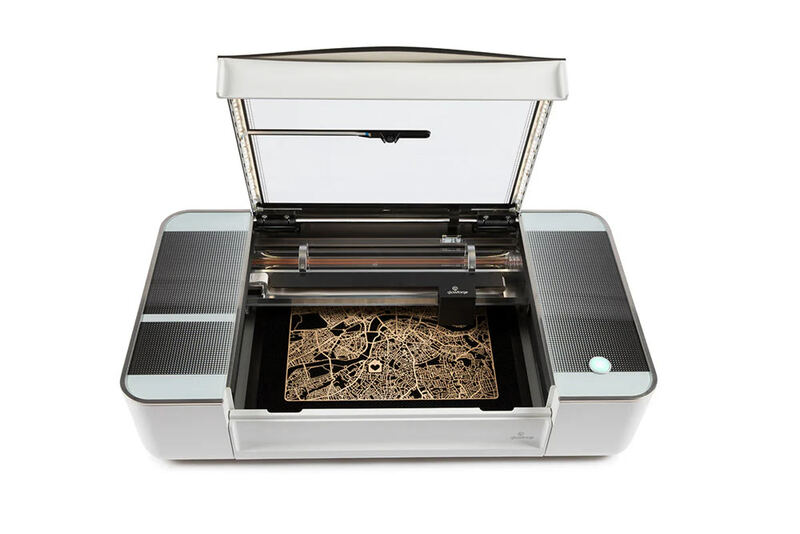
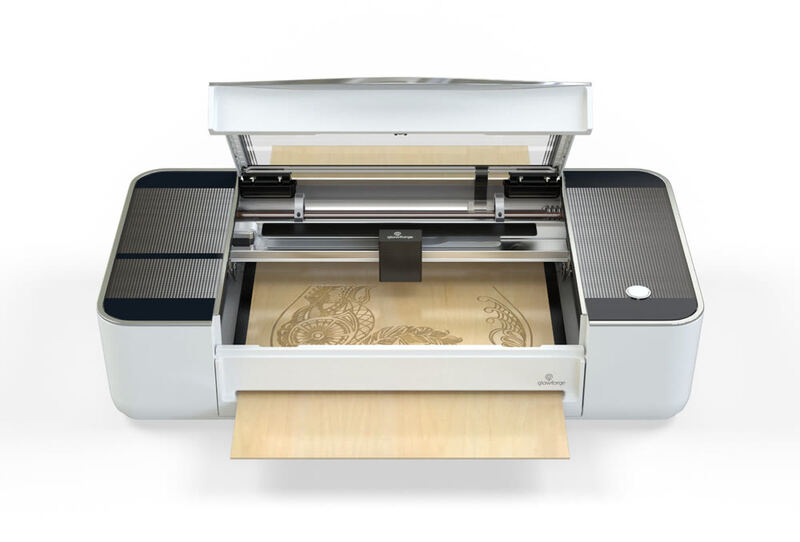
Compared to the Glowforge Pro, which is a popular entry-level laser cutter, the xTool P2 10W offers significantly more power and versatility. The P2's 55W CO2 laser can cut through materials that would typically require multiple passes or specialized equipment, while the Glowforge's diode laser system is limited in its cutting capabilities. However, the Glowforge is more user-friendly and requires less setup time, making it a better choice for casual users or those who want a simpler experience. The xTool P2 10W also lacks some of the advanced features found in the Glowforge's software, such as automatic material recognition and advanced batch processing capabilities. The P2's larger footprint and weight also make it less suitable for small workshops or those with limited space, while the Glowforge's compact design makes it more accessible for casual users.
Value at This Price
The machine's 55W CO2 laser, which can cut through thick materials and achieve high-speed engraving, provides capabilities that are not available in most competing options. The inclusion of built-in fume extraction and air assist systems also adds value by making the machine safer to use in enclosed spaces without requiring external ventilation systems. The P2's advanced features, such as curved surface engraving and automatic height detection, further justify its premium price point by offering capabilities that are not available in other machines in its category. However, the machine's complex setup process and need for distilled water and antifreeze may be seen as drawbacks by casual users who are looking for a simpler experience. The P2's large size and weight also make it less suitable for small workshops or those with limited space, which may limit its appeal to some users.
The xTool P2 10W's value proposition is strongest for users who need a machine that can handle a wide range of materials and projects efficiently. The machine's ability to cut through materials up to 20mm thick and achieve maximum engraving speeds of 600mm/s makes it a powerful tool for professional crafters and small business owners. The inclusion of optional accessories, such as the conveyor feeder system and rotary accessory, also adds value by expanding the machine's capabilities. However, the machine's price point of around $5,000 may be prohibitive for casual users or those on a tight budget. The P2's reliance on specific software for some of its advanced features may also be seen as a limitation by users who prefer more flexibility in their workflow. Despite these drawbacks, the xTool P2 10W's combination of power, versatility, and advanced features makes it a strong contender for professional users who need a high-performance laser cutter.
Strengths
- +55-watt CO2 laser provides substantial cutting and engraving power
- +Built-in fume extraction and air assist for safer operation
- +Curved Engraving feature automatically adjusts z-height for warped materials
- +Automated AI Batch Engraving recognizes shapes and engravings multiple objects in one batch
Watch-outs
- −Requires distilled water and included antifreeze before first use
- −Machine size is substantial at 39.4×25.1×10.6 inches
How it compares
The xTool P2 stands out from the Glowforge Pro with its fully enclosed design and built-in fume extraction, features that the Glowforge lacks without an expensive add-on. Compared to the xTool D1 Pro, it offers more power with its 55-watt CO2 laser and includes advanced AI batch engraving, but requires more setup effort and has a larger footprint.
Who this is for
At a glance: users wanting robust performance.
Why you’d buy the xTool P2 10W
- 55-watt CO2 laser provides substantial cutting and engraving power.
- Built-in fume extraction and air assist for safer operation.
- Curved Engraving feature automatically adjusts z-height for warped materials.
Why you’d skip it
- Requires distilled water and included antifreeze before first use.
- Machine size is substantial at 39.4×25.1×10.6 inches.
Rating sources
“The xTool P2 desktop CO2 laser cutter has blown me away. In fact, that is a huge understatement.”
“I have received the new xTool P2 CO2 laser, launched in 202,3, from Makeblock for reviewing purposes. All the opinions expressed in this post are solely my own and are based on my personal experience while using the laser.”
“I'll share my genuine experience using this tool for the first time, and any hiccups that occurred along the way.”
Our 4.3 score is the average of these published ratings. Ratings marked * were derived from the reviewer’s written analysis or video transcript — the publisher didn’t print an explicit numeric score, so we inferred one from their own words. Click through to verify. More about methodology.