TechGearLab found that the tactile scissor switches provide a quiet and responsive typing experience suitable for shared workspaces. The keyboard features four programmable action keys on the right side, but Laptop Mag reported frequent accidental presses when reaching for adjacent standard keys due to their proximity. While CNN Underscored confirmed reliable Easy-Switch functionality across multiple devices, the compact layout omits a number pad entirely, limiting utility for heavy data entry tasks. This device fits creative professionals seeking aesthetic customization and portability, whereas users requiring extensive numeric input or traditional key spacing should look elsewhere.
Full review
Scissor switches deliver a quiet and responsive typing feel
TechGearLab found that the tactile scissor switches in the Logitech POP Icon Keys produce a satisfying "pop" with every stroke, creating a fun and highly responsive typing experience. The keys feature comfort grooves and a light matte texture on their surface designed to gently cradle fingertips during extended use. This combination of mechanical-like feedback without the noise makes it suitable for shared workspaces where acoustic discretion is necessary.
CNN Underscored reported that despite the unique rounded-square shape of the keycaps, the typing experience remained comfortable and did not hinder accuracy or speed. The reviewer noted that the keys provide a pleasant clicking feel throughout long writing sessions, effectively addressing concerns that the unconventional geometry might negatively impact touch-typing ergonomics.
Laptop Mag described the keyboard as offering an effortlessly fast typing experience that balances quiet operation with striking aesthetics. The scissor-switch mechanism allows for rapid input without the loud clacking associated with traditional mechanical switches, positioning the device as a viable option for creative professionals who value both performance and visual appeal in their peripherals.
"Squircle" keycaps create distinct tactile spacing
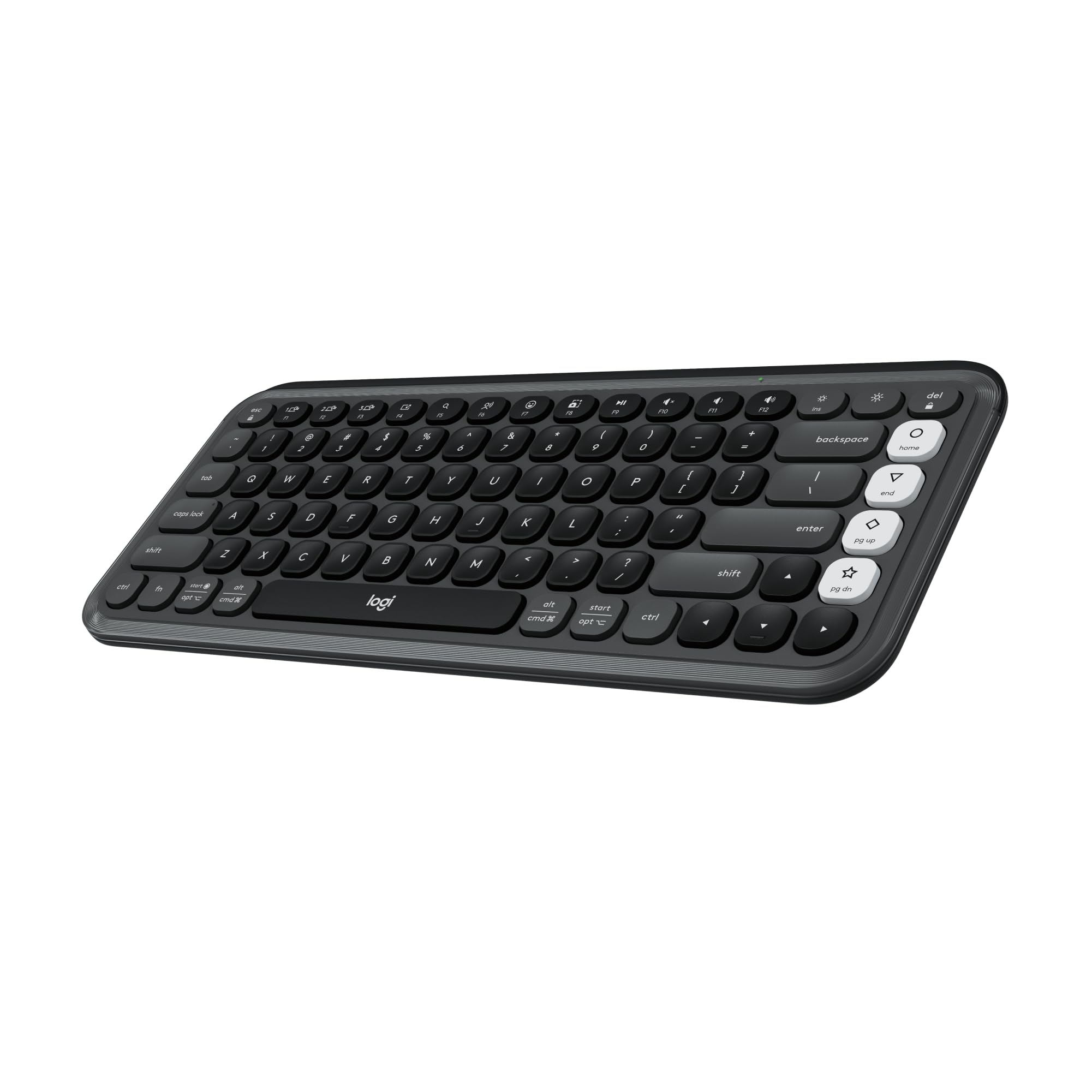
The defining physical characteristic of this keyboard is its use of "squircles," or rounded squares, for the main alphanumeric keys. Laptop Mag noted that this shape creates a feeling of space between the keys, which some users found helpful in reducing typos by clearly delineating individual character boundaries. The transition from round keys to these squircle shapes marks a significant design shift from the original POP Keys mechanical model.
TechGearLab highlighted that while the bold look is appealing, the unique key shape could turn some users off who prefer traditional rectangular keycaps. Despite this potential friction point for purists, multiple reviewers found that the scooped nature of the keys actually guided fingers effectively during use, mitigating the adjustment period typically associated with non-standard layouts.
The visual impact of these squircles is amplified by the available colorways, which include lilac, graphite, off-white, and rose. The transparent plastic frame surrounding the keys allows the vibrant colors to stand out, making the keyboard a statement piece on any desk rather than just a utilitarian tool.
Four programmable action keys offer customization
The right-hand side of the keyboard features four customizable action keys that can be programmed via Logi Options+ software to launch favorite apps or execute shortcuts. These keys are distinct in color from the main typing area, providing a visual cue for their special function. This feature elevates the keyboard beyond basic input, allowing users to tailor the device to specific workflows.
However, this customization comes with a physical trade-off. Laptop Mag reported losing count of how many times they accidentally hit one of the four programmable buttons when attempting to press the enter or backspace keys. The proximity of these action keys to the main typing cluster means that users must exercise caution to avoid triggering unintended commands during fast-paced typing sessions.
Users who rely heavily on keyboard shortcuts may find this layout beneficial once mastered, but those accustomed to standard key spacing might experience frustration during the initial adaptation phase.
Bluetooth Easy-Switch enables seamless device pairing
The Logitech POP Icon Keys supports easy switching between three paired devices using dedicated Bluetooth buttons. This functionality allows users to seamlessly transition their typing session from a desktop computer to a laptop or tablet without disconnecting and reconnecting the peripheral. The ability to maintain multiple connections is particularly valuable for professionals who juggle several screens throughout the day.
CNN Underscored confirmed that this feature works reliably across various operating systems, including PCs, Macs, Android devices, iPhones, iPads, Chromebooks, and even Linux distributions. This broad compatibility ensures that the keyboard can serve as a central input device for a mixed-ecosystem workspace without requiring complex configuration steps.
The wireless connectivity is supported by batteries included in the box, providing up to 36 months of battery life according to manufacturer specifications. This long-lasting power source reduces the frequency of maintenance and ensures that users do not need to worry about charging cables interfering with their desk setup.
Transparent casing shows dirt and smudges easily
The aesthetic choice of a transparent plastic frame around the keyboard has a practical downside regarding maintenance. Laptop Mag reported that the device is prone to picking up smudges, dirt, food particles, and other debris from daily use. The clear material acts as a canvas for fingerprints, making the keyboard look unclean if not wiped down regularly.
Some reviewers suggested that this susceptibility to showing dirt might actually be a feature rather than a bug, as it encourages users to keep their workspace tidy. However, for those who prefer peripherals that hide wear and tear over time, the high-maintenance nature of the transparent finish could become a significant annoyance within weeks of ownership.
The keyboard is available in four color schemes, each with varying amounts of post-consumer recycled plastic ranging from 37% to 70%. While this sustainable approach to manufacturing is commendable, it does not mitigate the visual impact of accumulated grime on the clear housing.
Compact layout omits a number pad entirely
The Logitech POP Icon Keys utilizes a compact 75% layout that completely lacks a dedicated number pad. This design choice contributes to the keyboard's smaller footprint, making it ideal for desks with limited space or users who prioritize portability and aesthetic minimalism over numerical input capabilities.
TechGearLab noted in their analysis that while the lack of a numpad is a standard feature for this form factor, it remains a significant limitation for users who frequently enter large amounts of data into spreadsheets. The absence of this component means that anyone relying on heavy financial or statistical work will need to use an external keypad.
The compact size also affects the placement of the programmable action keys, which are situated directly adjacent to the main typing area. This tight clustering reinforces the trade-off between portability and ergonomic comfort, as users must adjust their hand positioning to avoid accidental key presses on the side buttons.
Colorful designs appeal to creative professionals
The keyboard is marketed toward creative professionals through its "studio series" color options, which include vibrant shades like lilac, rose, and orange alongside more subdued graphite. Laptop Mag compared the aesthetic personality of the device to a pop star, noting that it offers a striking visual presence that catches the eye in any office environment.
TechGearLab found that the bright colorways spark joy in dull workspaces, adding a playful vibe to professional settings. The availability of traditional graphite crafted with 70% recycled material also provides an option for users who prefer a timeless look while still supporting sustainable manufacturing practices.
The bold "logi" logo on the space bar is a distinctive branding element that some reviewers found slightly too prominent or spammy. Despite this minor critique, the overall visual impact of the keyboard serves its purpose as a personal expression tool, allowing users to inject color and personality into their digital workspace.
Strengths
- +Delivers a quiet and responsive typing experience using laptop-style scissor switches that reviewers found comfortable.
- +Includes four customizable action keys on the right side that can be programmed via Logi Options+ software.
- +Supports easy switching between three paired devices using dedicated Bluetooth Easy-Switch buttons.
Watch-outs
- −The compact layout lacks a number pad and some users reported accidental key presses on the programmable action keys.
- −The rounded key shape may be difficult for some users to adjust to.
How it compares
The Logitech Pop Icon Keys includes four programmable action keys for customization, whereas the Logitech Pebble Keys 2 K380s lacks dedicated programmable macro keys. However, both use scissor switches; unlike the circular key shape of the Pebble Keys 2 which disrupts tactile guidance, the Pop Icon Keys uses rounded traditional shapes that some users find difficult to adjust to.
Rating sources
Counts as 4.39/5 in our score — this publisher's 138 scores on the site average 3.66, so its scores are adjusted up to compare fairly with other publishers.
Counts as 3.95/5 in our score — this publisher's 15 scores on the site average 3.90, so its scores are adjusted up to compare fairly with other publishers.
Counts as 4.16/5 in our score — this publisher's 181 scores on the site average 4.00, so its scores are adjusted up to compare fairly with other publishers.
Counts as 3.48/5 in our score — this publisher's 87 scores on the site average 3.98, so its scores are adjusted up to compare fairly with other publishers.
Our 4.0 score is the average of the 4 scored reviews above, each adjusted for how strictly its publisher scores; 4 more reviewed it without printing a score and are not in the average. More about methodology.