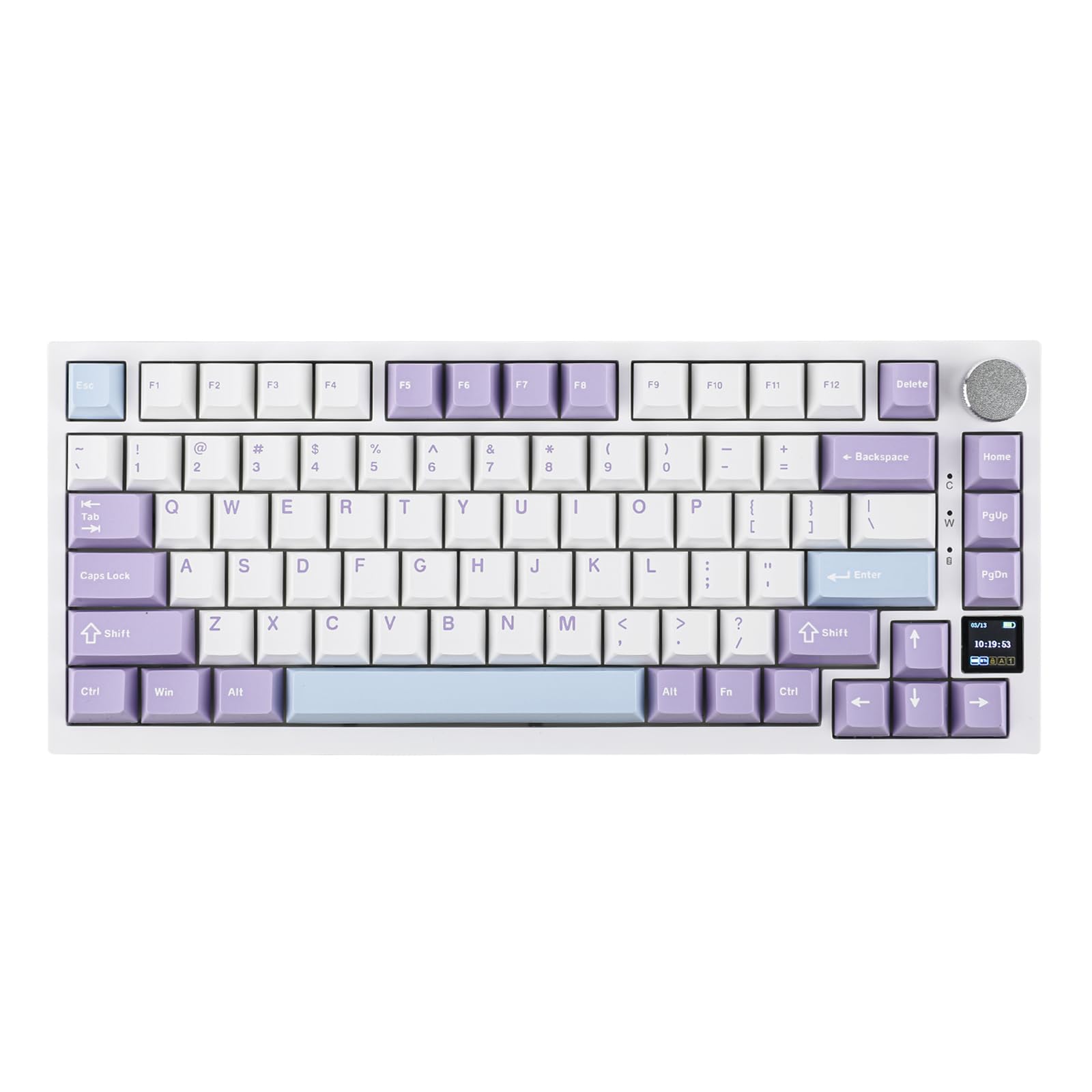
The Epomaker Ajazz AK820 Pro features a unique small TFT screen and tri-mode connectivity, but its utility is severely hampered by clunky software that makes uploading custom GIFs unreliable. IGN found the interface frustrating, turning the display’s potential into little more than a gimmick despite the hardware's sharp visuals. The keyboard also suffers from an ABS plastic shell that feels less premium than competitors like the Aula F75, and yellow accent keycaps on the Grey colorway are criticized for detracting from its aesthetic appeal. This model fits typists who prioritize acoustic performance and connectivity options over build quality and software polish.
Full review
TFT screen limitations and software friction
The small TFT display on the Epomaker Ajazz AK820 Pro provides a unique visual element for a budget mechanical keyboard, but its utility is severely hampered by frustrating software integration. The screen effectively displays essential information such as connection status, battery life, time, and date without requiring any configuration from the user. It also supports custom animated GIFs or personalized images, which adds a layer of customization that distinguishes it from other keyboards in its price range.
Despite this hardware capability, IGN found that the software support required to manipulate these settings is clunky and unreliable. In practical use, attempting to upload custom graphics often fails to work properly, turning what should be a standout feature into little more than a gimmick. The inability to configure advanced metrics like GPU or CPU temperatures further limits the screen's appeal for power users who might expect such functionality.
This friction creates a disjointed experience where the hardware promises customization but the software ecosystem fails to deliver it reliably. Reviewers noted that while the display itself is sharp, vibrant, and offers surprisingly good viewing angles, the process of actually utilizing its full potential involves navigating an unrefined interface. Until manufacturers collaborate on a robust software suite, this feature remains underutilized by most buyers.
Gasket-mount acoustics and switch performance
The acoustic profile of the Ajazz AK820 Pro punches far above its weight class for a $60 keyboard, largely due to its gasket-mount system and flex-cut polycarbonate plate. IGN reported that the stock sound signature is poppy-clacky, delivering an engaging typing experience that feels premium despite the plastic construction. This acoustic performance is enhanced by doubleshot PBT keycaps in an OEM profile, which provide sufficient thickness to dampen unwanted resonance while preserving the desired tactile feedback.
The keyboard features a 75% layout with 81 keys and supports both 3-pin and 5-pin hot-swappable PCBs, allowing enthusiasts to easily experiment with different switch types. The default switches, such as the Ajazz Gift linear variants found in the Grey colorway, complement the gasket-mount design by providing a smooth travel curve that maximizes the plate's flex properties.
For typists who prioritize sound without wanting to invest heavily in modding, this keyboard offers an immediate high-quality experience. The combination of south-facing RGB LEDs and the specific acoustic tuning means that even stock users can enjoy a refined typing feel right out of the box, making it a strong contender for those seeking premium acoustics at a budget price point.
Plastic chassis build quality assessment
Constructed entirely from ABS plastic, the Ajazz AK820 Pro feels robust in daily use but lacks the refined aesthetic of higher-end competitors. The case is sturdy with no creeks or groans when twisted, and it possesses a decent amount of heft that contributes to a somewhat premium feel on the desk. However, the material choice prevents it from matching the solid, cold touch of aluminum chassis found in more expensive mechanical keyboards.
IGN noted that while the build is rock-solid enough to withstand regular use, it falls slightly short when compared directly to rivals like the Aula F75. The Aula model was described as having finer attention to detail and a slightly heavier, more custom feel, whereas the Ajazz design feels somewhat generic in its execution. This comparison highlights that while the structural integrity is good, the tactile experience of the case itself does not elevate the product beyond its budget classification.
The disassembly process for maintenance or modding is straightforward, requiring only careful force to separate the top case after removing keycaps and switches. This ease of access is a positive aspect for hobbyists who might want to lube switches or add foam layers, even if the out-of-box aesthetic does not scream premium craftsmanship.
Volume knob tactility and control layout
A standout physical feature on the top right corner of the keyboard is a metal volume knob that provides satisfying, muted tactility. Users can feel each distinct step when rotating it to adjust audio levels, offering precise control without creating excessive noise during operation. The knob also functions as a mute button when clicked, adding another layer of convenience for media consumption and gaming sessions.
The layout includes three additional buttons positioned near the volume knob: Home, Page Up, and Page Down. These dedicated keys are useful for productivity workflows that rely heavily on navigation shortcuts. However, unlike many other keyboards in this category, the volume knob cannot be mapped to control RGB lighting intensity or effects, which IGN found surprising given how common this feature is among similar Chinese manufacturers.
While the inability to map the knob to lighting controls might disappoint some users who prefer quick visual adjustments, it does not significantly detract from the overall usability. The tactile feedback of the volume adjustment remains a highlight, providing a physical interaction point that feels more premium than standard plastic buttons found on cheaper alternatives.
Tri-mode connectivity and wireless stability
The Ajazz AK820 Pro supports tri-mode connectivity, allowing users to connect via USB-C wired, 2.4 GHz wireless, or Bluetooth 5.1. This versatility enables pairing with up to three different computers simultaneously, making it an ideal choice for users who switch between a desktop, laptop, and tablet throughout the day. The inclusion of a dedicated compartment for the 2.4 GHz dongle on the back ensures that this small accessory is not easily lost when traveling.
Bluetooth 5.1 support ensures stable wireless connections with low latency, suitable for both typing and gaming scenarios. Users can toggle between operating systems using switches located on the rear of the keyboard, streamlining the process of switching between Windows, macOS, or other supported devices without needing to re-pair each time.
The flexibility of having three connection methods means that users are not locked into a single workflow. Whether prioritizing zero-latency gaming with the 2.4 GHz dongle or battery efficiency via Bluetooth for mobile work, the Ajazz AK820 Pro accommodates diverse usage patterns effectively.
Colorway aesthetics and keycap design
The keyboard is available in three colorways: Grey, White Green, and White Purple. The Grey version features a black ABS plastic body paired with light and dark gray keycaps accented by bright yellow keys for the modifier row. While the doubleshot PBT construction ensures durability and clear legends without blurring or misalignment, the specific shade of yellow has drawn criticism for making the keyboard appear more budget-oriented than it actually is.
IGN expressed a personal dislike for the yellow accents, noting that they mar the overall look and detract from the otherwise clean aesthetic. This subjective critique highlights how color choices can significantly impact perceived value, even when the underlying build quality remains consistent across all variants. Users who prefer subtle, professional designs might find this accent scheme jarring.
The White Green and White Purple options offer alternative visual styles that may appeal to users looking for a more cohesive or vibrant look without the contrasting yellow elements. Regardless of the chosen colorway, the keycap profile remains OEM, providing a familiar typing height and shape that suits most typists.
Strengths
- +Includes a small TFT screen capable of displaying connection status, battery life, time, date, and custom GIFs or images via software.
- +Offers tri-mode connectivity (USB-C wired, 2.4 GHz wireless, Bluetooth 5.1) allowing pairing with up to three devices simultaneously.
- +Equipped with a metal volume knob that provides tactile feedback for adjusting audio levels and muting.
Watch-outs
- −The ABS plastic shell feels less premium compared to competitors like the Aula F75, despite robust internal construction.
- −Software support is described as clunky, making it difficult to upload custom GIFs or configure advanced screen settings effectively.
- −Yellow accent keycaps on the Grey colorway are criticized by some reviewers for looking cheap and detracting from the overall aesthetic.
How it compares
Unlike the Lemokey P1 HE which uses Hall Effect switches for adjustable actuation points, this model relies on hot-swappable mechanical switches that lack magnetic precision. It also features a small TFT screen, whereas the NuPhy Air75 V3 offers only a rotary knob module and lacks any display capabilities.
Rating sources
Counts as 4.41/5 in our score — this publisher's 2 scores on the site average 3.80, so its scores are adjusted up to compare fairly with other publishers.
Counts as 4.52/5 in our score — this publisher's 156 scores on the site average 4.15, so its scores are adjusted up to compare fairly with other publishers.
Our 4.5 score is the average of the 2 scored reviews above, each adjusted for how strictly its publisher scores; 1 more reviewed it without printing a score and is not in the average. More about methodology.