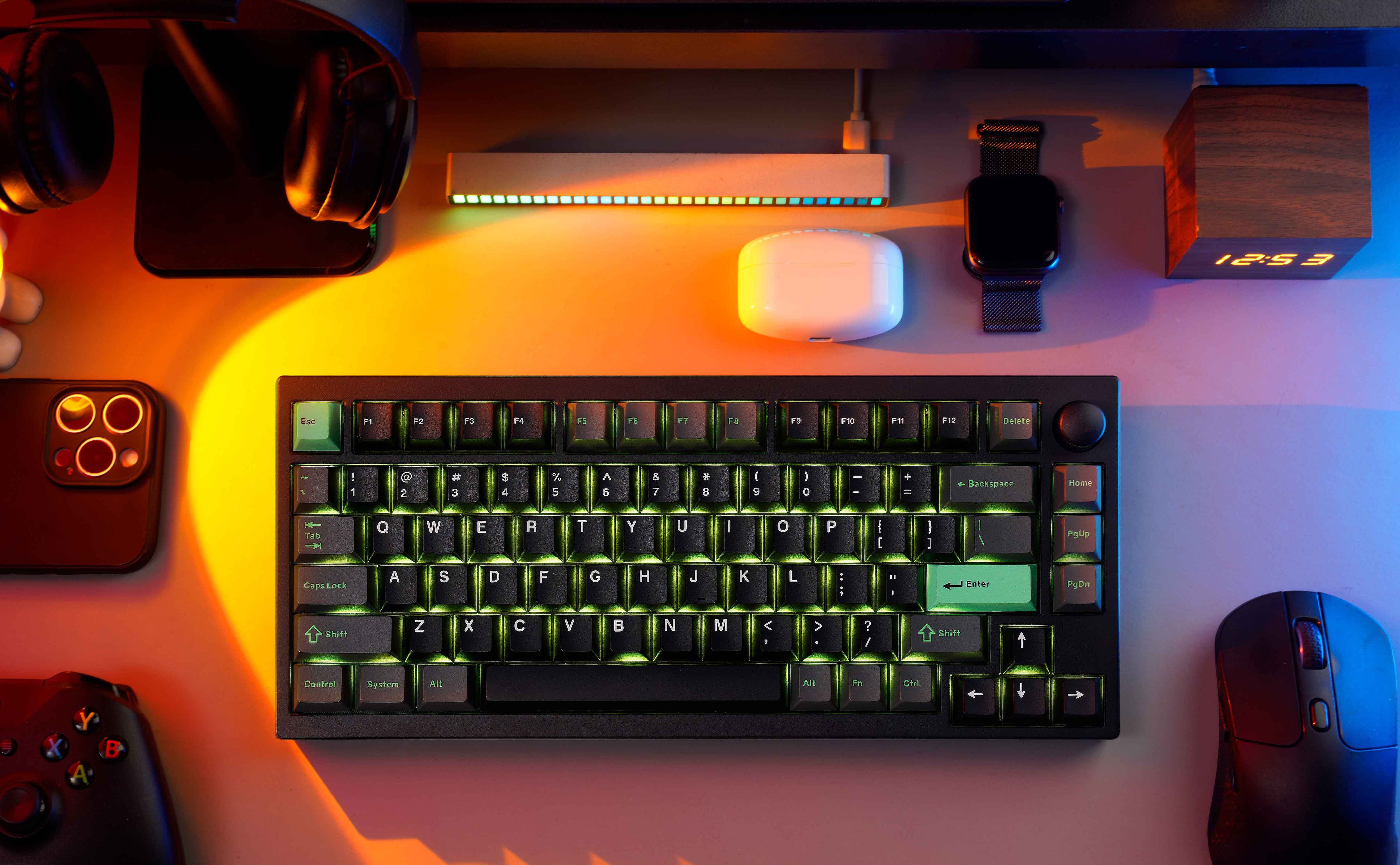
The Lemokey P1 HE features a full metal aluminum body that provides substantial weight to prevent desk movement and a gasket-mounted PCB with internal foam for a quiet, cushioned typing experience. XDA Developers found that the Gateron Double-Rail Magnetic Nebula switches allow adjustable actuation points from 0.2mm to 3.8mm, while Dilpickle1.com confirmed access to Rapid Trigger and other gaming features via the Lemokey Launcher software. Despite these strengths, the spacebar stabilizer produces a louder clack than surrounding keys, and the board lacks dedicated Mac OS mode switches or included Mac keycaps for immediate Apple usability. This keyboard fits competitive gamers seeking precise Hall Effect control on a stable chassis, but those prioritizing silent uniformity or native macOS hardware support should look elsewhere.
Full review
Hall Effect switches enable adjustable actuation
The Lemokey P1 HE utilizes Gateron Double-Rail Magnetic Nebula Hall Effect switches, which replace traditional mechanical contacts with magnetic sensors to determine key presses. XDA Developers found that this technology allows users to adjust the exact actuation point for every single key on the board. The adjustable range spans from a minimal 0.2mm of travel all the way up to 3.8mm, giving players granular control over how quickly their inputs register during gameplay. This level of customization is particularly useful for competitive gamers who want to reduce input delay or those who prefer lighter touch thresholds.
Polygon noted that while casual users might not immediately notice a difference between analog and mechanical switches, the action feels significantly smoother and more responsive on daily use. The linear nature of these magnetic switches eliminates physical tactile bumps, resulting in a quieter and more fluid typing experience compared to standard clicky or tactile boards. Dilpickle1.com confirmed that the Hall Effect switches paired with the Lemokey Launcher software provide access to advanced gaming features like Rapid Trigger, Last Keystroke Prioritization, and Snap Click. These tools allow for complex macro programming and rapid-fire inputs that are physically impossible on conventional mechanical keyboards.
Full metal chassis adds substantial desk weight
Dilpickle1.com reported that the full aluminum body gives the P1 HE a significant amount of heft, effectively preventing it from scooting around on the desk during intense gaming sessions. The keyboard weighs 3.5 pounds, providing a stable foundation that absorbs vibration and keeps the board firmly planted. Polygon highlighted that this metal construction is part of what makes the build feel incredibly premium for its price point. Despite the heavy chassis, the design remains relatively compact in its 75% layout, measuring 12.68 inches by 5.51 inches without protruding keycaps.
The design is described as basic and homogenized compared to other models in the Keychron lineup. However, Polygon pointed out that the keyboard can be easily disassembled using just six screws, allowing users to swap components like cases or plates if they want to customize the look further. Only the PCB, battery, and switches need to remain installed during such modifications.
Gasket mount creates quiet creamy typing sound
XDA Developers described the typing experience as one of the best they have encountered, noting that the keyboard employs multiple pieces of sound-absorbing foam to dampen noise. The gasket-mounted PCB design contributes significantly to this acoustic profile by isolating the plate from the case, resulting in a cushioned feel under the fingers and a creamy sound signature. Dilpickle1.com echoed these sentiments, stating that almost every Keychron and Lemokey keyboard delivers a phenomenal typing experience, with the P1 HE being no exception due to its internal dampening materials.
The spacebar stabilizer remains a minor acoustic outlier in an otherwise quiet package. XDA Developers specifically noted that while the board is about as quiet as they could hope for overall, the space bar is still slightly louder than the smaller keys surrounding it. This inconsistency prevents the typing experience from being perfectly uniform across the entire layout, though it does not detract significantly from the premium feel of the gasket mount system or the smoothness provided by the double-rail magnetic switches.
Wireless connectivity supports three Bluetooth devices
The Lemokey P1 HE offers versatile connectivity options, supporting USB-C wired connections, 2.4GHz wireless via a dedicated dongle, and Bluetooth 5.2 for multi-device pairing. Polygon noted that the keyboard can connect to up to three different devices simultaneously over Bluetooth, alongside one persistent 2.4GHz connection. This flexibility allows users to switch between a gaming PC, a work laptop, and a tablet without needing to unplug cables or re-pair hardware constantly.
Dilpickle1.com tested the battery performance extensively, confirming that the built-in 4,000 mAh battery lasts almost two weeks of constant use on Bluetooth. When switching to the lower-latency 2.4GHz wireless mode, they estimated the runtime would drop to between seven and ten days. Polygon also highlighted the 4,000 mAh capacity as sufficient for several days of heavy gaming without requiring a recharge via the included USB-C cable. The polling rate is capped at 1,000 Hz for both wired and 2.4GHz modes, which is standard but notably lower than some competitors like the Wooting 80 HE that offers an 8,000 Hz option.
Lemokey Launcher software handles all customization
All configuration for the P1 HE is managed through the Lemokey Launcher web application, which operates across Windows, macOS, and Linux without requiring a dedicated desktop installation. Dilpickle1.com found that changes made in the software sync across every operating system used by the user, meaning a macro programmed on a Mac will still function correctly when switching to a Windows PC. The software provides access to all Hall Effect-exclusive features, including Rapid Trigger sensitivity adjustments and per-key actuation point modifications.
Polygon clarified that unlike other Keychron models such as the Q1 HE, which supports the browser-based VIA open-source configuration tool, the P1 HE relies exclusively on Lemokey's proprietary web app. While this limits some of the deep community-driven customization available to VIA users, Polygon noted that the Lemokey interface is equally streamlined and easy to use. The software allows for extensive programming of actions to single keystrokes, making it a powerful tool for both gaming macros and productivity workflows.
Missing Mac keycaps limits immediate Apple usability
Dilpickle1.com reported that the P1 HE lacks an integrated MacOS mode switch, which is a feature available on other boards in the Keychron lineup. This omission means users must manually remap keys or use software to adjust the layout for Mac-specific functions like Command and Option keys. Although Dilpickle1.com found it easy to program the board to mimic the MacOS keyboard layout via the Lemokey Launcher, the absence of included physical Mac keycaps is a notable oversight at this price point.
XDA Developers explicitly listed in their pros and cons that no Mac keycaps are included with the purchase. This forces Apple users to either use Windows-labeled keycaps or source replacements separately if they prefer tactile confirmation of modifier keys. Polygon did not highlight this as a major dealbreaker but noted that the keyboard is fully compatible with macOS, provided users are willing to navigate the software configuration rather than relying on physical hardware switches for layout changes.
$169 price undercuts rival Hall Effect keyboards
While the Wooting offers a higher polling rate and arguably more established software, Polygon noted that the Lemokey provides a customizable media knob and better immediate availability since it does not suffer from the batch-production shortages common with other magnetic switch boards. This price positioning makes it an accessible entry point for gamers who want analog features without paying a premium.
Howtogeek also confirmed the $169 retail price, noting that the keyboard comes in two visual variants: one with shine-through keycaps available in black and white, and another solid black version without shine-through. The shine-through models allow the per-key RGB lighting to be more visible, though Howtogeek criticized the overall RGB design as not being very cohesive across the board. Despite this aesthetic critique, the inclusion of double-shot PBT Cherry profile keycaps ensures durability and a pleasing texture that complements the metal chassis.
Strengths
- +Full metal aluminum body provides a premium feel and prevents desk movement.
- +Gasket-mounted PCB with internal sound-absorbing foam creates a quiet, cushioned typing experience.
- +Hall Effect switches allow adjustable actuation points from 0.2mm to 3.8mm for precise gaming control.
- +Includes Rapid Trigger, Snap Click, and Last Keystroke Prioritization features via the Lemokey Launcher software.
Watch-outs
- −No dedicated Mac OS mode switch or included Mac keycaps despite cross-platform compatibility.
- −The spacebar stabilizer produces a louder clack than the surrounding keys.
How it compares
This keyboard utilizes Hall Effect switches with adjustable actuation points from 0.2mm to 3.8mm, providing precise gaming control that the Epomaker Ajazz AK820 Pro's standard hot-swappable mechanical switches cannot match. While both feature a metal chassis, the Lemokey P1 HE lacks the dedicated Mac OS mode switch or included keycaps found in no other listed product.
Rating sources
Counts as 4.58/5 in our score — this publisher's 87 scores on the site average 3.98, so its scores are adjusted up to compare fairly with other publishers.
Counts as 3.86/5 in our score — this publisher's 1 scores on the site average 5.00, so its scores are adjusted down to compare fairly with other publishers.
Counts as 4.52/5 in our score — this publisher's 156 scores on the site average 4.15, so its scores are adjusted up to compare fairly with other publishers.
Counts as 4.47/5 in our score — this publisher's 21 scores on the site average 4.21, so its scores are adjusted down to compare fairly with other publishers.
Counts as 4.24/5 in our score — this publisher's 18 scores on the site average 3.86, so its scores are adjusted up to compare fairly with other publishers.
Our 4.3 score is the average of the 5 scored reviews above, each adjusted for how strictly its publisher scores; 2 more reviewed it without printing a score and are not in the average. More about methodology.