Verdict
Head-to-head · Best Wireless Keyboards

Logitech Keys-To-Go 2 vs Logitech Pop Icon Keys

Which is the better buy? Side-by-side on rating, price, strengths, and watch-outs — with the published ratings we averaged to get there.

Verdict is reader-supported. As an Amazon Associate we earn from qualifying purchases. Some links on this page are affiliate links — if you click through and buy, we may earn a small commission at no extra cost to you. Our ratings are sourced from independent publications, not sponsors.
The short answer

Logitech Keys-To-Go 2 comes out ahead by a clear margin (4.4 vs 4.0). Logitech Keys-To-Go 2 is best for: Travelers seeking maximum portability and multi-device switching. Read the strengths below before deciding.

Logitech Keys-To-Go 2
Higher ratedRanked #2 in Best Wireless Keyboards
Logitech Keys-To-Go 2
3 sources$80as of Oct 21

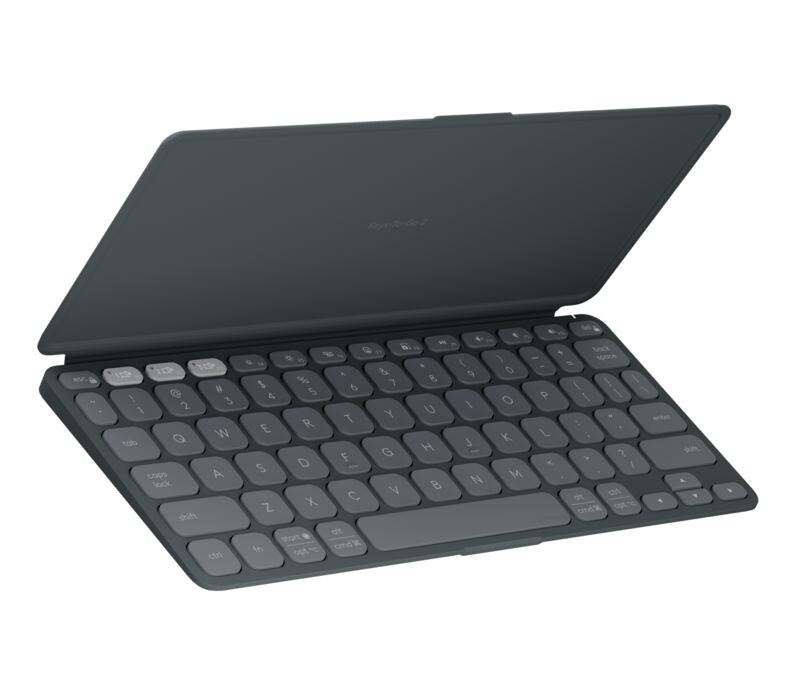
Laptop Mag found that scissor-switch keys and a matte finish create a typing experience similar to a compact laptop, while the magnetic flip cover doubles as an anti-slip base. The ultra-compact layout results in tiny arrow and modifier keys that can cause cramped hands or typos for users accustomed to standard sizes. Additionally, the device lacks a rechargeable USB-C port, requiring users to replace disposable coin cells when depleted, and does not include a built-in kickstand for tablets. This keyboard fits travelers seeking maximum portability and multi-device switching but may disappoint those who prioritize key size and convenient recharging.

Strengths
  • — Includes a magnetic flip cover that protects keys and doubles as an anti-slip typing base.
  • — Supports tri-mode Bluetooth connectivity with dedicated buttons to pair up to three devices simultaneously.
  • — Features scissor-switch keys with a matte finish for a comfortable, laptop-like typing experience.
Watch-outs
  • — The ultra-compact layout results in tiny arrow and modifier keys that can cause cramped hands or typos.
  • — Lacks a rechargeable USB-C port, requiring users to replace disposable coin cells when depleted.
  • — Does not include a built-in kickstand for the flip cover to prop up tablets.
Logitech Pop Icon Keys
Ranked #7 in Best Wireless Keyboards
Logitech Pop Icon Keys
4 sources$49.8as of Oct 21

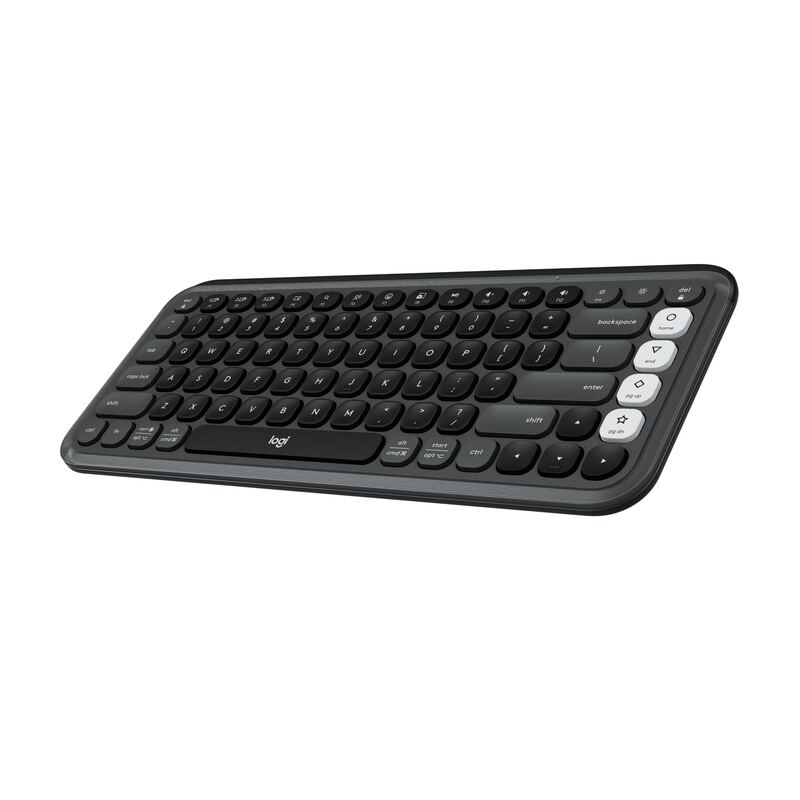
TechGearLab found that the tactile scissor switches provide a quiet and responsive typing experience suitable for shared workspaces. The keyboard features four programmable action keys on the right side, but Laptop Mag reported frequent accidental presses when reaching for adjacent standard keys due to their proximity. While CNN Underscored confirmed reliable Easy-Switch functionality across multiple devices, the compact layout omits a number pad entirely, limiting utility for heavy data entry tasks. This device fits creative professionals seeking aesthetic customization and portability, whereas users requiring extensive numeric input or traditional key spacing should look elsewhere.

Strengths
  • — Delivers a quiet and responsive typing experience using laptop-style scissor switches that reviewers found comfortable.
  • — Includes four customizable action keys on the right side that can be programmed via Logi Options+ software.
  • — Supports easy switching between three paired devices using dedicated Bluetooth Easy-Switch buttons.
Watch-outs
  • — The compact layout lacks a number pad and some users reported accidental key presses on the programmable action keys.
  • — The rounded key shape may be difficult for some users to adjust to.

How they stack up

Logitech Keys-To-Go 2

This ultra-compact keyboard relies on disposable coin cells for power, whereas the Logitech Pebble Keys 2 K380s offers up to three years of battery life from two AAA batteries. It also features a magnetic flip cover that doubles as an anti-slip base, a feature absent in the fixed-angle design of the Pebble Keys 2.

Logitech Pop Icon Keys

The Logitech Pop Icon Keys includes four programmable action keys for customization, whereas the Logitech Pebble Keys 2 K380s lacks dedicated programmable macro keys. However, both use scissor switches; unlike the circular key shape of the Pebble Keys 2 which disrupts tactile guidance, the Pop Icon Keys uses rounded traditional shapes that some users find difficult to adjust to.

Specs side-by-side

SpecLogitech Keys-To-Go 2Logitech Pop Icon Keys
ConnectivityBluetooth Tri-modeWireless Bluetooth
Switch TypeScissor switchScissor
Layout75% Compact—
Weight0.48 lb1.15 lb
Materialmatte plasticrecycled plastic
BacklightingWhite with ambient sensor—
Battery Lifebeautifully Long Battery Life36 months
← See the full ranking of best wireless keyboards