USB Type-A and USB-C connections both work with the Dell D6000 Universal Dock, which is what makes it useful in mixed-device environments. It supports triple 4K displays over USB-C, a rare feature at this price point. The drawbacks are real: the cable is non-removable and can't be replaced, DisplayLink drivers are required on every OS, and software-based video compression limits its usefulness for gaming or creative work. As a budget multi-monitor option for an office it holds up, though reliability concerns and performance limits keep it in general productivity territory rather than power-user work.
Full review
Universal Compatibility Design
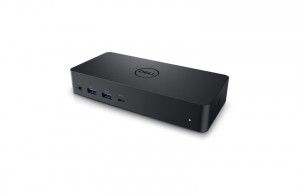
The Dell D6000 Universal Dock represents a clever compromise in laptop connectivity, supporting both legacy USB 3.0 Type-A and modern USB-C interfaces through a unique hybrid cable design. According to Laptop Mag's Andrew E. Freedman, the dock employs a USB-C cable with an integrated USB 3.0 adapter that snaps onto the Type-C end, allowing users to transition from older laptops to newer ones without replacing the entire dock. This approach, while functional, has drawn criticism for its clumsy implementation. The adapter looks 'ridiculous' and is 'clumsy,' though it does prevent loss of the adapter component. The dock's design features a plain black box with Dell's logo on top, measuring 6.6 x 3.1 x 1.2 inches, making it slightly too tall to use as a laptop stand. The integrated USB-C cable, while enabling universal compatibility, creates a significant reliability concern as it's non-removable, meaning any cable damage renders the entire dock unusable.
Office-Focused Ports, No SD Card Reader
The Dell D6000 provides a comprehensive set of ports designed for office productivity, including four USB 3.0 ports (one with PowerShare), one USB-C data port with PowerShare, two DisplayPort 1.2 outputs, one HDMI 2.0 output, Gigabit Ethernet, a combo audio jack, and a line-out port. The front panel offers easy access to a headphone jack, two USB 3.0 ports, and a USB-C port, while the back panel includes another pair of USB 3.0 ports, Ethernet, two DisplayPorts, and HDMI. Mini PC Reviewer's experience confirmed that the four USB 3.0 ports and one USB-C port provide ample connectivity for peripherals, but the lack of a card reader was noted as a missed opportunity for creative professionals. The dock's 130W power adapter delivers up to 65W of power to laptops over USB-C, though this may be insufficient for power-hungry workstations.
Multi-Monitor Display Support
Dell's D6000 claims support for up to three 4K displays, a capability that sets it apart from many USB docks in its price range. The performance varies significantly across different laptop models. Laptop Mag's review found that while the dock performed smoothly with a Dell XPS 15, it couldn't maintain 4K at 60 Hz on all three displays simultaneously. The XPS 15 managed two 4K displays over DisplayPort at full resolution, but the third HDMI monitor dropped to 1080p at 60 Hz. The Samsung Notebook 9 Pro had the most issues, failing to consistently charge over the 65W adapter and not outputting to any monitors over USB-C, though it worked fine with USB 3.0. The dock supports triple 4K display output via DisplayLink technology, though the third display is limited to 4K@30Hz rather than 60Hz, which affects performance for demanding applications.
Performance and Compatibility Issues
Performance varies significantly across different laptop models, with compatibility issues being a major concern. The dock's reliance on DisplayLink technology means drivers must be installed on every operating system, creating a setup challenge. The software-based video compression adds latency, making the dock unsuitable for gaming or GPU-intensive creative work. Mini PC Reviewer noted that achieving multi-monitor support required specific USB-C configurations not clearly outlined in documentation, leading to setup frustration. The dock's performance was smooth with 4K video playback, but gaming or creative applications were noted as problematic due to DisplayLink compression. Additionally, the non-removable cable creates a reliability concern, as any damage to the cable renders the entire dock unusable, which is a significant drawback for users who rely heavily on their docking station.
Power Delivery and Charging Capabilities
The Dell D6000 delivers up to 65W of power to laptops over USB-C, which is adequate for ultrabooks but may be insufficient for power-hungry workstations. The dock includes a 130W external power adapter confirmed that it can charge laptops while in use, though some users reported needing to keep their laptop's original charger connected for additional power. The dock's charging capability was praised by Mini PC Reviewer, who noted that it charges laptops up to 65W, providing a reliable power source for intensive tasks. However, the 65W power delivery may not keep up with power-hungry workstations, requiring users to supplement with their laptop's original charger. The dock's ability to charge laptops while providing connectivity is a significant advantage, particularly for users who travel frequently or work in mobile environments. The included 130W power adapter ensures sufficient power for most laptops, though power-hungry models may require additional charging solutions.
Build Quality and Reliability Concerns
The Dell D6000's build quality is straightforward but raises significant reliability concerns. The dock's design is described as plain and office-appropriate, measuring 6.6 x 3.1 x 1.2 inches and weighing 0.84 pounds, making it compact and lightweight. However, the non-removable USB-C cable is a major drawback, as reported by Mini PC Reviewer. If the cable fails, the entire dock becomes unusable, which is a significant risk for users who rely heavily on their docking station. The integrated cable design, while enabling universal compatibility, creates a single point of failure that has been criticized by reviewers. Additionally, the dock's reliance on DisplayLink technology, while enabling broad compatibility, also introduces latency issues that make it unsuitable for gaming or creative work. The 1-year standard warranty is shorter than many competitors, and users have reported mixed experiences with customer support, as noted by Mini PC Reviewer who encountered warranty concerns and mixed feedback from other users.
Triple 4K displays, but not for gaming
The Dell D6000 Universal Dock is best suited for users who need versatile multi-monitor support and are working with laptops that have either USB 3.0 or USB-C ports. It's particularly valuable for remote workers, tech enthusiasts, and professionals who require productivity enhancements through multiple displays. The dock's ability to connect to any USB-A or USB-C laptop makes it ideal for mixed-device environments and older hardware. The dock's triple 4K display support is notable for a USB dock at this price point, making it an excellent choice for users who need high-resolution displays for tasks like graphic design or data analysis. However, it's not recommended for gamers or creative professionals who require GPU-accelerated graphics on external displays due to DisplayLink compression latency. The dock's charging capability and port selection make it a solid choice for productivity-focused users who value convenience and versatility over raw performance for demanding applications.
Non-removable cable is a single point of failure
The Dell D6000 falls short in several key areas that significantly impact user experience. The most critical issue is the non-removable USB-C cable, which creates a single point of failure that renders the entire dock unusable if damaged. This design flaw has been consistently criticized by reviewers, including Mini PC Reviewer, who noted that any cable damage requires replacing the entire dock. The dock's reliance on DisplayLink technology introduces latency issues that make it unsuitable for gaming or GPU-intensive creative work, despite its impressive multi-monitor capabilities. Additionally, the dock's 1-year warranty is shorter than many competitors, and customer support experiences have been mixed according to user reports. The clumsy implementation of the USB 3.0 adapter and the lack of an SD card reader are also noted as drawbacks. Furthermore, the dock requires DisplayLink drivers on every OS, creating a setup challenge that many users find frustrating, particularly when working with older laptops or systems that don't support the required drivers.
Strengths
- +Supports both USB 3.0 and USB Type-C for universal compatibility with older and newer laptops
- +Outputs to up to three 4K monitors via USB-C (two at 4K@60Hz + third at 4K@30Hz)
- +Includes Gigabit Ethernet, multiple USB-A ports, and combo audio jack for office needs
- +Compact and lightweight at just 380g with a Kensington lock slot for security
Watch-outs
- −Non-removable USB-C cable means if it fails, the entire dock becomes unusable
- −Requires DisplayLink driver installation on all operating systems, not plug-and-play
- −DisplayLink compression makes it unsuitable for gaming or GPU-intensive creative work
How it compares
The Dell D6000 Universal Dock works over both USB 3.0 and USB Type-C and outputs to up to three 4K monitors, but it requires DisplayLink drivers on every operating system, where the HyperDrive 12 USB-C Dock runs triple displays on Windows and ChromeOS without drivers. Its 65W power delivery is below the 100W listed for the UGREEN Revodok Pro USB-C Dock, and its Gigabit Ethernet compares with the UGREEN's 2.5 Gbps.
Rating sources
Counts as 4.20/5 in our score — this publisher's 15 scores on the site average 3.90, so its scores are adjusted up to compare fairly with other publishers.
Our 4.2 score is the average of the 1 scored review above, each adjusted for how strictly its publisher scores; 2 more reviewed it without printing a score and are not in the average. More about methodology.