The Adonit Note+ 2 offers impressive value as an affordable iPad stylus that rivals the Apple Pencil in many features. Laptop Mag praised its stylish design, ergonomic comfort, and broad compatibility, calling it an 'essential accessory for iPad artists.' While it lacks the iPad Pro hover feature found on M2 models, it compensates with pressure sensitivity, interchangeable nibs, and a shortcut rocker switch. Reddit users noted its solid build quality and good palm rejection, though they emphasized that feature support varies by app. This stylus is ideal for users seeking a budget-friendly alternative to Apple's offering, particularly those who value versatility over premium features.
Full review
A budget-friendly option without the hover feature
The Adonit Note+2 retails for $69.99, making it a significantly more affordable option compared to Apple's USB-C Pencil, which costs over $100. Creative Bloq emphasized that despite the price difference, the Note+2's value proposition is strong for those who don't require the hover feature exclusive to M2 iPad models. AppleInsider highlighted that while the Note+2's price advantage is clear, the durability concerns may impact long-term value, especially when compared to the Apple Pencil's build quality. The stylus is positioned as a budget-friendly alternative that delivers on core functionality without the premium price tag.
Design and ergonomics
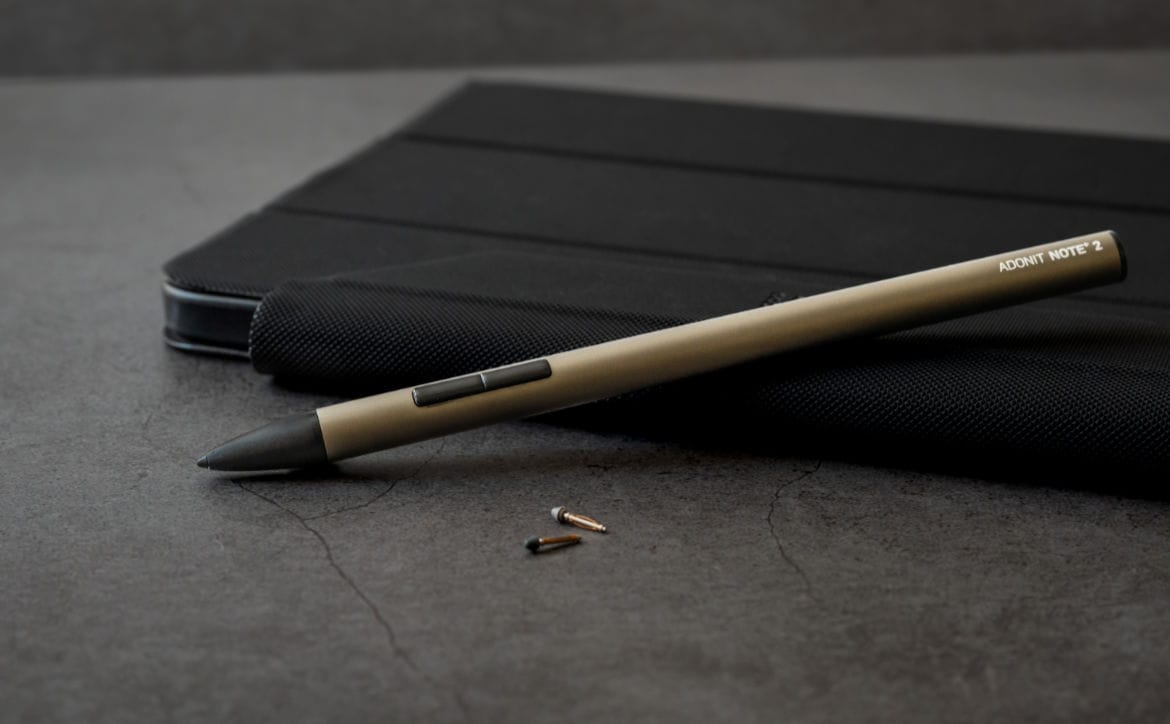
The Adonit Note+2 features a sleek, cylindrical design measuring 165.7mm in length and weighing just 14 grams, making it notably lighter than the Apple Pencil 2 at 19.8g. Creative Bloq described it as stylish in slate grey aluminium with black plastic accents, and noted its comfortable grip. AppleInsider reported that the stylus has a plastic cone and tip, which may loosen slightly over time, though no structural failures occurred during extended use. The device is made of aluminium body with plastic accents, and includes a planed flat ledge to house the USB-C charging port and battery indicator, which also helps with grip. The ergonomic comfort is praised across reviews, with reviewers noting its slim profile and balanced weight distribution that makes it easy to handle for extended drawing or note-taking sessions.
Compatibility and supported devices
The Adonit Note+2 is compatible with a wide range of iPad models, including iPad 6th gen and newer, iPad mini 5th gen and newer, iPad Air 3rd gen and newer, iPad Pro 11-inch 1st gen and newer, and iPad Pro 12.9-inch 3rd gen and newer. Parka Blogs confirmed that the stylus works with newer iPads beyond the listed models, but recommended checking compatibility before purchase. AppleInsider noted that while the stylus works with most modern iPads, it did not function with an iPad Pro 2018 (3rd gen), though it worked with an M1 iPad Pro (2021). The stylus does not require Bluetooth pairing or any special setup, and operates seamlessly with supported iPad models. The magnetic attachment feature allows for secure placement on the iPad, though it does not charge magnetically, requiring a USB-C connection for charging.
Performance and features
Laptop Mag reported that the stylus offers impressive precision and low-latency registration, with pressure sensitivity that performs well in compatible apps. AppleInsider noted that the palm rejection is quite similar to the Apple Pencil, particularly when using Goodnotes 5 for note-taking. However, Creative Bloq pointed out that the stylus lacks hover support, which is exclusive to M2 iPad models. The Note+2 includes two shortcut buttons for quickly switching between tools or colors, which are customizable depending on the app used. The stylus also supports interchangeable nibs, including soft, medium, and hard tips, which vary in feel and suitability for different tasks such as sketching or note-taking. Parka Blogs mentioned that while the stylus supports palm rejection, apps like Wacom Bamboo Paper on iPadOS do not support palm rejection, leading to stray strokes when resting the palm on the screen.
Battery life and charging
The Adonit Note+2 provides 8 hours of continuous use from a 1-hour charge, which is consistent with its claimed battery life of 8 hours. AppleInsider reported that the battery life is adequate for daily use, but noted that charging the device while using it can be inconvenient due to the charging wire affecting writing speed. The stylus takes approximately an hour to charge through USB-C, and the LED indicator flashes red when the battery is low. Creative Bloq mentioned that the battery indicator might not be easily noticeable during use, potentially leading to unexpected shutdowns. The stylus does not support wireless charging, and the charging cable is short, which may limit convenience during use.
Aluminium body holds up, plastic cone may loosen
The build quality of the Adonit Note+2 is described as robust, with AppleInsider noting that despite being launched in 2023, it has held up well after over a month of use. The aluminium body and plastic components are durable, though the plastic cone may loosen slightly over time. Laptop Mag reported that the stylus was tested by accidentally launching it across the apartment, and it showed minimal wear. AppleInsider also mentioned that while the stylus is lightweight and portable, the plastic cone may not be as durable as the Apple Pencil's structure. Creative Bloq highlighted that the stylus is affordable and provides adequate quality for its price, but durability concerns may prevent it from lasting multiple years compared to Apple's offering.
App support and user experience
The Adonit Note+2 performs well with compatible apps, offering pressure sensitivity, palm rejection, and low-latency registration. Laptop Mag found that the stylus gives the Apple Pencil a run for its money in terms of functionality, particularly for artists and note-takers. AppleInsider noted that the stylus is nearly the same length as the Apple Pencil and provides similar performance, especially in note-taking applications like Goodnotes 5. However, Creative Bloq emphasized that the stylus lacks hover support and that app compatibility for shortcut buttons is limited, as programming depends on which app is being used. The stylus also supports different tip types, with the hard tip being ideal for note-taking over long periods, while the soft and medium tips are better suited for sketching and artistic work.
Strengths
- +Interchangeable nibs for different writing and drawing experiences
- +Good feature set including pressure sensitivity and shortcut rocker switch
- +Wide iPad compatibility with support for most iPad models
- +8-hour battery life from a 1-hour charge
- +Very affordable
Watch-outs
- −Features vary across apps
- −No hover support for M2 iPads
How it compares
The Adonit Note+2 offers interchangeable nibs and a shortcut rocker switch, features not found in the Apple Pencil (1st generation). While it lacks the pressure sensitivity and advanced features of the Apple Pencil (2nd generation), it provides impressive value at $69.99, making it an attractive budget-friendly alternative for users who prioritize versatility over premium features.
Rating sources
Counts as 4.20/5 in our score — this publisher's 15 scores on the site average 3.90, so its scores are adjusted up to compare fairly with other publishers.
Counts as 4.01/5 in our score — this publisher's 13 scores on the site average 4.16, so its scores are adjusted up to compare fairly with other publishers.
Counts as 3.44/5 in our score — this publisher's 16 scores on the site average 4.25, so its scores are adjusted down to compare fairly with other publishers.
“The overall writing and note taking experience is excellent so this is a stylus I can recommend very easily.”
Our 3.9 score is the average of the 3 scored reviews above, each adjusted for how strictly its publisher scores; 3 more reviewed it without printing a score and are not in the average. More about methodology.