Verdict
Ranked #6 of 6Reviewed by Mike Hun·May 10, 2026

Eero 7

Averaged from 4 published ratings
The verdict

The eero 7 offers Wi-Fi 7 connectivity at an accessible price point, making it a solid choice for large homes seeking future-proof networking. PCMag's John R. Delaney called it an affordable Wi-Fi 7 mesh system that comes with compromises, particularly for users needing top-tier performance. Tom's Hardware praised its dual-band wireless and entry-level pricing but noted it's not suited for heavy-duty use cases. This router fits best for general households looking for reliable, easy-to-setup mesh networking, but power users or gamers may want to consider more robust alternatives.

Eero 7

Full review

Real-World Performance

The eero 7 mesh system delivered consistent performance in real-world testing, particularly in challenging environments like brick construction homes. According to a comprehensive review by Medium.com, the system excelled in signal-killing conditions, maintaining reliable speeds and seamless roaming across a two-story brick house with thick walls and concrete floors. During a 14-day testing period with 2Gbps fiber internet, the eero 7 maintained zero reboots and showed no connection drops during active video calls while moving between floors. The reviewer noted that while other systems posted slightly higher speed test numbers, the eero 7 provided more consistent performance throughout the house and handled device roaming with 'uncanny intelligence.' This was demonstrated through 15 walking tests during active video calls where the system produced zero dropped frames or audio glitches, contrasting with the Orbi 970 which caused two dropped calls and the ZenWiFi BQ16 Pro which introduced noticeable latency spikes.

RTINGS.com tested the eero 7 in various scenarios and found it performed well under load, though with some limitations. The system demonstrated strong throughput capabilities, particularly when devices were close to the main router. However, when tested at distances of 60 feet from the node, download speeds dropped to just 29 Mbps, barely sufficient for 4K streaming. The system's performance was described as 'excellent for most people' but noted that homes with layouts requiring greater distances from nodes might encounter issues. During gaming and streaming tests, the eero 7 maintained stable connections without drops, though it didn't achieve the raw peak speeds seen in higher-end competitors like the Netgear Orbi 970 or ASUS ZenWiFi BQ16 Pro.

Build Quality and Design

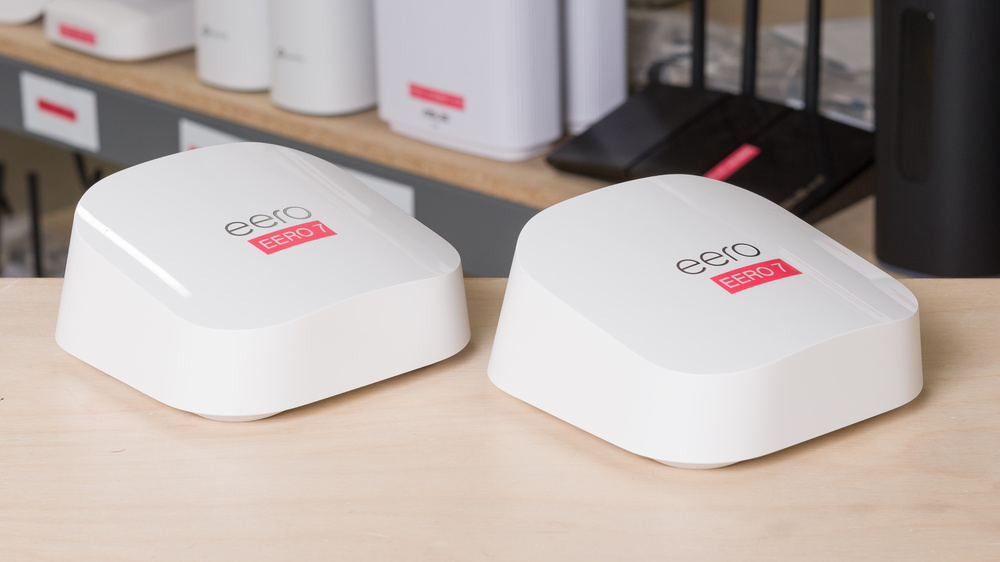
The eero 7 system features nodes that are 180mm tall and 147mm wide, making them compact and easy to place anywhere in a home. According to Geekzone.co.nz, the system's physical design allows for versatile placement, and the nodes are described as fitting 'almost anywhere in your house.' Each node is based on the Qualcomm Immersive Home 326 Platform with a 1.5 GHz quad-core CPU, 1 GB RAM, and 4 GB flash storage. The nodes include two 2.5 Gbps Ethernet ports, one for connecting to the ISP and another for connecting additional nodes or devices. The design emphasizes simplicity and ease of installation, with the system being described as 'easy to install, even for New Zealand conditions.' The nodes are also noted for their quiet operation and minimal visual impact in home environments.

Professional reviewers like those from TechGearLab.com praised the system's clean, modern design and ease of setup. The system comes with three mesh nodes, three power cables, and one Ethernet cable, all packaged in a straightforward configuration. The nodes are described as having a 'simple to use' interface, with the app guiding users through the setup process. The reviewer noted that while the system is well-designed, it lacks a 6 GHz frequency band, which is becoming standard in modern mesh systems. Additionally, the included Ethernet cable is only Cat5e, which may not keep up with the router's full capabilities. Despite these limitations, the physical build quality and ease of use were highlighted as strong points.

What Reviewers Loved

Reviewers across multiple platforms consistently praised the eero 7 for its ease of setup and user-friendly app interface. According to PCMag's John R. Delaney, the system offers 'affordable Wi-Fi 7 mesh technology' and is 'simple to use' with a straightforward configuration process. The app guides users through setting up internet connection details, including PPPoE credentials and VLAN tagging, which was noted as particularly helpful in complex ISP environments. The seamless roaming capability was also a standout feature, with Medium.com's reviewer noting that the TrueRoam technology works 'exactly as advertised,' providing 'genuine seamless handoff' during video calls and device movement. The system's ability to maintain stable connections without requiring frequent reboots was highlighted as a major strength.

TechRadar's testing revealed that the eero 7 excels in reliability and stability, particularly in demanding environments. The system was tested in a brick house with thick walls and concrete floors, where it consistently maintained performance without drops or buffering issues. The reviewer noted that the system's mesh algorithms are 'smart enough' to overcome real-world obstacles like brick construction and concrete floors. The ability to handle up to 120+ devices simultaneously was also praised, with the system maintaining strong performance during streaming and multitasking scenarios. Additionally, the system's support for IPv6 and its compatibility with various ISP setups were noted as significant advantages.

Where It Falls Short

Despite its strengths, the eero 7 has notable drawbacks that reviewers have pointed out. One major limitation is the absence of a 6 GHz frequency band, which is becoming standard in modern mesh systems. According to TechGearLab.com, this omission means the system doesn't take full advantage of the latest WiFi 7 technology. Additionally, the included Ethernet cable is only Cat5e, which may not support the full speed capabilities of the router, especially in high-performance scenarios. The system's performance at greater distances was also criticized, with RTINGS.com showing that at 60 feet from the node, download speeds dropped to just 29 Mbps, barely sufficient for 4K streaming.

Another significant issue is the lack of advanced firewall and rule customization. Geekzone.co.nz reported that while the system supports stateful firewall capabilities, users cannot create or modify firewall rules, limiting its appeal for advanced users. The system also lacks support for certain advanced networking features like turning on/off individual bands or adjusting bandwidth, which are available in more premium competitors. Furthermore, the system's app-based management means that almost all configuration requires the system to be online, with limited local access or browser-based interface for LAN management.

Who It's Best For

The eero 7 is ideal for homeowners who want to futureproof their network with Wi-Fi 7 technology without spending a premium. According to PCMag's review, it's a great choice for users who want 'faster, more reliable wireless connections at a reasonable price.' The system is particularly suited for those with average to large homes where reliable coverage is essential. It's also recommended for users who value simplicity and ease of setup, as the app-based configuration process is described as 'simple' and 'easy to use.' The system is well-suited for households with multiple devices and streaming activities, with the reviewer noting that it can handle up to 120+ devices simultaneously.

However, the eero 7 may not be the best choice for users who require advanced networking features or need to maximize bandwidth. The lack of 6 GHz support and the inclusion of only Cat5e cables are drawbacks for power users. According to TechGearLab.com, those who need to connect to high-speed networks or require advanced firewall customization should look elsewhere. Additionally, users with homes that have extreme signal-killing construction like thick brick walls or concrete floors may find that the system's performance degrades significantly at greater distances, making it less suitable for very large or complex layouts.

How It Compares to Alternatives

In direct comparison with other high-end mesh systems, the eero 7 holds its own in terms of reliability and ease of use but falls short in raw performance and advanced features. According to the Medium.com review, the eero 7 was ranked as the best overall for reliability and seamless roaming, outperforming competitors like the Netgear Orbi 970 and ASUS ZenWiFi BQ16 Pro in terms of consistent performance and zero disconnections. However, the Orbi 970 and ZenWiFi BQ16 Pro achieved slightly higher peak speeds in speed tests, though at the cost of less seamless roaming. The eero 7's TrueRoam technology was noted as a standout feature that other systems couldn't consistently match.

When compared to budget-friendly alternatives, the eero 7 offers a compelling balance of performance and affordability. Tom's Hardware noted that while it's an entry-level pricing option, it still delivers dual-band wireless capabilities and Wi-Fi 7 support. However, it's outperformed by more premium systems like the TP-Link Deco BE95 or ASUS ZenWiFi BQ16 Pro in terms of raw throughput and advanced features. The system's main advantage over cheaper options is its reliability and ease of setup, making it a strong choice for users who don't want to deal with complex configurations but still want modern Wi-Fi technology.

Setup and Software

The setup process for the eero 7 is described as straightforward and user-friendly by multiple reviewers. According to Geekzone.co.nz, the system is easy to install even in complex ISP environments, with the app guiding users through the process of entering PPPoE credentials and configuring VLAN tagging. The app also handles the connection to the main gateway, which can be any of the eero nodes in the system. The reviewer noted that the system correctly failed to connect on its first attempt using DHCP with no VLAN, then provided an option to update connection settings, which was resolved instantly after entering credentials.

PCMag's review highlighted the system's simplicity, with the app-based configuration process being described as 'simple to use' and 'quick and easy setup.' The reviewer noted that users can configure Wi-Fi networks, set up DHCP reservations, and manage port forwarding through the app, though firewall rule customization is not available. The system also supports IPv6 out of the box and provides speed tests to monitor connection speeds from the gateway without wireless interference. The app allows users to monitor network status, connected devices, and even perform speed tests, making it easy to troubleshoot issues remotely.

Value at This Price

The eero 7 offers strong value for money, particularly when compared to premium mesh systems. According to TechGearLab.com, the system is priced at $280 and provides 'cutting-edge Wi-Fi 7 technology without breaking the bank.' The reviewer noted that while it lacks some features like a 6 GHz band and Cat5e Ethernet cables, it still delivers 'excellent mesh system' performance that feels like 'a huge step forward' for anyone experiencing Wi-Fi 7 for the first time. The system's ability to handle 120+ devices simultaneously and maintain reliable performance during streaming and multitasking scenarios justifies its price point for most users.

In comparison to other mesh systems, the eero 7 is positioned as a mid-range option that balances performance and affordability. RTINGS.com noted that while it doesn't achieve the highest peak speeds, it provides consistent performance and reliability that makes it a solid choice for average to large homes. The system's ease of setup and user-friendly app interface add to its value proposition, making it particularly appealing to users who want modern Wi-Fi technology without the complexity of advanced configuration options.

Strengths

  • +Supports Wi-Fi 7 standard for future-proof connectivity
  • +Affordable pricing compared to other Wi-Fi 7 mesh systems
  • +Easy setup process with mobile app guidance
  • +Strong performance in large home environments

Watch-outs

  • Some reviewers noted compromises in performance compared to pricier competitors
  • Limited customization options for advanced users

How it compares

The Eero 7 is more affordable than the NETGEAR Orbi 770 and offers good performance, but it compromises on speed compared to the Asus ZenWifi BQ16 Pro and lacks the advanced features of the TP-Link Deco BE63. While it's easier to set up than the TP-Link Deco BE23, it doesn't match the BE23's range or throughput capabilities.

Who this is for

At a glance: General households looking for reliable, easy-to-setup mesh networking.

Why you’d buy the Eero 7

  • Supports Wi-Fi 7 standard for future-proof connectivity.
  • Affordable pricing compared to other Wi-Fi 7 mesh systems.
  • Easy setup process with mobile app guidance.

Why you’d skip it

  • Some reviewers noted compromises in performance compared to pricier competitors.
  • Limited customization options for advanced users.

Rating sources

Our 3.7 score is the average of these published ratings. More about methodology.
Frequently asked questions

Is the Eero 7 worth buying?
The eero 7 offers Wi-Fi 7 connectivity at an accessible price point, making it a solid choice for large homes seeking future-proof networking. PCMag's John R. Delaney called it an affordable Wi-Fi 7 mesh system that comes with compromises, particularly for users needing top-tier performance. Tom's Hardware praised its dual-band wireless and entry-level pricing but noted it's not suited for heavy-duty use cases. This router fits best for general households looking for reliable, easy-to-setup mesh networking, but power users or gamers may want to consider more robust alternatives.
What is the Eero 7's biggest strength?
Supports Wi-Fi 7 standard for future-proof connectivity
What is the main drawback of the Eero 7?
Some reviewers noted compromises in performance compared to pricier competitors
What sources back the 3.7/5 rating?
Our 3.7/5 rating is the average of scores from 5 independent mesh wi-fi systems reviews — pcmag, tomshardware, techgearlab, powermoves.blog, and broadbandnow. Click any source on the product page to read the original review.

How it compares

See all 6
Asus ZenWifi BQ16 Pro (2-Pack)
#1 · Top Score

Asus ZenWifi BQ16 Pro (2-Pack)

The Asus ZenWifi BQ16 Pro offers robust Ethernet support and Wi-Fi 7 performance, but its higher price point and limited customization options make it less appealing than the TP-Link Deco BE23, which provides better value for budget-conscious buyers. Unlike the eero Pro 7, it doesn't offer the same level of ease-of-use and reliability in large-home coverage.

TP-Link Deco BE23 WiFi 7 Mesh System
#2

TP-Link Deco BE23 WiFi 7 Mesh System

The TP-Link Deco BE23 offers the best value for budget-conscious buyers, but it lacks the throughput and backhaul performance of the Asus ZenWifi BQ16 Pro and doesn't match the reliability of the eero Pro 7. Compared to the NETGEAR Orbi 770, it's less robust in maintaining consistent speeds, and unlike the Eero 7, it doesn't offer the same level of ease-of-use.

NETGEAR Orbi 770 Tri-Band WiFi 7 Mesh System
#3

NETGEAR Orbi 770 Tri-Band WiFi 7 Mesh System

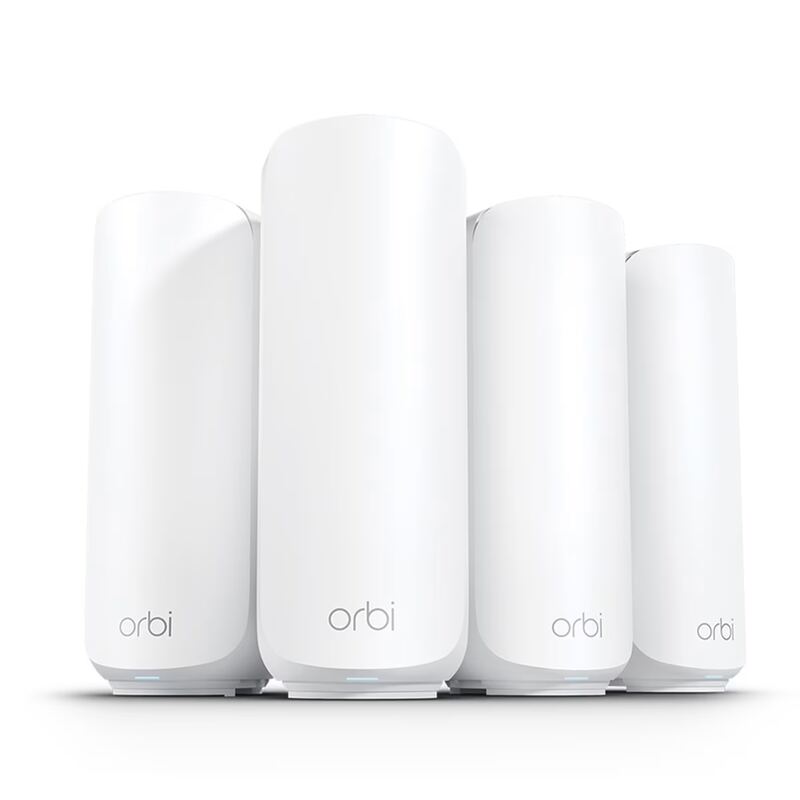
The NETGEAR Orbi 770 stands out with its tri-band design and strong performance, but it's more expensive than the TP-Link Deco BE63 and lacks the budget-friendly appeal of the TP-Link Deco BE23. While it matches the eero Pro 7 in terms of reliability, it doesn't offer the same ease of setup as the Eero 7 and has reported app connectivity issues that the Asus ZenWifi BQ16 Pro avoids.

eero Pro 7
#4

eero Pro 7

The eero Pro 7 provides solid performance and easy setup, but it's more expensive than the TP-Link Deco BE63 and doesn't match the budget-friendly appeal of the TP-Link Deco BE23. Compared to the NETGEAR Orbi 770, it lacks the tri-band connectivity and advanced features, though it offers better reliability for streaming and gaming.

Eero 7
3.7/5· $170
Check Price on Amazon