The Dell UltraSharp 40 Curved Thunderbolt Hub Monitor delivers solid performance across multiple categories without any standout features. It offers 5K resolution at 120Hz with a curved IPS black panel and VESA DisplayHDR 600 support. While it doesn't excel in any single area, reviewers noted it functions adequately well with no rough edges. The monitor's high price point may deter budget-conscious buyers, though it provides reliable connectivity through its Thunderbolt hub.
Full review
Resolution and pixel density
The Dell UltraSharp 40 Curved Thunderbolt Hub Monitor delivers a 5120 x 2160 pixel resolution, which the manufacturer markets as 5K2K. According to PCMag, this resolution provides a pixel density of 140ppi, which is notably higher than the 111ppi found on the Dell UltraSharp 38 USB-C Hub Monitor. This higher density supports crisp text rendering and detailed image work, making it suitable for graphic artists and video editors who require sharp visual clarity. The 21:9 ultrawide aspect ratio offers an immersive viewing experience that is particularly beneficial for multitasking and content creation workflows.
Reviewers noted that while the resolution is impressive, it is not necessarily the most outstanding feature of the monitor. The 5K2K resolution provides sufficient detail for professional work, but the monitor does not necessarily excel in any single aspect. The pixel density supports clear text rendering, which is essential for professionals who spend long hours working on detailed projects. The screen's ability to display fine details without pixelation makes it a strong contender for creative professionals who require high visual fidelity.
IPS Black panel technology
The monitor utilizes IPS Black panel technology, which provides a 2000:1 contrast ratio and deep black levels. This technology is described as a significant improvement over standard IPS displays, offering better color precision and accurate depiction of dark areas. HotHardware says the panel technology enables the monitor to render 99% of the DCI-P3 and Display P3 color space on average, which is essential for color-critical work. The IPS Black panel technology also retains wide viewing angles, up to 178 degrees for both vertical and horizontal, ensuring consistent image quality from various angles.
While the IPS Black panel provides excellent color accuracy, it does come with some trade-offs. The response times are not as fast as standard IPS panels, with the monitor achieving a 5ms response time at 120Hz in Fast mode. This is acceptable for casual to moderately-fast gaming but may not satisfy fast-paced esports gamers. The technology also means that the monitor does not quite match the contrast of vertical alignment (VA) panels, but it still offers a substantial improvement over standard IPS displays.
Connectivity and hub features
The monitor includes a comprehensive set of connectivity options, with two Thunderbolt 4 ports and six downstream USB ports. This built-in hub eliminates the need for external docks, which can be a significant advantage for users who want a single-cable solution. The Thunderbolt 4 ports support 140 watts of power delivery, which is sufficient for charging most laptops. The inclusion of Ethernet, HDMI, and DisplayPort inputs makes it easy to connect various devices without the need for additional adapters.
The monitor's KVM functionality allows users to connect two computers and switch between them with a single keyboard and mouse. This feature is particularly useful for professionals who work with multiple systems. The USB ports are front-facing and housed in a retractable bay, which helps maintain a clean desk setup. The inclusion of a built-in hub reduces cable clutter and simplifies the connection process, making it a practical choice for users who need to connect multiple devices.
Performance and refresh rate
With a 120Hz refresh rate, the monitor provides smooth motion and reduces artifacts and screen tearing, which is beneficial for game designers and video editors. The refresh rate is supported by a 5ms response time in Fast mode, which is adequate for casual to moderately-fast gaming. The monitor's performance in handling high-resolution content is commendable, with the ability to display detailed images without lag or delay. The 120Hz refresh rate contributes to a more fluid user experience, particularly when scrolling through documents or navigating between applications.
Despite the 120Hz refresh rate, the monitor's response times are not as fast as some gaming-oriented displays. The 5ms response time is sufficient for general use and casual gaming but may not meet the demands of competitive esports players. The monitor's performance in handling high-resolution content is consistent, with no noticeable lag or delay when displaying detailed images. The refresh rate contributes to a more fluid user experience, particularly when scrolling through documents or navigating between applications.
Design and ergonomics
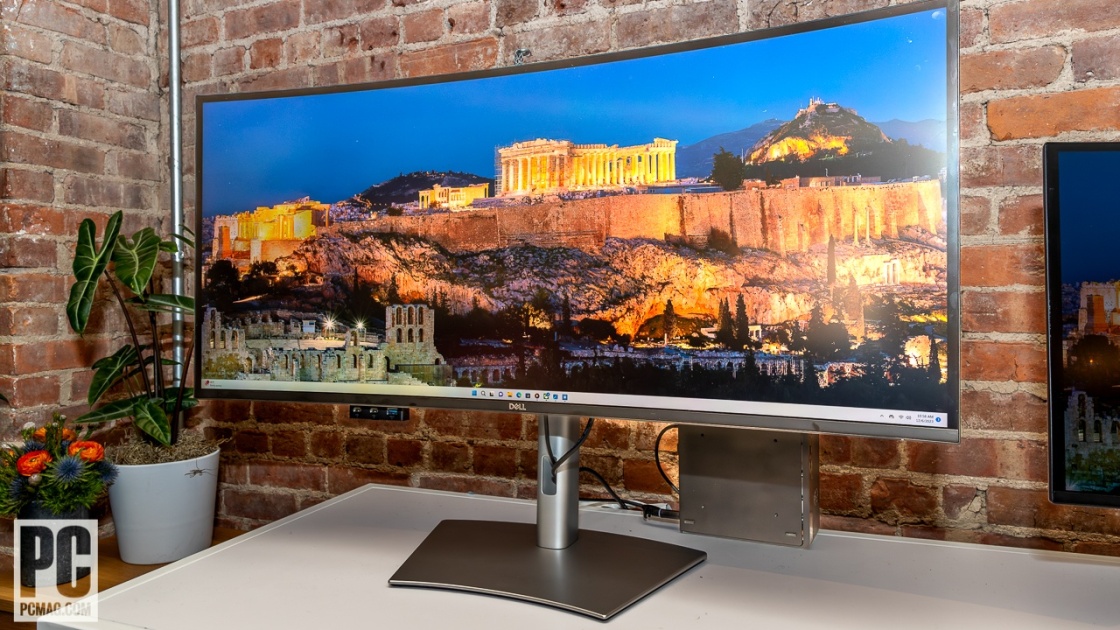
The monitor features a sleek design with a thin black bezel on all four sides and a silver-gray matte finish. The stand supports height, swivel, and tilt adjustment, allowing for optimal ergonomic positioning. The cabinet has holes spaced 100mm apart for a VESA bracket, which allows for wall mounting if desired. The stand's adjustability ensures that users can position the screen at a comfortable viewing angle, reducing eye strain and improving productivity.
The monitor's curved design provides an immersive viewing experience, which is particularly beneficial for multitasking and content creation. The 2500R curvature enhances the sense of depth and engagement, making it easier to focus on multiple tasks simultaneously. The monitor's build quality is solid, with a high-density plastic construction over an interior metal frame. The overall design is professional and sleek, making it a suitable addition to a modern workspace. The inclusion of a cable management slot on the stand helps keep the desk organized and reduces cable clutter.
Brightness and viewing experience
The monitor delivers a typical brightness of 450 cd/m² and can peak at 600 cd/m² in HDR mode. This brightness level is sufficient for most office environments and provides good visibility under various lighting conditions. The IPS Black panel technology ensures deep black levels and excellent contrast, which is essential for color-critical work. The screen's ability to maintain consistent brightness and color accuracy across different viewing angles is a significant advantage for collaborative work environments.
The viewing experience is enhanced by the monitor's wide viewing angles and high contrast ratio. The IPS Black panel technology ensures that colors remain accurate and consistent, even when viewed from the side. The screen's ability to maintain good visibility under various lighting conditions makes it suitable for both office and home environments. The monitor's brightness and contrast levels are well-balanced, providing a comfortable viewing experience for extended periods.
Price and value proposition
The price reflects the high-end features, including the 5K2K resolution, IPS Black panel technology, and the built-in Thunderbolt hub. The monitor is positioned as a premium product for creative professionals who can afford the cost and require high-resolution displays for their work. The inclusion of multiple connectivity options and a built-in hub reduces the need for external docks, which can be a cost-saving factor for some users.
While the monitor is expensive, it offers a comprehensive set of features that justify the price for professionals. The built-in hub eliminates the need for external docks, which can be a significant cost-saving factor. The monitor's ability to deliver high-resolution content, excellent color accuracy, and a wide range of connectivity options makes it a strong contender for creative professionals. The monitor's performance in handling high-resolution content and its ability to support multiple devices make it a valuable investment for users who require a high-end display solution.
Strengths
- +Supports 5K resolution at 120Hz refresh rate
- +Features a curved IPS black panel with 2000:1 contrast ratio
- +Provides VESA DisplayHDR 600 support
- +Includes Thunderbolt hub functionality for single-cable connectivity
Watch-outs
- −Price is high
- −High price point
How it compares
The Dell UltraSharp 40 Curved Thunderbolt Hub Monitor offers the highest resolution at 5K with 120Hz refresh rate, surpassing the BenQ PD3225U and Apple Studio Display in terms of sharpness and motion clarity.
Rating sources
Our 4.4 score is the average of the 4 scored reviews above; 1 more reviewed it without printing a score and is not in the average. More about methodology.