The TP-Link TL-WR902AC is a compact travel router designed to extend and improve Wi-Fi connectivity while traveling. Reviewers praised its portability, dual-band wireless capabilities, and USB functionality for external devices. However, users noted the router requires a detailed setup process and needs a power outlet, which can be limiting. One reviewer specifically recommended it for families with tech-averse members who need seamless device connectivity. It's best suited for travelers seeking reliable signal extension rather than advanced networking features.
Full review
Compact Design and Portability
The TP-Link TL-WR902AC delivers on its promise of portability with a design that fits easily into a pocket, purse, or travel bag. Reviewer Tyler from adadsadventures.ca noted that the device's compact size makes it ideal for travel, allowing him to take it anywhere he goes where Wi-Fi access is available. The router's dimensions and weight are specifically engineered for on-the-go use, making it a practical choice for frequent travelers who need reliable internet connectivity without the bulk of traditional routers. This small form factor doesn't compromise on functionality, as the device still includes all necessary ports and features for dual-band wireless networking.
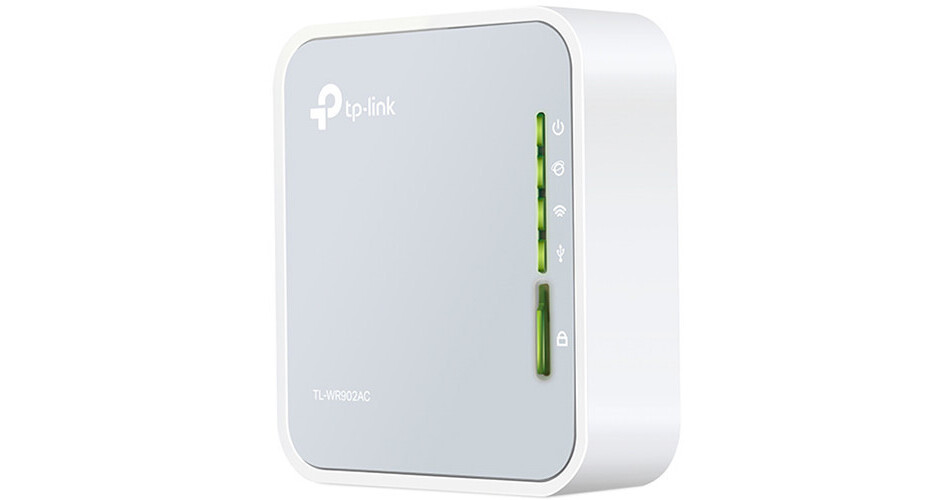
The device features a minimalistic interface with status LEDs indicating power, internet connection, wireless activity, USB connection, and security status. The placement of the WAN/LAN Ethernet port, USB 2.0 port, microUSB power connection, reset button, and mode switch on the sides of the unit allows for convenient access during travel. The TL-WR902AC's travel-friendly design also includes a quick install guide and Wi-Fi info card in the box, though Tyler noted that after initial setup, users typically only need to pack the router, power adapter, and microUSB cable. The compact nature of the device makes it particularly appealing for users who need to travel light while maintaining connectivity.
Dual-Band Wireless Performance
The TL-WR902AC operates on dual-band Wi-Fi with 802.11ac n 5GHz and 802.11bgn 2.4GHz capabilities, providing speeds up to 433Mbps on the 5GHz band and 300Mbps on the 2.4GHz band. This dual-band approach allows users to take advantage of faster data rates when available, particularly beneficial for streaming HD content or transferring large files. Tyler from adadsadventures.ca highlighted that having both bands available significantly improved his family's connectivity during trips, especially when sharing videos or photos between multiple devices. The 5GHz band's ability to deliver faster speeds compared to the previous 2.4GHz-only models makes this travel router a substantial upgrade for users who require better performance.
While the device's wireless performance is adequate for most travel scenarios, reviewers have noted that it's not designed to boost signals over large distances. The router functions best as a signal extender rather than a signal booster, which is its intended purpose. Users who need to extend Wi-Fi range in areas with weak signals will find the TL-WR902AC effective, but those seeking to improve signal quality across large areas may find it insufficient. The device's ability to create a stable connection from a weak signal source makes it particularly valuable for travelers staying in locations with marginal internet access.
Setup and Configuration
Setup of the TL-WR902AC is straightforward, with the manufacturer providing clear instructions and a quick install guide in the box. Tyler from adadsadventures.ca found the initial setup process simple and effective, particularly appreciating the ability to configure the device to work with existing Wi-Fi networks. The router supports various connection modes including Share Hotspot mode, which allows users to take an existing Wi-Fi signal and create their own network on top of it. This feature is particularly useful for extending range and maintaining consistent connections across multiple devices. The device also includes a reset button for troubleshooting and a mode switch for different operational configurations.
Community support from TP-Link's forums indicates that users can configure the device for various scenarios, including connecting to captive portal networks. However, some users have reported challenges when trying to set up the device for specific network configurations, particularly when connecting wireless to wired setups. Kevin_Z from TP-Link's community forum noted that while the device works well for standard wireless-to-wireless connections, captive portal networks may present compatibility issues. The router's configuration process is generally user-friendly, but advanced users may need to consult documentation or community forums for complex setups.
Power and Connectivity Options
The TL-WR902AC offers flexible power options with both microUSB and external adapter compatibility, allowing users to power the device from various sources including portable chargers or laptop USB ports. This versatility makes it particularly suitable for travelers who may not always have access to standard power outlets. The device includes a USB 2.0 port that can be used for sharing files or charging devices, with support for up to 5V/1A of power. Tyler noted that while the included USB power cable is short, the flexible power options make the device practical for extended travel periods.
The router's connectivity options include a 10/100Mbps WAN/LAN port for wired connections, which can be useful for connecting to wired networks or for connecting to other devices. The inclusion of both wireless and wired connectivity options makes the TL-WR902AC versatile for different environments, whether users need to connect to hotel Wi-Fi via Ethernet or prefer wireless connections. The device's ability to function as a bridge between wireless and wired networks is particularly valuable for users who need to connect to specific network setups, such as those requiring captive portal authentication.
Real-World Performance and User Experience
User experiences with the TL-WR902AC vary based on specific use cases and environmental factors. Tyler from adadsadventures.ca reported consistent performance during family trips, particularly appreciating the ability to extend Wi-Fi range in areas with marginal signal quality. He noted that the router's dual-band capabilities significantly improved connectivity compared to previous 2.4GHz-only devices, allowing for better performance when sharing media and transferring data. The device's ability to maintain stable connections even in challenging environments makes it a reliable choice for travelers who need dependable internet access.
However, some users have noted limitations in the device's performance under heavy load conditions. Users have reported that while the device works well for basic connectivity needs, it may not be suitable for demanding applications such as online gaming or multiple 4K video streams. The device's performance is best suited for light to moderate usage scenarios typical of travel environments where users typically connect a few devices rather than supporting heavy network loads.
Where It Falls Short
Despite its strengths, the TL-WR902AC has several notable limitations that potential buyers should consider. The most commonly cited issue is the short USB power cable provided, which Tyler from adadsadventures.ca specifically mentioned as a drawback. This limitation can be problematic for users who need to position the device away from power sources or who prefer longer cable lengths for convenience. Additionally, the device's inability to significantly improve Wi-Fi signals over large distances means it's better suited as a signal extender rather than a signal booster, which may disappoint users seeking to overcome substantial signal degradation.
Another limitation is the device's performance under heavy network loads. While the router handles typical travel usage well, users attempting to support multiple high-bandwidth devices simultaneously may experience performance degradation. Furthermore, some users have reported compatibility issues with certain captive portal networks, as noted in TP-Link community discussions, which may prevent the device from working in specific network environments where authentication is required.
Who It's Best For
The TP-Link TL-WR902AC is best suited for travelers who need portable Wi-Fi connectivity and want to extend existing Wi-Fi signals rather than boost weak ones. Users who frequently stay in hotels, campgrounds, or other locations with intermittent or weak Wi-Fi access will find this device particularly valuable. The router's dual-band capabilities make it ideal for families or groups who need to connect multiple devices to a single network while maintaining reasonable performance levels. Tyler from adadsadventures.ca specifically recommended it for users who travel with multiple devices and want a simple, reliable solution for maintaining connectivity.
This device is also well-suited for users who need a simple, no-frills solution for extending Wi-Fi range in their homes or offices. The router's ability to function as a bridge between wireless and wired networks makes it useful for connecting to specific network setups, such as those requiring captive portal authentication. However, users seeking maximum performance, heavy network loads, or advanced features should look elsewhere, as the TL-WR902AC is designed for basic to moderate usage scenarios typical of travel and light home use rather than demanding professional applications.
Value and Price Comparison
At approximately $50-60 CDN, the TL-WR902AC offers competitive value for its features and portability. Tyler from adadsadventures.ca noted that the device is actually less expensive than his previous model while offering more features, making it an attractive option for budget-conscious consumers. The device's price point reflects its target market of casual users who need basic travel connectivity without the premium features of more expensive routers. The inclusion of essential ports, dual-band wireless capabilities, and flexible power options at this price point makes it a solid value proposition for its intended use cases.
When compared to other travel routers in the same price range, the TL-WR902AC holds its own in terms of features and performance. While it may not offer the advanced features of more expensive models, it provides sufficient functionality for most travel scenarios. The device's ability to extend Wi-Fi signals and provide reliable connectivity makes it a practical choice for users who don't require high-end performance but need dependable connectivity on the go. The router's value is particularly evident when considering its portability and ease of use, which are essential features for travelers.
Strengths
- +Small and portable design that fits in a pocket
- +Improves weak Wi-Fi signals by extending range
- +Supports both 2.4GHz (up to 300Mbps) and 5GHz (up to 433Mbps) bands
- +Includes USB 2.0 port for external storage or cellular modem use
- +Simple status LEDs indicate device connection and activity
Watch-outs
- −Requires an 8-step configuration process that can be time-consuming
- −Needs to be plugged into an outlet, consuming power space
- −May have compatibility issues with local network encryption settings
How it compares
The TP-Link TL-WR902AC is more portable and easier to set up than the GL-MT2500 Flint, which has more advanced features but a complex configuration process. Unlike the GL-SFT1200 Slate, it lacks built-in VPN support and has slower Wi-Fi speeds. Compared to the GL-MT1300 Beryl 2, it's larger and less efficient but offers better signal extension for weak Wi-Fi areas.
Who this is for
At a glance: Families needing signal extension with simple setup.
Why you’d buy the TP-Link TL-WR902AC
- Small and portable design that fits in a pocket.
- Improves weak Wi-Fi signals by extending range.
- Supports both 2.4GHz (up to 300Mbps) and 5GHz (up to 433Mbps) bands.
Why you’d skip it
- Requires an 8-step configuration process that can be time-consuming.
- Needs to be plugged into an outlet, consuming power space.
- May have compatibility issues with local network encryption settings.
Rating sources
“I have used other travel routers in the past, but so far the TP-Link AC750 Wireless Travel Router has been the best that I have used.”
“The tiny AC750 router running the stock TP-Link firmware was far from perfect for a few reasons: It didnt support WPA3, either as a wireless client or an access point. Does not support VPN connections as a client.”
“It's not all that complicated, but it does take a little bit of patience. For all my setups, I set it up to AP range extender or client. So, I put that switch down like that.”
Our 3.9 score is the average of these published ratings. Ratings marked * were derived from the reviewer’s written analysis or video transcript — the publisher didn’t print an explicit numeric score, so we inferred one from their own words. Click through to verify. More about methodology.