The GL.iNet Mango (GL-MT300N-V2) is a compact travel router designed for security and portability. Reviewers noted its OpenWRT-based firmware provides a secure platform with intuitive GL.iNet interface, supporting VPN connections and encrypted DNS. While praised for its small form factor and travel utility, some reviewers found the 300 Mbps WiFi speed insufficient for heavy usage. The device requires manual SSH configuration on Mac/Linux systems, though this is seen as a minor inconvenience for advanced users. It's best suited for travelers seeking secure connections and basic networking functionality rather than high-speed performance.
Full review
Compact Design and Portability
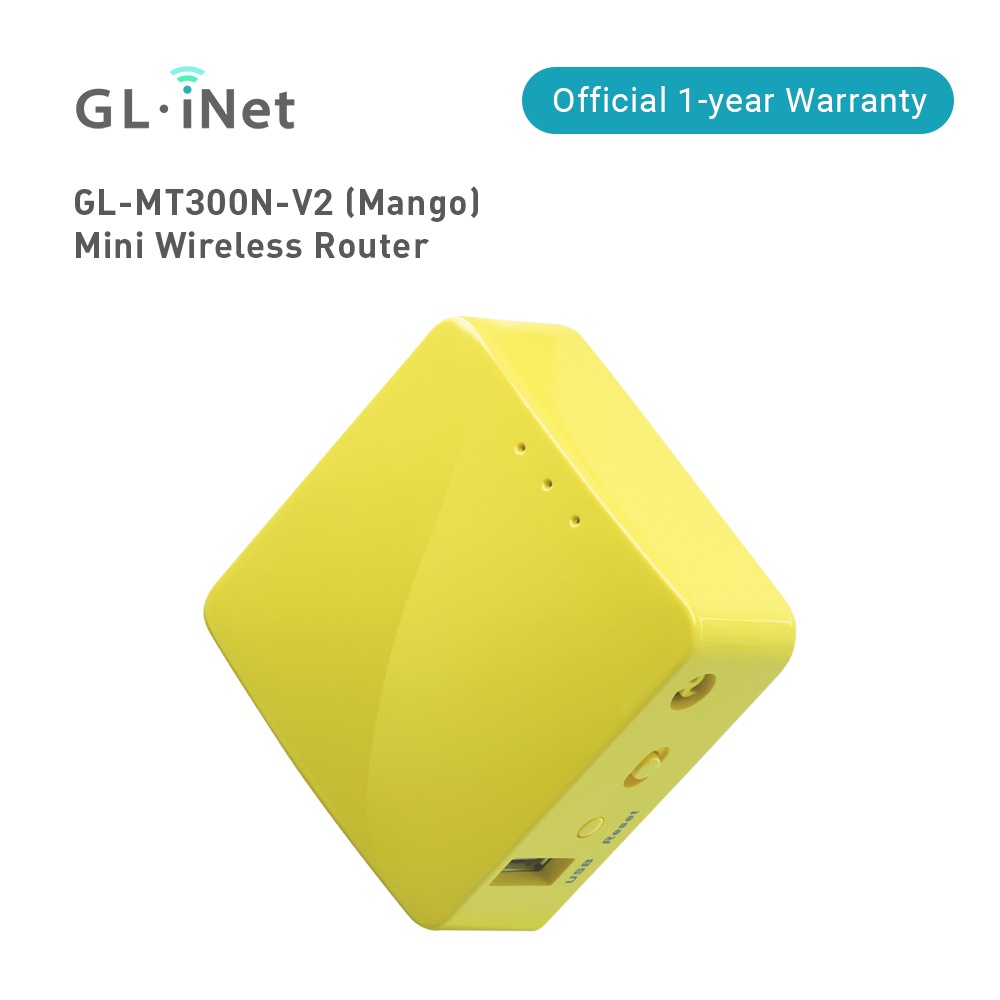
The GL.iNet GL-MT300N-V2 Mango stands out as a remarkably compact travel router, measuring just 58 x 58 x 25mm and weighing only 40g. This tiny form factor makes it exceptionally portable, easily fitting into a pocket or travel bag. TechRadar's review noted that its 'small and colorful' design is 'definitely a useful addition to those looking to secure their public network usage or extend out their network for light usage.' The device's minimalist aesthetic features a bright mango-colored casing with three status LEDs on top and a simple cube-like profile. PC Guide highlighted that the router's compact size and low power consumption make it ideal for travel, requiring only a 5V 2A power input that can be satisfied by power banks or small adapters. The unit includes a USB-A to micro-B cable and an Ethernet cable, with no additional accessories or documentation beyond a getting started guide. The device's design prioritizes portability over performance, with minimal ventilation holes and no external antennas, relying on internal components for wireless transmission.
Firmware and Security Features
The GL-MT300N-V2 runs on OpenWRT, a Linux-based firmware that provides robust security features and open-source flexibility. ZDNET's review emphasized that 'the GL.iNet Mango is based on OpenWRT which is a Linux OS designed for embedded devices' and that OpenWRT 'is long been known to be a secure platform.' The router supports VPN connections through both OpenVPN and WireGuard protocols, allowing users to create encrypted tunnels for secure internet access. According to the official GL.iNet documentation, the device can connect to VPN services like ProtonVPN and NordVPN, with configuration as simple as copying and pasting connection details into the admin interface. However, Johns Tech Blog reviewer noted that SSH access requires specific configuration on Mac or Linux systems, using a config file with hostkey algorithms and pubkey accepted algorithms, which they described as 'a fairly simple fix' but 'shouldnt be something the end user needs to do.' The router also supports encrypted DNS through Cloudflare DNS over TLS, providing an additional layer of privacy protection for users concerned about tracking their internet activity.
Performance and Speed
Performance testing reveals that the GL-MT300N-V2 operates on Wi-Fi 4 (802.11n) standards with only 2.4GHz frequency band support, limiting its maximum speed to 300Mbps. PC Guide's review noted that while 'the GL.iNet GL-MT300N-V2 is certainly a useful little piece of hardware,' its 'slow ethernet and USB performance but good features to have' and that 'the baseline of the router inside features the Mediatek MTK MT7628NN @580Mhz SoC platform, which isnt exactly a speedy or powerful setup.' The router's 128MB DDR2 memory and 16MB NOR flash storage create constraints for advanced applications, with PC Guide reporting that 'limited storage means you cant have many apps installed at a time.' In real-world testing, Cruise Packing List reviewer reported that while speed tests are 'to be taken with a grain of salt,' the router handled basic tasks like streaming and web browsing adequately, though 'nothing choked' during 24-hour continuous use. The device's performance is adequate for light business and entertainment needs but falls short for demanding applications like online gaming or high-definition video streaming.
Setup and User Experience
Setup of the GL-MT300N-V2 is straightforward, requiring users to connect to the router's default WiFi network and access the admin interface at 192.168.8.1. Johns Tech Blog reviewer noted that 'accessing the Mango is as simple as connecting to the wifi network it broadcasts after you power it up' and that 'at first login you must change the password.' The interface is user-friendly, with clear navigation for configuring VPN connections, DNS settings, and network parameters. Cruise Packing List reviewer emphasized that 'after setting up the router one of the most important steps you should complete is to update the firmware' and that 'updated firmware contains security and bug fixes.' The device supports both repeater mode for connecting to captive networks and access point mode for creating secure networks. However, the router's limited hardware capabilities mean that advanced features like multiple simultaneous connections or high-speed data transfers are constrained by its underlying SoC and memory specifications.
Limitations and Drawbacks
Despite its portability and security features, the GL-MT300N-V2 has several notable limitations. The most significant constraint is its outdated Wi-Fi 4 standard with only 2.4GHz support, which limits its compatibility with modern networks and reduces overall throughput. PC Guide's review highlighted that 'the GL.iNet GL-MT300N-V2 is certainly a useful little piece of hardware' but 'its so cheap, but shows that with older hardware.' The device's 128MB RAM and 16MB flash storage create limitations for advanced applications and firmware updates. Johns Tech Blog reviewer noted that 'the onboard Flash RAM is 16 MB' and that 'limited storage means you cant have many apps installed at a time.' Additionally, the router's performance is hampered by its low-powered MTK MT7628NN SoC, which struggles with demanding tasks. The device also lacks USB 3.0 support and has limited Ethernet port speeds, making it unsuitable for high-bandwidth applications. TechRadar's review noted that 'the device is not connected to the Internet' when first set up, requiring manual configuration to establish connectivity.
Value and Market Positioning
At approximately $30, the GL-MT300N-V2 offers exceptional value for users seeking a portable, secure networking solution for travel. ZDNET's review emphasized that 'a $30 router with a built-in VPN? I had to try it - and haven't had any regrets,' highlighting its affordability and functionality. The router's combination of portability, security features, and open-source firmware makes it attractive to budget-conscious consumers and tech enthusiasts. However, PC Guide's review noted that 'the GL.iNet GL-MT300N-V2 is certainly a useful little piece of hardware' but 'its so cheap, but shows that with older hardware,' suggesting that while it provides good value for its price, it's not suited for heavy-duty applications. The device is ideal for travelers who need secure internet access in public spaces but don't require high-speed connections or advanced networking features. Its $30 price point makes it accessible to a broad audience, though potential buyers should understand its limitations in terms of performance and capabilities.
Who It's Best For
The GL-MT300N-V2 is best suited for travelers who prioritize portability and security over performance. Johns Tech Blog reviewer noted that 'the mission of this device is mostly to connect to free wifi hotspots and then automatically connect to an OpenVPN or WireGuard VPN connection' making it ideal for business travelers or remote workers who need secure internet access in hotels or cafes. Cruise Packing List reviewer emphasized that 'travel routers are (or at least should be) designed to handle captive networks' and that the device 'can work with VPN services like NordVPN and others.' The router is particularly valuable for users who need to connect to public networks that require captive login portals, such as hotels, cruise ships, or airport Wi-Fi. However, it's not recommended for users requiring high-speed internet for streaming, online gaming, or other bandwidth-intensive applications. TechRadar's review noted that while 'the GL.iNet Mango is based on OpenWRT which is a Linux OS designed for embedded devices,' it's not suitable for users who need advanced networking features or high-performance capabilities.
Comparison to Alternatives
When compared to other travel routers, the GL-MT300N-V2 offers a unique combination of portability and security features at a competitive price point. Unlike higher-end travel routers that support Wi-Fi 6 and multiple frequency bands, the Mango's Wi-Fi 4 standard with 2.4GHz support limits its performance. However, its OpenWRT-based firmware provides more flexibility than typical consumer routers, allowing for advanced configurations that standard routers don't support. The device's $30 price point makes it significantly cheaper than alternatives like the GL.iNet Slate series, which offer better performance but at higher costs. PC Guide's review noted that 'it is a compact little travel router for providing a network solution on the go and not taking up too much space' and that 'with so many connection options, it has great value as a travel router to fit in your pocket.' While it lacks the performance of more expensive devices, its combination of security features, portability, and affordability makes it a strong contender for budget-conscious travelers who prioritize security over raw performance.
Strengths
- +Compact and lightweight design suitable for travel
- +Built on OpenWRT Linux OS for secure, customizable networking
- +Supports VPN connections including WireGuard and OpenVPN
- +Includes encrypted DNS settings for enhanced privacy
Watch-outs
- −Maximum WiFi speed of 300 Mbps may be slow for bandwidth-intensive tasks
- −SSH access requires manual configuration on Mac/Linux
How it compares
The GL-MT300N-V2 Mango is more portable and secure than the GL-MT2500, which has better Wi-Fi 7 support and USB 3.0 features. While the GL-SFT1200 Slate is smaller, the Mango offers better VPN support and encrypted DNS settings. Compared to the GL-MT1300 Beryl 2, it has lower Wi-Fi speeds but more straightforward setup and better compatibility with various VPN providers.
Who this is for
At a glance: Travelers seeking secure, basic networking.
Why you’d buy the GL.iNet GL-MT300N-V2 (Mango)
- Compact and lightweight design suitable for travel.
- Built on OpenWRT Linux OS for secure, customizable networking.
- Supports VPN connections including WireGuard and OpenVPN.
Why you’d skip it
- Maximum WiFi speed of 300 Mbps may be slow for bandwidth-intensive tasks.
- SSH access requires manual configuration on Mac/Linux.
Rating sources
“The GL.iNet Mango is based on OpenWRT which is a Linux OS designed for embedded devices. Translation: It is the router”
Our 4.5 score is the average of these published ratings. Ratings marked * were derived from the reviewer’s written analysis or video transcript — the publisher didn’t print an explicit numeric score, so we inferred one from their own words. Click through to verify. More about methodology.