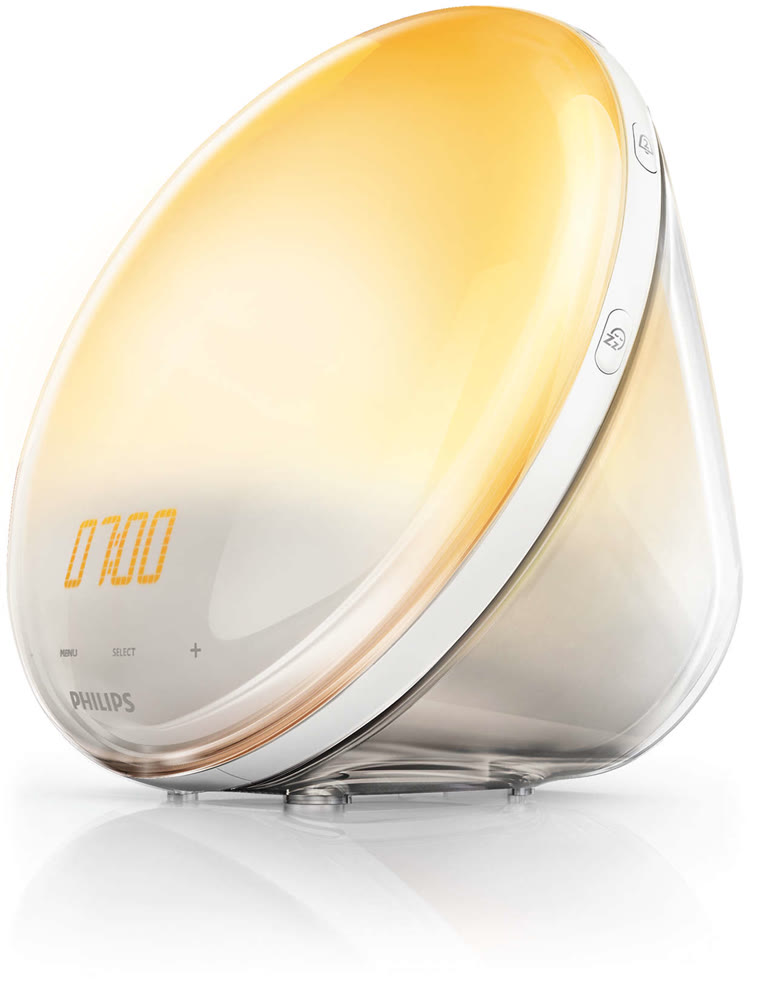
The Philips SmartSleep Wake-Up Light HF3520 simulates a sunrise and a sunset, which helps people wake up naturally and fall asleep more easily. Wirecutter's Phillip Zminda praised the red-tinted light for how closely it mimics natural sunlight, and the sunset function for promoting better sleep. The menu system isn't intuitive and the buttons are small, which is a problem first thing in the morning. Light sleepers who want a gentle wake-up will like it; anyone who prefers simple controls won't.
Full review
Natural Wake-Up Experience
The Philips SmartSleep Wake-Up Light HF3520 delivers on its promise of a gentler awakening through its sunrise simulation feature. Unlike traditional alarm clocks that jolt users awake with sudden noise, the HF3520 gradually increases light intensity over 30 minutes, transitioning from red to orange to yellow. This mimics natural sunlight and helps regulate circadian rhythms more effectively. According to Wirecutter's Phillip Zminda, the red-tinted light feels more like the sun's rays than a harsh white light, which aligns with a 2015 PLOS Biology study suggesting that natural light is more effective at shifting the internal clock. The light's gradual increase helps users wake up more refreshed, reducing grogginess and improving overall mood. The device's ability to simulate both sunrise and sunset makes it a versatile tool for sleep regulation, with Zminda noting that the sunset function helped him fall asleep faster and more deeply.
The HF3520's sunrise simulation is particularly effective when placed strategically on a nightstand, angled toward the user's face. However, as noted by software engineer Jasmine Khoury, improper placement can lead to uneven light distribution. The device also includes five natural alarm sounds such as birds chirping and gentle piano music that play when the light reaches peak brightness. These sounds are designed to be calming rather than jarring, making them suitable for cohabiting partners who might otherwise be disturbed by a traditional alarm. The combination of light and sound creates a more holistic and less disruptive waking experience compared to conventional alarm clocks.
Design and Interface
The HF3520 features a sleek, minimalist design that fits well on bedside tables and integrates seamlessly into modern bedroom aesthetics. The front of the device sports a touch-sensitive display for adjusting settings, complemented by physical buttons around its rim. The touch screen interface, while functional, has received criticism for its lack of clarity. As reported by Wirecutter, the opaque commands like 'Menu' and 'Select' make the interface unintuitive, especially during early morning grogginess. Users often struggle with navigating the system due to the small, finger-sized buttons that control alarm settings and brightness. The device's simplicity in design is both a strength and a weakness — it's aesthetically pleasing but can be frustrating to operate for those unfamiliar with its layout.
Optimize Your Biology's Derek Antosiek, who set all three SmartSleep lamps up for his comparison, found the HF3520 and the cheaper HF3500 'pretty straightforward to use' and said there was 'no real complaint here' — the icon-only menu he called 'a kind of nightmare' is the HF3650's, not this model's. Where the HF3520 steps up from the HF3500 is in control: the sunrise runs 20 to 40 minutes rather than a fixed 30, there are 20 brightness steps instead of 10, and it stores two alarms rather than one. Unlike the HF3500, its clock face can also be turned off completely, which matters if you want a pitch-black bedroom.
Snooze taps add exactly 9 minutes of sleep
The HF3520 excels in delivering consistent performance across its core functions. The sunrise simulation operates smoothly over a 30-minute period, transitioning from red to yellow light as intended. The device provides 20 different light intensity settings, allowing users to fine-tune the brightness according to their preferences. This level of customization is beneficial for users who require specific lighting conditions for sleep or reading. The sunset simulation also works effectively, gradually dimming the light over 30, 45, or 60 minutes, which helps users wind down before sleep. According to GadgetViper's review, the device's ability to replicate natural light changes makes it a standout among dawn simulator alarm clocks.
Additional features include a tap-to-snooze function that allows users to extend their sleep by 9 minutes, with two snooze options available. The device also supports FM radio and five natural sounds that play when the light reaches peak brightness. These sounds include bird chirping, gentle piano music, and other soothing tones. The volume can be adjusted and gradually increases over 90 seconds, ensuring a smooth transition from sleep to wake. However, the device's performance is limited by its interface complexity, which can make setting up alarms or adjusting settings challenging. The touch screen's sensitivity and the small physical buttons contribute to a less-than-ideal user experience, particularly for those with limited dexterity or in low-light conditions.
User Experience and Setup
Setup and initial use of the HF3520 are more straightforward than its position in the range suggests. Optimize Your Biology's Derek Antosiek set all three SmartSleep models up for his comparison and reported no real complaint about this one; the model that left him repeatedly checking the manual to work out where he was in the menus was the HF3650, whose navigation is icon-only with no words. Buyers who want fewer controls still should look at the HF3500, which trades away the adjustable sunrise, the second alarm and the fully-dimming clock face for a simpler set of buttons.
Wirecutter's Phillip Zminda emphasized that despite the initial setup challenges, the HF3520 has proven reliable over nearly four years of consistent use. The device's ability to maintain a consistent wake-up routine and its effectiveness in helping users sleep better makes it a worthwhile investment despite its interface quirks. The tap-to-snooze feature, while convenient, requires users to be familiar with the device's layout to operate effectively. The device's performance in real-world scenarios, such as waking users up without disturbing partners, is generally positive, but the setup process remains a point of contention for many reviewers.
Menu system called 'a nightmare' by one reviewer
Despite its strengths, the HF3520 has notable shortcomings that detract from its overall appeal. The clearest one is measured rather than felt: Optimize Your Biology's Derek Antosiek put the lamp on a flicker meter and recorded roughly 120 Hz modulation at close to 100% depth at both full and half brightness, squarely inside the risk region of the IEEE 1789 standard, and the cheaper HF3500 is the only SmartSleep in the line that avoids it. The 'a kind of nightmare' menu verdict often quoted against this lamp is his verdict on the HF3650. What is fair to hold against the HF3520 is that its sunrise cannot be set shorter than 20 minutes and that it has no backup alarm if the power goes out, both of which the HF3650 offers.
Another significant drawback is the device's limited customization options. The HF3520 offers 20 light intensity settings and a sunrise adjustable between 20 and 40 minutes, so the flexibility it gives up to the HF3650 is narrow: only the top model can be set to a sunrise shorter than 20 minutes, and only the top model swaps the five alarm tones for seven nature sounds. The lack of a dedicated sleep mask compatibility feature also means that users who rely on sleep masks may find the light simulation less effective.
Praised as non-disruptive for cohabiting partners
The Philips SmartSleep Wake-Up Light HF3520 is ideal for individuals seeking a gentle, natural wake-up experience that aligns with their circadian rhythms. Users who struggle with traditional alarm clocks and want to improve their sleep quality will find the device particularly beneficial. The sunrise simulation is especially effective for those who experience seasonal affective disorder (SAD) or have difficulty waking up in the early morning hours. The device's ability to simulate both sunrise and sunset makes it a versatile tool for sleep regulation, helping users fall asleep faster and wake up more refreshed. According to Wirecutter's Phillip Zminda, the HF3520 is particularly well-suited for cohabiting partners who want a non-disruptive alarm solution.
However, the device may not be ideal for users who prioritize ease of use or have limited technical skills. The confusing interface and small buttons can make the device frustrating to operate, particularly for older adults or those with dexterity issues. Users who require a highly customizable sunrise duration or a completely off clock face may find the HF3520 lacking in comparison to other models like the HF3650. Additionally, those who rely on sleep masks may find the light simulation less effective, as the device's light output is designed to be visible to the user's eyes.
Sits between the simpler HF3500 and pricier HF3650
When compared to other Philips SmartSleep models, the HF3520 sits between the HF3500 and HF3650 in terms of features and usability. The HF3500 offers a simpler interface and better flicker performance but lacks the customizable sunrise duration and 20 brightness settings found in the HF3520. The HF3520, in turn, provides more flexibility in sunrise settings and brightness control but suffers from a confusing menu system. As noted by Optimize Your Biology, the HF3650 offers the brightest light output and a wider range of sunrise durations, but its menu system is more complex than the HF3520's, making it less user-friendly. The HF3500, while budget-friendly, lacks the ability to turn off the alarm beep, which may be a dealbreaker for some users.
In comparison to other sunrise alarm clocks, the HF3520 stands out for its red-tinted light, which aligns with scientific findings that natural light is more effective at regulating circadian rhythms. However, its interface complexity and limited customization options make it less appealing than more modern alternatives. The device's performance in real-world scenarios, such as waking users up without disturbing partners, is generally positive, but its usability issues prevent it from being a top-tier choice for all users.
Held up through four years of Wirecutter testing
Priced around $139, the Philips SmartSleep Wake-Up Light HF3520 offers a compelling value proposition for users seeking a natural wake-up experience. Despite its interface shortcomings, the device's effectiveness in improving sleep quality and wake-up routines justifies its cost for many consumers. The device's ability to simulate both sunrise and sunset, combined with its 20 brightness settings and five natural sounds, provides a comprehensive sleep solution. According to GadgetViper, the HF3520 is considered one of the best dawn simulator alarm clocks available, particularly for those who appreciate the benefits of natural light exposure.
However, potential buyers should weigh the device's usability against its benefits. The confusion surrounding its menu system and the small buttons may be a significant drawback for users who prioritize ease of use. For those who value the gentle, natural wake-up experience and are willing to invest time in learning the device's interface, the HF3520 provides excellent value. The device's long-term reliability, as demonstrated by Wirecutter's four-year usage, also supports its value proposition. Nonetheless, users who prioritize simplicity and ease of operation may find better alternatives in the HF3500 or HF3650 models, which offer more intuitive interfaces.
Strengths
- +Gradual red-tinted light mimics natural sunrise to reduce grogginess
- +Includes sunset simulation feature to help users fall asleep
- +The Philips SmartSleep Wake-Up Light HF3520 offers a soothing simulated sunrise and sunset, helping users wake up naturally and fall asleep easier. Wirecutter's Phillip Zminda praised its red-tinted light for mimicking natural sunlight and its sunset function for promoting better sleep. However, reviewers noted the device's unintuitive menu system and small buttons make it challenging to use, especially in the morning. This alarm clock is ideal for light sleepers seeking a gentle wake-up experience but may not suit those who prefer simple controls.
Watch-outs
- −Awkward touch screen interface with vague symbols
- −Tiny buttons around rim are difficult to navigate when groggy
How it compares
The Philips SmartSleep offers a unique red-tinted sunrise and sunset simulation that the Hatch Restore 3 and Jall lack, but it's criticized for its confusing interface compared to the user-friendly Lumie Glow 150. Unlike the bright Lumie Shine 300, it doesn't prioritize brightness and lacks the motion sensor features found in the Casper Glow Light. Its complex menu system also makes it less intuitive than the simpler Lumie models.
Rating sources
“Its one-two punch of a gradual ray of red-tinted light and tranquil alarm sounds have woken me up for nearly four years.”
“I will say right out of the gate that the wake up sounds that accompany the light are much more natural sounding than the ones on the Philips Somneo Wake up Light I tried last year, which you can read by clicking here too . That's a nice improvement.”
Our 4.3 score is the average of the 4 scored reviews above; 1 more reviewed it without printing a score and is not in the average. Ratings marked * were derived from the reviewer’s written analysis or video transcript — the publisher didn’t print an explicit numeric score, so we inferred one from their own words. Click through to verify. More about methodology.