The Cricut Maker 4 is a smart cutting machine designed for crafters of all skill levels, capable of handling over 300 materials including paper, fabric, wood, and leather. TechRadar praised its speed improvements and versatility, while YouTube reviewers noted its size and weight as drawbacks for portability. The machine connects via Bluetooth or USB and uses the Cricut Design Space app for design customization. It's suitable for both basic projects like stickers and homemade t-shirts, as well as advanced crafts such as 3D folded designs and engraved metal or leather. The device comes with a crafting mat, phone storage rail, and storage compartments, making it a comprehensive tool for home crafting enthusiasts.
Full review
Setup process and accessibility
Cricut Maker 4 demonstrates a notably streamlined setup experience that accommodates both novices and experienced crafters. Digital Reviews Network reviewer Julie Verbakel noted that the initial configuration took approximately 15 minutes, with clear instructions and automated calibration making the process highly accessible for beginners. The machine arrives well-packaged with essential accessories including a LightGrip cutting mat, weeding tool, and pre-installed blade. The setup guide included with the machine is described as super helpful, guiding users through connecting via Bluetooth or USB. Verbakel found that connecting over Wi-Fi was straightforward, though she ultimately preferred using the USB cable for uninterrupted communication with her laptop. The Cricut Design Space software requires account creation and automatically prompts firmware updates, which the reviewer found to be painless and fast. The machine's front display guides users through test cuts and blade calibration, which Digital Reviews Network found to be seamless and user-friendly.
Cutting precision and material compatibility
The Cricut Maker 4 delivers impressive cutting precision across a wide range of materials, with performance that varies significantly based on material type and project complexity. In testing with iron-on vinyl, Digital Reviews Network reported clean cuts on intricate script fonts down to 0.2 height with no jagged edges. The machine's ability to handle materials including vinyl, cardstock, leather, fabric, and wood veneer is highlighted as a major selling point. According to GrifGlo.com, the Maker 4 supports cutting, drawing, engraving, debossing, foiling, perforating, and scoring across more than 300 compatible materials. The reviewer noted that the machine works with advanced materials including leather, wood veneer, matboard, fabric, vinyl, cardstock, and heat-transfer materials. The cutting speed improvements are substantial, with Cricut advertising speeds up to 2× faster than previous Maker models, achieving speeds of up to 35.8 cm per second or 14.1 inches per second when using smart materials. This enhanced speed applies to both smart materials and standard materials, significantly reducing production time for crafters.
Software integration and user interface
Cricut Design Space software serves as the central hub for all crafting projects, offering both beginner-friendly features and advanced capabilities for experienced users. Digital Reviews Network found that while the interface is jam-packed with features, it can initially seem overwhelming, requiring hours of YouTube and TikTok video tutorials for new users to become comfortable. However, the software provides robust functionality including pre-made project templates, font customization, image uploading (SVGs, PNGs, JPGs), and the ability to create custom designs from scratch. The software includes cut previews and countdown prompts that help ensure proper preparation before cutting begins. GrifGlo.com emphasizes that Design Space offers guided setup processes and built-in templates that beginners appreciate, while also providing access to thousands of designs for users who want to leverage existing templates rather than creating from scratch. The software also supports print-then-cut functionality with most inkjet printers, enabling full-color projects including custom stickers, labels, planner accessories, and printable decals. The interface includes helpful tooltips and tutorial prompts that help soften the learning curve for new users.
Speed performance and productivity
Speed improvements represent one of the most significant enhancements in the Cricut Maker 4 compared to previous models, with Cricut claiming up to 2× faster cutting performance. GrifGlo.com specifically notes that the Maker 4 can cut and write up to twice as fast as previous models in supported modes, which becomes particularly valuable for small business owners and crafters producing large batches. Digital Reviews Network observed that cutting speed is significantly improved, with the machine cutting at speeds of up to 35.8 cm per second or 14.1 inches per second when using smart materials. The reviewer noted that this increased speed applies to both smart materials and standard materials, making the machine notably faster than older Cricut models. The enhanced speed is particularly beneficial for users who need to produce multiple projects or work with time-sensitive orders. For hobbyists and casual crafters, this speed improvement means less waiting time and more efficient project completion, while for small business owners and Etsy sellers, it translates to increased productivity and potentially higher output capacity.
Versatility and advanced tool support
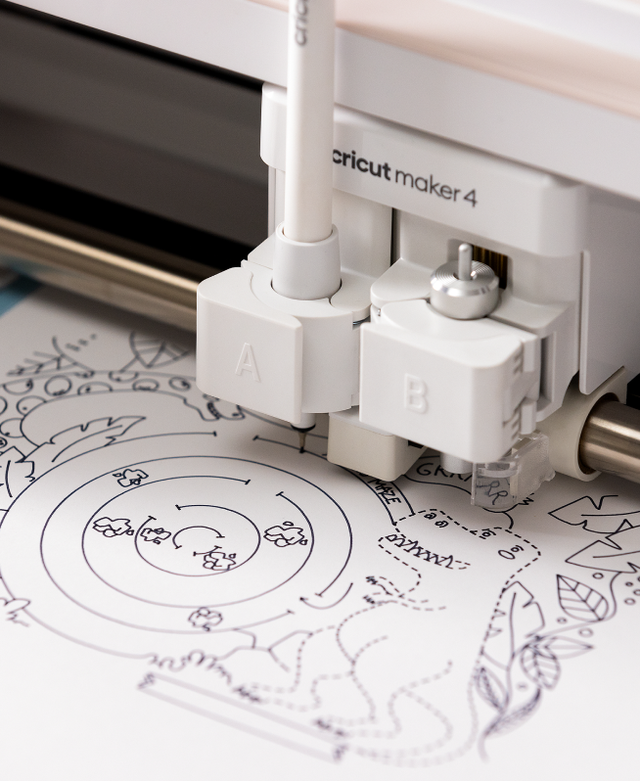
The Cricut Maker 4 stands out for its extensive tool support and advanced capabilities that expand creative possibilities beyond basic cutting. GrifGlo.com highlights that the machine supports specialty tools for engraving, debossing, rotary fabric cutting, knife cutting, scoring wheels, and perforation, dramatically expanding creative options. The machine can perform multiple operations including cutting, drawing, engraving, debossing, foiling, perforating, and scoring across more than 300 compatible materials. Digital Reviews Network notes that the machine can also add a felt-tip pen and write messages and motifs simultaneously while cutting material, with the ability to write in multiple colors by creating different layers during design. The machine's ability to work with materials including leather, wood veneer, matboard, fabric, vinyl, cardstock, and heat-transfer materials makes it suitable for a wide range of projects including custom apparel, home décor, wedding projects, small businesses, Etsy shops, scrapbooking, and personalized gifts. The front loader tray serves as storage space for tools and accessories, with a lid that locks in place using magnets, keeping frequently used items conveniently accessible.
Cost considerations and ecosystem integration
The Cricut Maker 4's value proposition includes both upfront costs and ongoing ecosystem expenses that potential buyers should carefully consider. GrifGlo.com identifies the biggest drawback as the expensive initial investment, with buyers often needing to purchase additional mats, specialty blades, vinyl materials, and tool attachments beyond the base machine. The reviewer notes that total startup costs can grow quickly, with the machine itself priced at approximately $400 for brand new units. Additional costs include premium images/fonts that may require subscriptions, accessories that can be expensive, and replacement blades that add ongoing costs. Digital Reviews Network mentions that the machine's substantial size (measuring approximately 18cm x 56cm x 16cm and weighing almost 9kg) requires dedicated workspace, which may be a limitation for users with very limited crafting areas. The reviewer also notes that while the machine is beginner-friendly, advanced features like engraving, debossing, and multi-layer projects can take time to master, creating a learning curve for users seeking more sophisticated capabilities.
Strengths
- +Cuts, engraves, scores, and debosses over 300 materials including paper, fabric, wood, and leather
- +Up to two times faster than the previous model
- +Works with the Cricut Design Space app for design and customization
- +Includes a crafting mat, phone storage rail, and storage compartments for accessories
- +Suitable for both beginner and advanced crafting projects
Watch-outs
- −Machine is fairly large and heavy, similar to a home office printer
- −Requires a learning curve for new users to get started
How it compares
The Cricut Maker 4 stands out from the Cricut Maker and Maker 3 with its significant speed improvements and expanded material capabilities, though it's heavier and less portable than the Cricut Joy 2. Unlike the Explore series, it offers more advanced features like debossing and engraving, but lacks the beginner-friendly simplicity of the Explore 5.
Rating sources
“Setup took about 15 minutes total. Clear instructions and automated calibration make the Maker 4 highly accessible for beginners.”
“Modern crafters have a variety of tools at their disposal, and intelligent machines, such as the new Cricut Maker 4, help bring original ideas to reality.”
“I love this gadget!”
Our 4.4 score is the average of the 4 scored reviews above; 4 more reviewed it without printing a score and are not in the average. Ratings marked * were derived from the reviewer’s written analysis or video transcript — the publisher didn’t print an explicit numeric score, so we inferred one from their own words. Click through to verify. More about methodology.