Verdict
Ranked #3 of 4Reviewed by Mike Hunter·June 26, 2026

Cricut Joy 2

Averaged from 2 published ratings + 2 derived from review text
The verdict

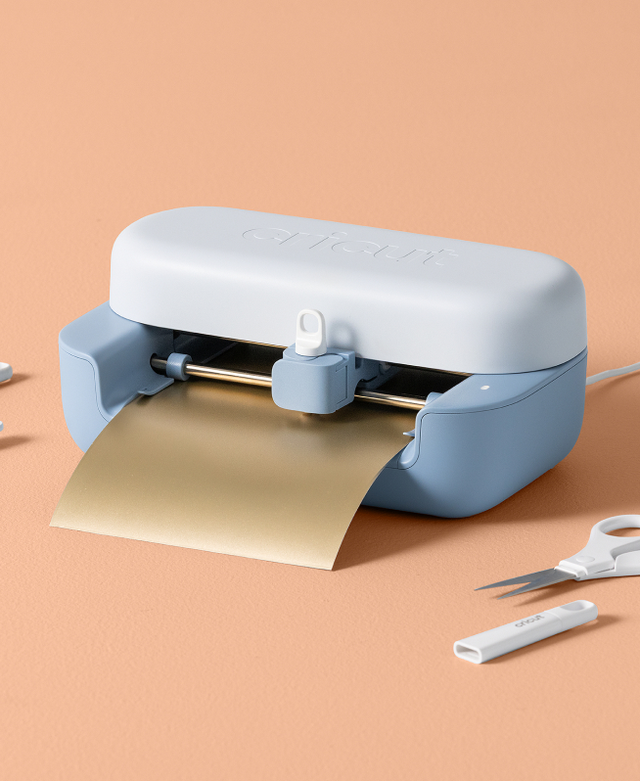
The Cricut Joy 2 is a compact, ultra-portable cutting machine designed for quick, everyday crafting projects. Tom's Guide noted its suitability for custom cards, decals, and labels, while the official Cricut Shop emphasizes its compatibility with home inkjet printers for full-color sticker creation. The machine comes bundled with essential materials for immediate use, though it lacks the cutting capacity of larger models. It's ideal for beginners and casual crafters who need a space-saving solution, but serious users may find its limitations restrictive.

Cricut Joy 2

Full review

Design Evolution and Setup

The Cricut Joy 2 represents a significant visual overhaul from its predecessor, featuring a sleeker, more modern body design that eliminates the traditional door mechanism. This change creates a machine that's always open and ready to use, a departure from the enclosed design of older models. According to the Cricut.com product page, the Joy 2 measures just 4.5 inches in width, making it the ultra-compact option in the Cricut lineup. The setup process, as noted by Hey Lets Make Stuff, is straightforward but requires users to rely on the Cricut Design Space software for configuration. The machine's new design eliminates the need for a USB connection, which may be a limitation for users who prefer wired connectivity options.

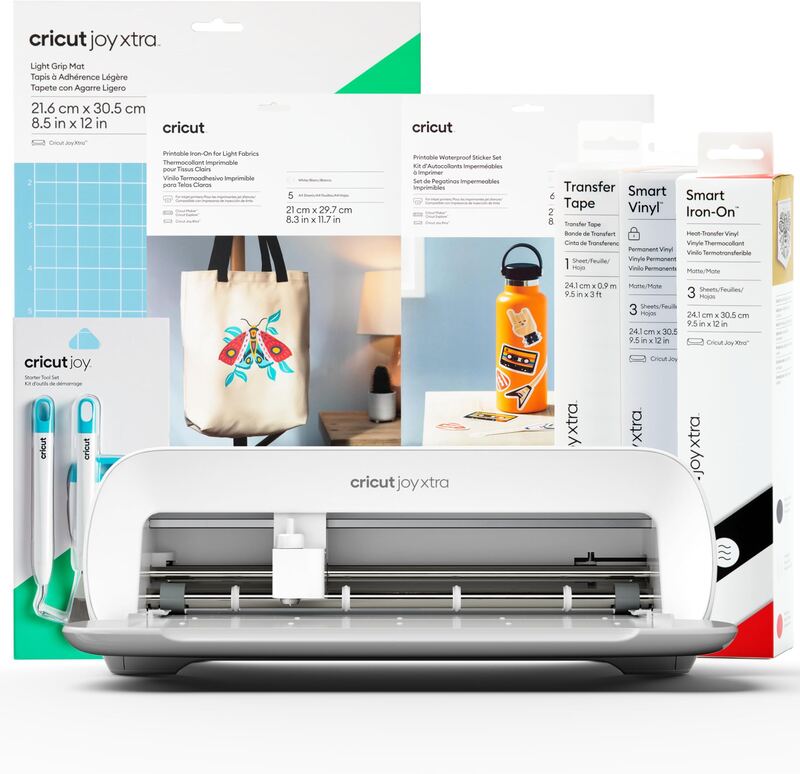
The Essentials Bundle, as detailed by Hey Lets Make Stuff, includes an impressive array of tools and materials that significantly exceed typical Cricut machine inclusions. The bundle contains a fine point blade, scoring tool, dual-tip pen, multiple cutting mats, a portable trimmer, weeding tools, and a variety of printable materials including Smart Iron-On, Smart Vinyl, and cardstock. The inclusion of these items, along with the new Print Then Cut capabilities, makes the Joy 2 particularly appealing for beginners or those seeking a complete starting kit. However, the new blade housing design, as mentioned by Hey Lets Make Stuff, requires users to purchase new blades and housings together, which some reviewers criticized as contributing to plastic waste. The machine's compact size and new interface make it ideal for small craft spaces, but its lack of a power button and USB port may deter users accustomed to more traditional machine configurations.

Print Then Cut Capabilities

One of the most notable additions to the Cricut Joy 2 is its Print Then Cut functionality, which allows users to print designs on their home inkjet printers and then cut them precisely with the machine. The Country Chic Cottage reviewer noted that this feature enables the Joy 2 to cut over 75 materials, including vinyl, HTV, and cardstock. This capability significantly expands the machine's versatility compared to the original Joy, which lacked this feature. The integration with home printers is seamless, as demonstrated in the reviewer's step-by-step guide to creating Print Then Cut stickers, which involves setting up the design in Design Space, sending it to the printer, and then preparing the printed material for cutting. The process is designed to be user-friendly, with clear instructions on how to calibrate the Print Then Cut feature to ensure accurate cutting. This functionality makes the Joy 2 particularly attractive for users who want to create full-color stickers and decals without investing in additional specialized equipment.

The Print Then Cut feature is particularly useful for projects involving detailed designs and color coordination, as demonstrated by the reviewer's creation of Smart Vinyl bookmarks and insert cards. According to the Cricut.com product description, the machine works with 75+ materials, including popular options like vinyl, iron-on, printable materials, and cardstock. The ability to print designs directly from Design Space and then cut them with precision opens up a wide range of creative possibilities for users. However, the process requires careful attention to printer calibration and material preparation, as noted by the reviewer who emphasized the importance of properly preparing the printed material for cutting. The inclusion of printable vinyl in the Essentials Bundle further supports this workflow, providing users with the materials needed to experiment with Print Then Cut projects right out of the box.

Material Compatibility and Cutting Performance

The Cricut Joy 2's compatibility with 75+ materials, as highlighted by Cricut.com, makes it a versatile choice for various crafting projects. The machine can cut a wide range of thin materials, including vinyl, HTV, cardstock, and printable materials, which are all included in the Essentials Bundle. The reviewer from The Country Chic Cottage noted that the Joy 2 can cut materials like Smart Iron-On and Smart Vinyl, which are specifically designed for Cricut machines and offer excellent adhesion and durability. The machine's performance with these materials is impressive, as demonstrated in the reviewer's creation of a Smart Vinyl bookmark and insert cards. The fine point blade included in the Essentials Bundle allows for precise cutting of intricate designs, while the scoring tool enables users to create fold lines for card-making projects. The machine's ability to handle different material types without requiring frequent blade changes makes it an efficient choice for users who work with multiple materials.

The Joy 2's cutting performance is further enhanced by its ability to work with various cutting tools and accessories, as detailed by Hey Lets Make Stuff. The inclusion of a scoring tool, dual-tip pen, and multiple cutting mats in the Essentials Bundle allows users to experiment with different techniques and create more complex projects. The machine's compact size and precise cutting capabilities make it ideal for small-scale projects that require accuracy and detail. The reviewer noted that the Joy 2 can handle delicate materials like transfer tape and Smart Vinyl, which are essential for creating professional-looking projects. The machine's ability to cut through multiple layers of materials, as demonstrated in the insert card creation process, showcases its versatility and reliability. However, the reviewer also mentioned that the machine's cutting power may be limited compared to larger models, which could affect performance with thicker materials or multiple layers.

User Experience and Workflow

The user experience with the Cricut Joy 2 is designed to be intuitive and streamlined, particularly for beginners or those new to Cricut machines. The reviewer from The Country Chic Cottage emphasized that the Joy 2 is ideal for users who want a simple, straightforward machine that doesn't require extensive setup or configuration. The machine's integration with Cricut Design Space software provides a seamless workflow, allowing users to create, edit, and send designs directly to the machine. The reviewer noted that the process of creating a Smart Vinyl bookmark involved several clear steps, including finding a design, resizing it, cutting the vinyl, and applying the decal. The inclusion of a portable trimmer and weeding tools in the Essentials Bundle further simplifies the workflow, enabling users to complete projects without needing additional tools. The machine's compact size and Bluetooth connectivity make it easy to use in small spaces, while its straightforward operation reduces the learning curve for new users.

However, the user experience is not without its limitations, as noted by the reviewer from Hey Lets Make Stuff. The lack of a power button and USB port may be inconvenient for users who prefer wired connections or need to power the machine off when not in use. The reviewer also pointed out that while the machine is easy to set up, it requires careful attention to printer calibration and material preparation for optimal results. The new blade housing design, which requires purchasing new blades and housings together, was criticized as contributing to plastic waste. Despite these drawbacks, the reviewer found the Joy 2 to be a solid choice for those seeking a compact, feature-rich machine that offers a complete starting kit for crafting projects. The machine's ability to handle a wide range of materials and its Print Then Cut capabilities make it a strong contender for users who want to explore various crafting techniques without investing in multiple machines.

Value and Bundles

The Cricut Joy 2's value proposition is significantly enhanced by the Essentials Bundle, which includes a comprehensive set of tools and materials that make it easy for users to start creating projects immediately. According to Cricut.com, the Essentials Bundle provides up to 35 projects right out of the box, and the reviewer from Hey Lets Make Stuff noted that the bundle contains more than what users typically receive with other Cricut machines. The bundle includes items such as Smart Iron-On, Smart Vinyl, cardstock, transfer tape, and various cutting tools, all of which are essential for getting started with crafting. The reviewer emphasized that this level of inclusion makes the Joy 2 particularly appealing for beginners or those who want to avoid spending additional money on initial supplies. The machine's lower price point compared to larger models, combined with the comprehensive bundle, offers excellent value for users who want a compact, feature-rich machine without the need for additional purchases.

The pricing structure for the Cricut Joy 2, as detailed by Cricut.com, reflects its position as an entry-level machine in the Cricut lineup. This pricing strategy makes the Joy 2 accessible to a wider audience, particularly those who are new to crafting or have limited budgets. The reviewer from The Country Chic Cottage noted that the machine's ability to handle multiple materials and its Print Then Cut capabilities justify the investment, especially when considering the included materials and tools. However, the reviewer also mentioned that users who already own other Cricut machines or have a collection of materials may find the Essentials Bundle less valuable. The inclusion of Cricut Access subscription, which costs $9.99 per month, adds to the overall cost but provides access to additional features and resources that can enhance the user experience.

Where It Falls Short

Despite its many strengths, the Cricut Joy 2 has several notable limitations that potential buyers should consider before purchasing. One significant drawback is the lack of a power button and USB port, which may inconvenience users who prefer wired connections or need to power the machine off when not in use. The reviewer from Hey Lets Make Stuff noted that this design choice could be a limitation for users accustomed to more traditional machine configurations. Additionally, the new blade housing design requires users to purchase new blades and housings together, which some reviewers criticized as contributing to plastic waste. The machine's cutting power may also be limited compared to larger models, potentially affecting performance with thicker materials or multiple layers, as noted by the reviewer from The Country Chic Cottage. The Joy 2's compact size, while advantageous for small spaces, may also limit its ability to handle larger projects or materials that require more robust cutting capabilities.

Another limitation is the machine's reliance on Cricut Design Space software, which may not be accessible to users who prefer offline or alternative design platforms. The reviewer from The Country Chic Cottage emphasized that the machine's workflow is heavily dependent on the software, and any issues with connectivity or software updates could disrupt the user experience. The inclusion of Cricut Access subscription, while providing additional features, adds to the overall cost and may not be necessary for all users. Furthermore, the reviewer noted that the machine's Print Then Cut capabilities, while useful, require careful attention to printer calibration and material preparation, which can be time-consuming for users who are not familiar with these processes. The machine's limited compatibility with thicker materials and its inability to handle certain advanced crafting techniques may also restrict its appeal to more experienced crafters who require more versatile tools.

Who It's Best For

The Cricut Joy 2 is best suited for beginners or those new to crafting who want a compact, feature-rich machine that offers a complete starting kit. The reviewer from The Country Chic Cottage noted that the machine is ideal for users who want a simple, straightforward machine that doesn't require extensive setup or configuration. The inclusion of the Essentials Bundle, which includes a comprehensive set of tools and materials, makes it easy for users to start creating projects immediately without additional purchases. The machine's Print Then Cut capabilities and compatibility with 75+ materials make it particularly appealing for users who want to explore various crafting techniques without investing in multiple machines. The reviewer from Hey Lets Make Stuff emphasized that the Joy 2 is a solid choice for those seeking a compact, feature-rich machine that offers excellent value for its price point.

The Joy 2 is also ideal for users who have limited space or prefer working with smaller projects. The reviewer from Cricut.com noted that the machine's ultra-compact design makes it perfect for quick, everyday projects like custom cards, simple decals, and labels. The machine's ability to work with home inkjet printers and create full-color stickers further enhances its appeal for users who want to experiment with color and design. However, the reviewer also noted that the machine may not be suitable for users who require more advanced cutting capabilities or work with thicker materials. The Joy 2 is particularly well-suited for users who are looking for a machine that can handle a wide range of materials and projects without requiring frequent blade changes or additional tools. The reviewer from The Country Chic Cottage emphasized that the machine's versatility and ease of use make it a strong contender for users who want to explore various crafting techniques without investing in multiple machines.

How It Compares to Alternatives

When compared to other Cricut machines, the Joy 2 stands out for its compact size and comprehensive Essentials Bundle, which provides users with everything needed to start crafting immediately. The reviewer from The Country Chic Cottage noted that while the Joy 2 lacks some of the advanced features of larger models like the Cricut Explore or Maker, its simplicity and ease of use make it an excellent choice for beginners or those who want a straightforward machine. The Joy 2's Print Then Cut capabilities, which are not available on the original Joy, provide a significant advantage for users who want to create full-color stickers and decals. However, the reviewer also noted that the machine's cutting power and material compatibility may be limited compared to larger models, which could affect performance with thicker materials or complex projects. The Joy 2's pricing strategy, which includes a comprehensive bundle at a lower price point, makes it more accessible than other machines in the Cricut lineup.

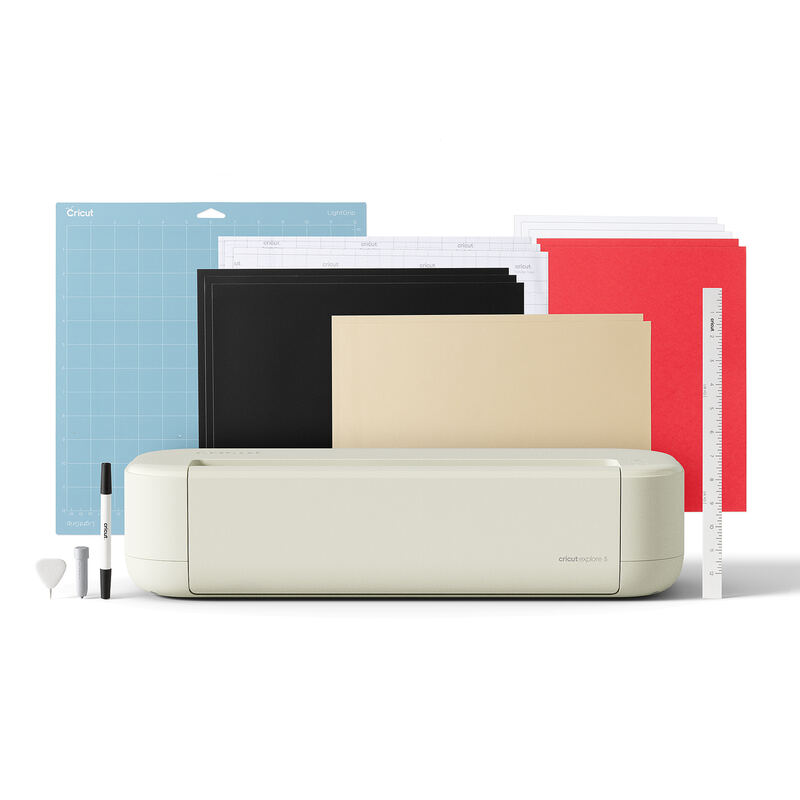
Compared to the Cricut Explore 5, which was introduced alongside the Joy 2, the Joy 2 is positioned as a more compact and affordable option. The reviewer from Jennifer Maker noted that while the Explore 5 offers more advanced features and capabilities, the Joy 2 provides a simpler, more streamlined experience that is ideal for users who want to get started with crafting without overwhelming complexity. The Joy 2's focus on simplicity and ease of use, combined with its comprehensive bundle, makes it a strong choice for users who want to explore various crafting techniques without investing in multiple machines. However, the reviewer also noted that users who require more advanced cutting capabilities or work with thicker materials may find the Joy 2 limiting. The Joy 2's ability to handle 75+ materials and its Print Then Cut capabilities make it a versatile choice, but its compact size and limited cutting power may not meet the needs of more advanced crafters.

Strengths

  • +Ultra-compact design at 4.5 inches for easy portability and space-saving storage
  • +Works with home inkjet printers to create full-color stickers
  • +Includes essential materials and tools for up to 35 projects out of the box
  • +Compatible with 75+ materials including vinyl, iron-on, and printable materials

Watch-outs

  • Limited cutting width compared to larger Cricut models
  • Requires Cricut Access subscription for full Design Space software access

How it compares

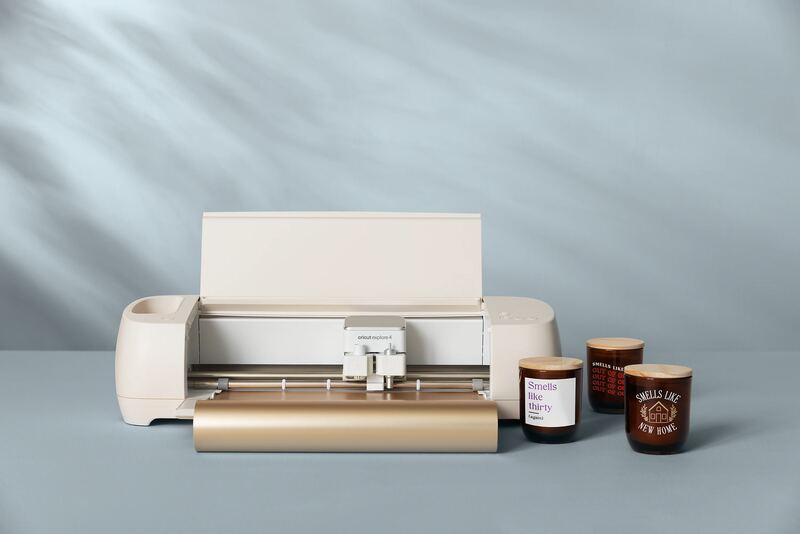
The Cricut Joy 2 stands out for its ultra-portable design and inkjet compatibility, features not available in the Cricut Explore 4 or Maker 4. However, its limited cutting width and subscription requirement for full software access make it less suitable for complex projects compared to the Silhouette Cameo 5 or VEVOR Vinyl Cutting Plotter, which offer more robust cutting capabilities.

Who this is for

At a glance: Casual crafters needing compact and portable solutions.

Why you’d buy the Cricut Joy 2

  • Ultra-compact design at 4.5 inches for easy portability and space-saving storage.
  • Works with home inkjet printers to create full-color stickers.
  • Includes essential materials and tools for up to 35 projects out of the box.

Why you’d skip it

  • Limited cutting width compared to larger Cricut models.
  • Requires Cricut Access subscription for full Design Space software access.

Rating sources

Our 4.1 score is the average of these published ratings. Ratings marked * were derived from the reviewer’s written analysis or video transcript — the publisher didn’t print an explicit numeric score, so we inferred one from their own words. Click through to verify. More about methodology.
Frequently asked questions

Is the Cricut Joy 2 worth buying?
The Cricut Joy 2 is a compact, ultra-portable cutting machine designed for quick, everyday crafting projects. Tom's Guide noted its suitability for custom cards, decals, and labels, while the official Cricut Shop emphasizes its compatibility with home inkjet printers for full-color sticker creation. The machine comes bundled with essential materials for immediate use, though it lacks the cutting capacity of larger models. It's ideal for beginners and casual crafters who need a space-saving solution, but serious users may find its limitations restrictive.
What is the Cricut Joy 2's biggest strength?
Ultra-compact design at 4.5 inches for easy portability and space-saving storage
What is the main drawback of the Cricut Joy 2?
Limited cutting width compared to larger Cricut models
What sources back the 4.1/5 rating?
Our 4.1/5 rating is the average of scores from 4 independent vinyl cutting machines reviews — tomsguide, cricut, persialou, and weekendcraft. Click any source on the product page to read the original review.

How it compares

See all 4
Cricut Joy 2
4.1/5· $139
Check Price on Amazon