Verdict
Head-to-head · Best Docking Stations

Anker 555 8-in-1 USB-C Hub vs Dell D6000 Universal Dock

Which is the better buy? Side-by-side on rating, price, strengths, and watch-outs — with the published ratings we averaged to get there.

Verdict is reader-supported. As an Amazon Associate we earn from qualifying purchases. Some links on this page are affiliate links — if you click through and buy, we may earn a small commission at no extra cost to you. Our ratings are sourced from independent publications, not sponsors.
The short answer

Anker 555 8-in-1 USB-C Hub comes out ahead by a narrow margin (4.3 vs 4.2). Anker 555 8-in-1 USB-C Hub is best for: MacBook Air/Pro users needing multiple connections. Read the strengths below before deciding.

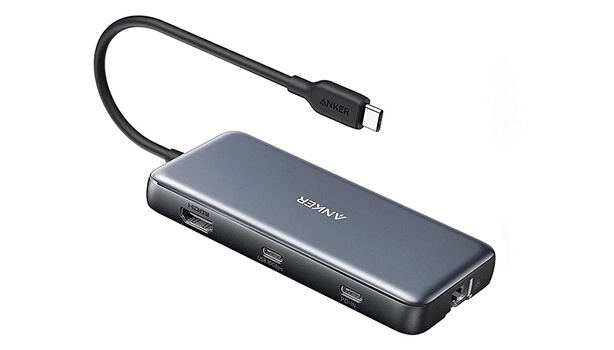
Anker 555 8-in-1 USB-C Hub
Higher ratedRanked #4 in Best Docking Stations
Anker 555 8-in-1 USB-C Hub
2 sourcesall derived$48.16as of Oct 20

Creatives who need several connections at once are the target for the Anker 555 USB-C Hub. Fstoppers praised the 4K 60Hz HDMI output and PC Tech Bits found the data transfer speeds reliable. It handles pass-through charging up to 85 watts and includes Ethernet, USB-A, USB-C, and card readers. PC Tech Bits cautioned that it needs a quality charger to avoid performance issues, and Reddit users reported occasional compatibility quirks. MacBook Air and Pro owners get the most out of it; Linux users and people with older devices may not.

Strengths
  • — Compact and lightweight design at 4.5 ounces with small footprint
  • — 4K HDMI output at 60 Hz supporting high-definition displays
  • — 85-watt pass-through charging capability for power delivery
Watch-outs
  • — No rubber feet provided, causing potential sliding on surfaces
  • — Requires separate USB-C cable and power adapter for full functionality
  • — Charging performance drops with power-hungry laptops or overloaded ports
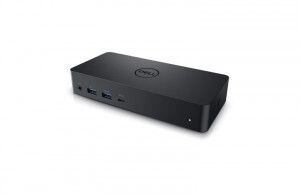
Dell D6000 Universal Dock
Ranked #5 in Best Docking Stations
Dell D6000 Universal Dock
1 source$140as of Oct 20

USB Type-A and USB-C connections both work with the Dell D6000 Universal Dock, which is what makes it useful in mixed-device environments. It supports triple 4K displays over USB-C, a rare feature at this price point. The drawbacks are real: the cable is non-removable and can't be replaced, DisplayLink drivers are required on every OS, and software-based video compression limits its usefulness for gaming or creative work. As a budget multi-monitor option for an office it holds up, though reliability concerns and performance limits keep it in general productivity territory rather than power-user work.

Strengths
  • — Supports both USB 3.0 and USB Type-C for universal compatibility with older and newer laptops
  • — Outputs to up to three 4K monitors via USB-C (two at 4K@60Hz + third at 4K@30Hz)
  • — Includes Gigabit Ethernet, multiple USB-A ports, and combo audio jack for office needs
Watch-outs
  • — Non-removable USB-C cable means if it fails, the entire dock becomes unusable
  • — Requires DisplayLink driver installation on all operating systems, not plug-and-play
  • — DisplayLink compression makes it unsuitable for gaming or GPU-intensive creative work

Derived means the reviewer published no score, so one was inferred from their written verdict. Everything else is a number the publisher printed. How we rank.

How they stack up

Anker 555 8-in-1 USB-C Hub

The Anker 555 8-in-1 Hub is more compact and affordable than the CalDigit TS4, but lacks the 98W power delivery and 18-port configuration that makes the CalDigit a powerhouse for demanding users. Compared to the Plugable USBC-9IN1E, it offers more ports and better charging capabilities, though the Plugable has a more plug-and-play design and doesn't require a separate power adapter. Unlike the Anker 563, it provides better HDMI output and pass-through charging but is less versatile in terms of port variety.

Dell D6000 Universal Dock

The Dell D6000 Universal Dock works over both USB 3.0 and USB Type-C and outputs to up to three 4K monitors, but it requires DisplayLink drivers on every operating system, where the HyperDrive 12 USB-C Dock runs triple displays on Windows and ChromeOS without drivers. Its 65W power delivery is below the 100W listed for the UGREEN Revodok Pro USB-C Dock, and its Gigabit Ethernet compares with the UGREEN's 2.5 Gbps.

Specs side-by-side

SpecAnker 555 8-in-1 USB-C HubDell D6000 Universal Dock
Power Delivery100-watt input, 85-watt pass-through charging65W
PortsHDMI, USB-A 3.2, USB-C 3.2, Ethernet, SD, microSD—
Display Support4K at 60 Hz HDMI output—
EthernetGigabit Ethernet10/100/1000 Mbps
USB Speed10 Gbps USB throughput—
ThunderboltNo—
Weight0.28 lb—
Audio3.5mm Audio Jack—
Host Connection—USB-C
USB-A Ports—4
USB-C Ports—1
Display Outputs—2x DisplayPort 1.2, 1x HDMI 2.0
Card Slots—SD, microSD
Build Material—Plastic
← See the full ranking of best docking stations