The Logitech MX Master 3S delivers exceptional productivity features, including a MagSpeed electromagnetic scroll wheel that moves up to 1,000 lines per second and an 8,000 DPI Darkfield sensor capable of tracking on glass. TechGearLab found the device excels in comfort metrics for palm-grip users with medium to extra-large hands, while Sypnotix highlighted the utility of the horizontal thumb wheel for navigating timelines and code. However, the soft-touch rubberized finish is prone to accumulating dirt and grime over time, and the side thumb rest button requires an unnatural pressing motion that some find awkward. Additionally, Binaryfork noted the polling rate is limited to 125 Hz on the Logi Bolt receiver, which falls short of typical gaming mouse standards. This mouse fits professionals seeking precision and ergonomic support but may disappoint gamers or those with smaller hands.
Full review
Ergonomic shape and palm grip comfort
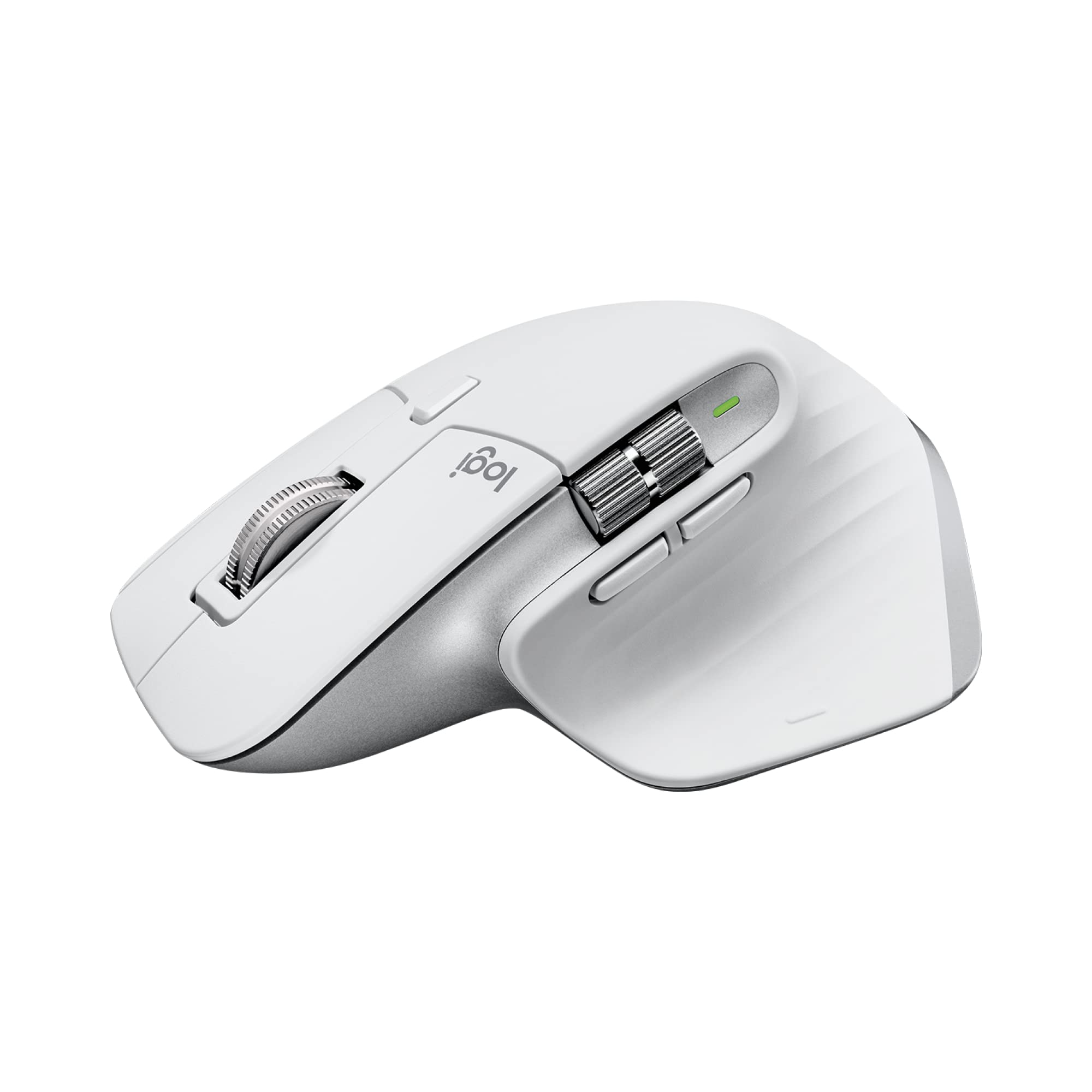
The Logitech MX Master 3S features a contoured, right-handed design that prioritizes long-duration comfort for users who employ a palm grip. TechGearLab found the mouse scored exceptionally high in its comfort metrics, with testers possessing medium to extra-large hands ranking it as a solid 9 out of 10. The substantial weight distribution and ergonomic sculpting allow the hand to spread evenly across the device without inducing strain during extended work sessions.
Sypnotix noted that despite not being explicitly marketed as an ergonomic mouse, its shape provides superior hand support compared to many flat alternatives in the productivity category. However, this generous size creates a specific trade-off for smaller-handed users who may find the chassis too large to maneuver comfortably. Additionally, TechGearLab emphasized that left-handed individuals are entirely excluded from using this model due to its asymmetrical layout.
The physical construction utilizes a soft-touch rubberized finish intended to provide a confident and luxurious grip. Binaryfork observed that while the matte graphite color exudes professional elegance initially, the material is highly susceptible to accumulating grime. After only a few days of use, minor signs of gunk buildup appeared on the surface, raising concerns about how the coating will hold up over years of daily office friction.
MagSpeed scroll wheel mechanics
The primary scrolling mechanism is a MagSpeed electromagnetic wheel capable of moving through 1,000 lines per second with an instant click-to-click toggle between free-spinning and ratcheted modes. Sypnotix described the high-speed scrolling as buttery fast, making it highly effective for navigating long documents or web pages without fatigue. The tactile feedback during mode switching is distinct, allowing users to transition seamlessly from precise clicking to rapid browsing.
A secondary horizontal thumb scroll wheel sits near where the user's thumb rests, offering a dedicated control axis that standard mice lack. Sypnotix highlighted this feature as particularly beneficial for creative professionals and developers who need to navigate timelines or traverse long lines of code horizontally. The silver aesthetic of the secondary wheel contrasts with the main body, providing both visual distinction and functional utility.
TechGearLab awarded high marks in its scroll wheel testing category, noting that the friction-free infinite scroll is a standout feature for productivity workflows. However, the review also pointed out that while the mechanism is innovative, some users may find the toggle button placement requires an adjustment period to avoid accidental mode changes during standard clicking tasks.
8K DPI Darkfield sensor performance
The mouse utilizes a Darkfield laser sensor with adjustable sensitivity ranging from 200 to 8,000 DPI in increments of 50. Binaryfork noted that the high resolution is particularly beneficial for users operating on high-resolution displays or large screen real estate, as it allows for swift and precise cursor movements across vast desktop areas without lifting the mouse.
TechGearLab recorded exceptional tracking accuracy scores, with the device performing flawlessly even on tricky surfaces like clear glass tables and polished white desks. This capability eliminates the need for a traditional mousepad in many office environments, providing reliable performance where optical sensors typically fail. The sensor's ability to track on virtually any surface is a major advantage for clean-desk setups.
Sypnotix encountered no noticeable latency while swiping around with the mouse at standard settings, confirming that the 8K DPI rating translates to smooth, responsive movement in daily use. Once users customize their preferred sensitivity level within Logi Options+, the tracking remains consistent and precise across different desk materials.
125 Hz polling rate limitations
Binaryfork explicitly identified this as a significant limitation for users who might attempt to use the mouse for gaming or high-speed cursor tasks. This figure is far below the 1000 Hz standard found on typical gaming mice, resulting in less frequent communication between the device and the computer.
While Binaryfork admitted that the low polling rate was not noticeable during general office work or browsing on a 4K monitor, it represents a hard ceiling for performance-sensitive applications. Gamers seeking sub-millisecond response times will find this hardware constraint unacceptable, as the cursor movement will feel less fluid compared to devices operating at higher frequencies.
The limitation is inherent to the mouse's design philosophy rather than a defect; Logitech prioritized battery efficiency and precision tracking over raw polling speed. Users who switch between productivity tasks and competitive gaming may need to maintain a separate high-performance device, as the MX Master 3S cannot bridge that gap effectively.
Silent click force and tactile feedback
Logitech claims the new switches reduce clicking noise by 90% compared to the previous generation, a change Sypnotix described as highly satisfying for shared office environments. The soft tactile feedback exudes tension from recoil, ensuring that users do not disturb colleagues with loud clicks while maintaining clear confirmation of each press. This makes the mouse an ideal choice for quiet workspaces or late-night home offices.
TechGearLab found the MX Master 3S to be among the easiest and quietest mice in its testing pool regarding click force. The reduced physical effort required to depress the switches contributes to less finger fatigue during long typing or clicking sessions. However, Binaryfork noted that while the main clicks are refined, there is a unique button on the thumb side near the bottom of the mouse.
This specific thumb rest button requires an unnatural pressing motion that some users find awkward for their workflow. TechGearLab highlighted this as a minor ergonomic quirk; while the primary clicking mechanism is excellent, the placement and resistance of the secondary thumb button can be difficult to press down consistently without shifting hand position.
Logi Options+ software customization
The mouse supports up to 7 programmable buttons that can be customized via Logitech's Logi Options+ software. TechGearLab praised the software for allowing users to easily program a variety of button tasks and gestures, including app-specific profiles that change behavior depending on which application is currently active.
Binaryfork described the software as powerful but noted some frustrations with its interface and feature set compared to competitors. While the core functionality allows for multi-device switching across up to three computers, advanced gesture customization can feel limited without third-party tools like AutoHotkey. The ability to assign different functions to the thumb scroll wheel and side buttons enhances productivity significantly.
Sypnotix found that the software integration was seamless on macOS, with instant pairing and reliable performance over low-energy Bluetooth. The multi-device support allows users to switch between a work laptop and a personal desktop using a dedicated button on the bottom of the mouse, making it highly effective for hybrid workflows.
Battery life and charging convenience
Binaryfork confirmed this longevity, noting that the efficient power management allows users to go weeks without plugging in even with heavy daily usage. The USB-C charging port is positioned at the front of the mouse, making it easily accessible.
A quick-charge feature provides 3 hours of use from just a 1-minute charge, mitigating the risk of unexpected shutdowns during critical work sessions. TechGearLab highlighted this rapid recovery capability as a key advantage for users who frequently forget to charge their peripherals overnight. The battery life significantly outlasts many competing productivity mice that require monthly charging.
Strengths
- +Features a MagSpeed electromagnetic scroll wheel capable of scrolling up to 1,000 lines per second with an instant click-to-click toggle.
- +Includes a dedicated horizontal thumb scroll wheel that provides precise control for navigating timelines and code.
- +Offers customizable buttons via Logi Options+ software, supporting app-specific profiles and smart actions across multiple devices.
- +Equipped with an 8,000 DPI Darkfield sensor that tracks accurately on virtually any surface, including glass.
Watch-outs
- −The soft-touch rubberized finish is prone to accumulating dirt and grime over time.
- −The side thumb rest button requires an unnatural pressing motion that some users find awkward for their workflow.
- −The polling rate is limited to 125 Hz on the Logi Bolt receiver, which falls short of typical gaming mouse standards.
How it compares
It offers app-specific button customization via software, providing deeper productivity features than the standard programmable buttons found on the Logitech G305 LIGHTSPEED.
Rating sources
Counts as 4.79/5 in our score — this publisher's 138 scores on the site average 3.66, so its scores are adjusted up to compare fairly with other publishers.
Counts as 4.52/5 in our score — this publisher's 156 scores on the site average 4.15, so its scores are adjusted up to compare fairly with other publishers.
Our 4.6 score is the average of the 4 scored reviews above, each adjusted for how strictly its publisher scores; 1 more reviewed it without printing a score and is not in the average. More about methodology.