Verdict
Ranked #4 of 5Reviewed by Mike Hunter·April 28, 2026

Arzopa Z1RC 16-Inch 2.5K

Averaged from 3 published ratings + 1 derived from video review
The verdict

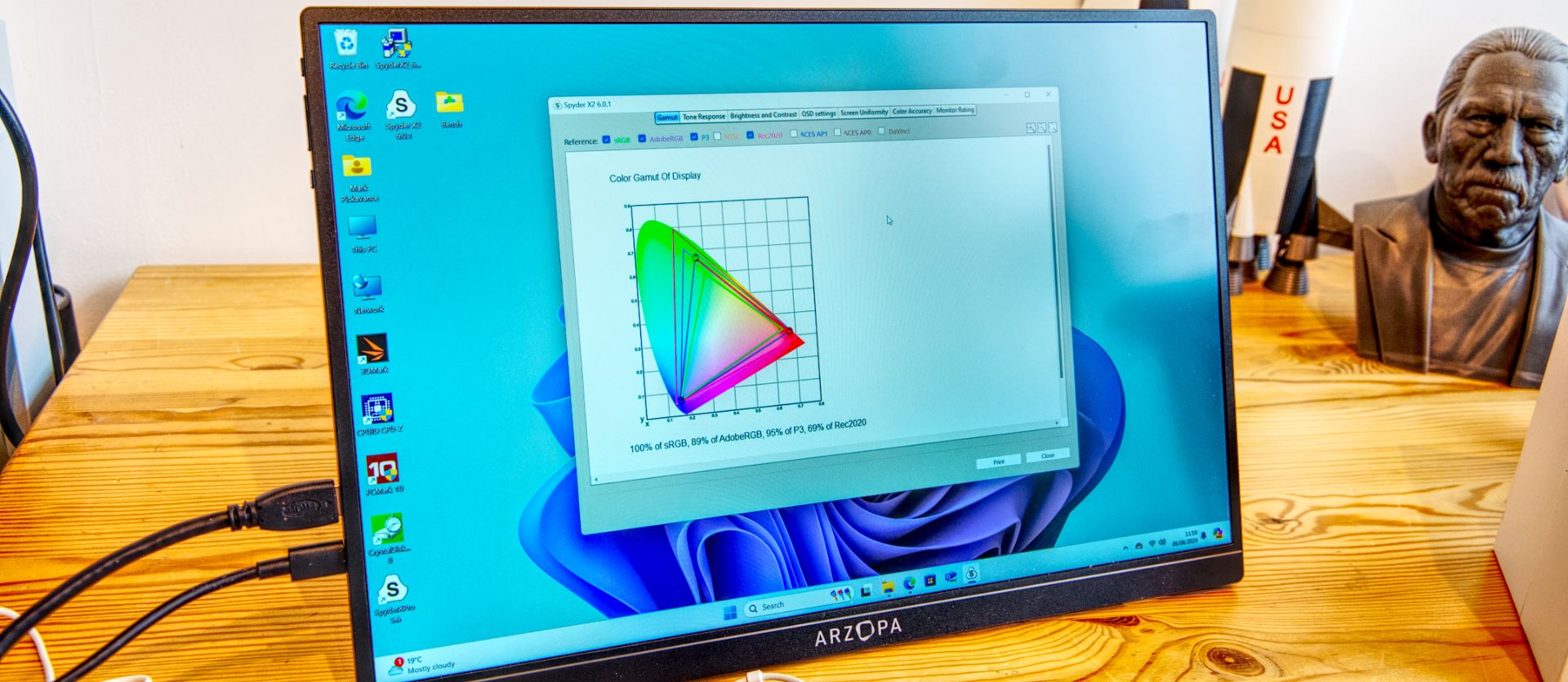
Reviewers characterize the Arzopa Z1RC as a budget-friendly secondary display that excels in versatility but compromises on image fidelity. TechRadar noted that while the 2.5K resolution and adjustable stand are impressive for the price, the panel suffers from backlight uniformity issues and lacks the color accuracy required for creative professionals. CNET highlighted its solid build quality and portability, making it a practical choice for general productivity. This monitor is best suited for users needing an affordable, lightweight second screen for office work or casual media, while those requiring precise color reproduction or premium build protection should look elsewhere.

Arzopa Z1RC 16-Inch 2.5K

Full review

Display Performance and Brightness

The Arzopa Z1RC distinguishes itself in the budget portable monitor market primarily through its 16-inch IPS panel with a 2560 x 1600 resolution, often marketed as 2.5K. TechRadar noted that while the color accuracy may not meet the rigorous standards required by professional creatives, the resolution provides a sharp image that is significantly more detailed than the 1080p panels found on cheaper competitors. The Gadgeteer emphasized that the 500-nit peak brightness is a standout feature, making the display viable for use in well-lit indoor environments and even moderate outdoor conditions, though direct sunlight remains challenging. This brightness level is notably higher than many entry-level portable monitors, which often cap out at 300 nits, allowing for better visibility when working near windows or in brightly lit cafes.

Build Quality and Physical Design

Reviewers consistently praised the physical construction of the Z1RC, with BGR describing the build as solid despite the low price point. The monitor weighs approximately 1.13 pounds (810 grams) and measures just 0.36 inches thick, making it slim enough to slip into a standard laptop sleeve or backpack alongside a 14-inch MacBook Pro. A key design element highlighted by both TechRadar and The Gadgeteer is the integrated kickstand, which folds out to an 80-degree angle. This mechanism supports both landscape and portrait orientations, a crucial feature for users who need vertical screen real estate for coding or reading documents. However, TechRadar pointed out a significant omission: the lack of an included protective case or sleeve. Given the thin profile and exposed screen, reviewers strongly advised purchasing separate protection to prevent scratches or damage during transit, as the device itself offers no built-in shielding.

Connectivity and Power Options

The Z1RC offers versatile connectivity through a Mini HDMI port and two USB-C ports, allowing for flexible setup configurations. BGR explained that users can power the monitor via one USB-C port while sending video through the Mini HDMI port, or utilize a single USB-C cable for both power and video transmission, simplifying the cable management for laptop users. The Gadgeteer confirmed that the single-cable USB-C connection works seamlessly with macOS, automatically detecting the display and allowing for easy resolution adjustments. However, TechRadar noted that powering the monitor via USB from a laptop will inevitably drain the host device's battery faster, a trade-off users must consider when working away from a power outlet. The inclusion of a USB-A to USB-C cable in the box allows for power delivery from standard wall adapters or power banks, providing a workaround for laptops with limited USB-C ports.

Audio Capabilities and Limitations

One of the most consistent criticisms across all review sources is the quality of the built-in speakers. The Gadgeteer bluntly described the audio as sounding like it is coming from a toy speaker, noting that the sound quality is significantly inferior to even basic laptop speakers. EnosTech and BGR echoed this sentiment, suggesting that the 1W dual speakers are largely unusable for any serious media consumption or video conferencing. The speakers are positioned on the side of the device, which can lead to uneven sound distribution depending on the viewing angle. Reviewers universally recommended using external audio solutions, such as Bluetooth headphones or the audio output of the primary laptop, rather than relying on the Z1RC's internal audio. This limitation is a common compromise in thin portable monitors, but it is particularly pronounced here due to the small driver size and lack of acoustic chambering.

Where It Falls Short

Despite its strong value proposition, the Arzopa Z1RC has several notable drawbacks that potential buyers should weigh. TechRadar highlighted issues with backlight uniformity, noting that the panel does not provide perfectly even illumination across the screen, which can be distracting in dark environments. BGR pointed out that the 60Hz refresh rate is adequate for productivity but insufficient for gaming, especially when compared to higher-refresh-rate portable monitors available from the same brand. Additionally, the lack of VESA mounting points, as noted by The Gadgeteer, limits the monitor's versatility for users who wish to integrate it into a permanent desk setup with a monitor arm. The physical controls, located on the side, were also described as somewhat cumbersome to use, with BGR mentioning that they rarely touched the buttons after initial setup, preferring to manage settings through the operating system.

Value and Market Positioning

The Arzopa Z1RC is positioned as a high-value option in the portable monitor market, with pricing frequently dropping below $150 on Amazon, down from an MSRP of $189.99. TechRadar described it as a bargain, particularly when compared to premium portable monitors that can cost three to four times as much. The Gadgeteer and EnosTech both emphasized that the combination of 2.5K resolution and 500-nit brightness at this price point is difficult to beat. However, reviewers cautioned that the low price comes with compromises in color accuracy and audio quality. For users seeking a secondary display for general productivity, web browsing, or document editing, the Z1RC offers exceptional value. Those requiring professional-grade color reproduction or high refresh rates for gaming will need to look at more expensive alternatives, but for the average consumer, the Z1RC delivers a compelling package.

Who It Is Best For

The Arzopa Z1RC is ideally suited for business travelers, students, and remote workers who need a lightweight, affordable second screen to boost productivity. BGR noted that the monitor excels in scenarios where users need to keep static content like to-do lists, project management software, or reference documents open alongside their primary laptop screen. The ability to switch between landscape and portrait modes makes it particularly useful for programmers or writers who benefit from vertical text layout. TechRadar suggested that it is a strong fit for anyone who wants a portable second display without investing in a high-end laptop with a large screen. However, it is not recommended for professional photographers, video editors, or gamers who require precise color accuracy, high refresh rates, or superior audio performance. Shoppers who prioritize portability and resolution over audio fidelity and color precision will find this monitor to be a strong addition to their workflow.

Strengths

  • +Offers a high 2560 x 1600 (2.5K) resolution for a 16-inch portable screen
  • +Supports both landscape and portrait orientations with an adjustable integrated stand
  • +Provides versatile connectivity via both Mini HDMI and USB-C inputs
  • +Can be powered entirely by USB, eliminating the need for a separate power adapter
  • +Extremely affordable pricing, often found well below its $189.99 MSRP

Watch-outs

  • Backlight uniformity is poor, leading to uneven brightness across the panel
  • Color accuracy is insufficient for professional creative work or photo editing
  • Lacks a protective case or sleeve, requiring users to source their own travel protection

Who this is for

At a glance: Best for for budget-conscious travelers wanting 2.5K resolution at a low price.

Why you’d buy the Arzopa Z1RC 16-Inch 2.5K

  • Offers a high 2560 x 1600 (2.5K) resolution for a 16-inch portable screen.
  • Supports both landscape and portrait orientations with an adjustable integrated stand.
  • Provides versatile connectivity via both Mini HDMI and USB-C inputs.

Why you’d skip it

  • Backlight uniformity is poor, leading to uneven brightness across the panel.
  • Color accuracy is insufficient for professional creative work or photo editing.
  • Lacks a protective case or sleeve, requiring users to source their own travel protection.

Rating sources

Our 4.1 score is the average of these published ratings. Ratings marked * were derived from the reviewer’s written analysis or video transcript — the publisher didn’t print an explicit numeric score, so we inferred one from their own words. Click through to verify. More about methodology.
Frequently asked questions

Is the Arzopa Z1RC 16-Inch 2.5K worth buying?
Reviewers characterize the Arzopa Z1RC as a budget-friendly secondary display that excels in versatility but compromises on image fidelity. TechRadar noted that while the 2.5K resolution and adjustable stand are impressive for the price, the panel suffers from backlight uniformity issues and lacks the color accuracy required for creative professionals. CNET highlighted its solid build quality and portability, making it a practical choice for general productivity. This monitor is best suited for users needing an affordable, lightweight second screen for office work or casual media, while those requiring precise color reproduction or premium build protection should look elsewhere.
What is the Arzopa Z1RC 16-Inch 2.5K's biggest strength?
Offers a high 2560 x 1600 (2.5K) resolution for a 16-inch portable screen
What is the main drawback of the Arzopa Z1RC 16-Inch 2.5K?
Backlight uniformity is poor, leading to uneven brightness across the panel
What sources back the 4.1/5 rating?
Our 4.1/5 rating is the average of scores from 4 independent portable monitors reviews — techradar, bgr, themonitorexpert.co.uk, and Lightweight, portable & bright .... Click any source on the product page to read the original review.

How it compares

See all 5
Arzopa Z1RC 16-Inch 2.5K
4.1/5· $130
Check Price on Amazon