PCWorld describes the HP Series 5 Pro 514pn as an 'ultra-lux' portable display, with a built-in kickstand and magnetic cover doing much to justify the premium price. Reviewers praise the 14-inch WQXGA panel for its sharpness, wide color gamut, and high color accuracy, which covers professional work. The IPS Black panel cannot match OLED competitors on contrast, and there is no HDMI port or Adaptive Sync, which narrows what you can connect and what you can play. Mobile professionals who care about build quality and color fidelity are the fit; gamers or anyone needing HDMI should look elsewhere.
Full review
Design and Portability
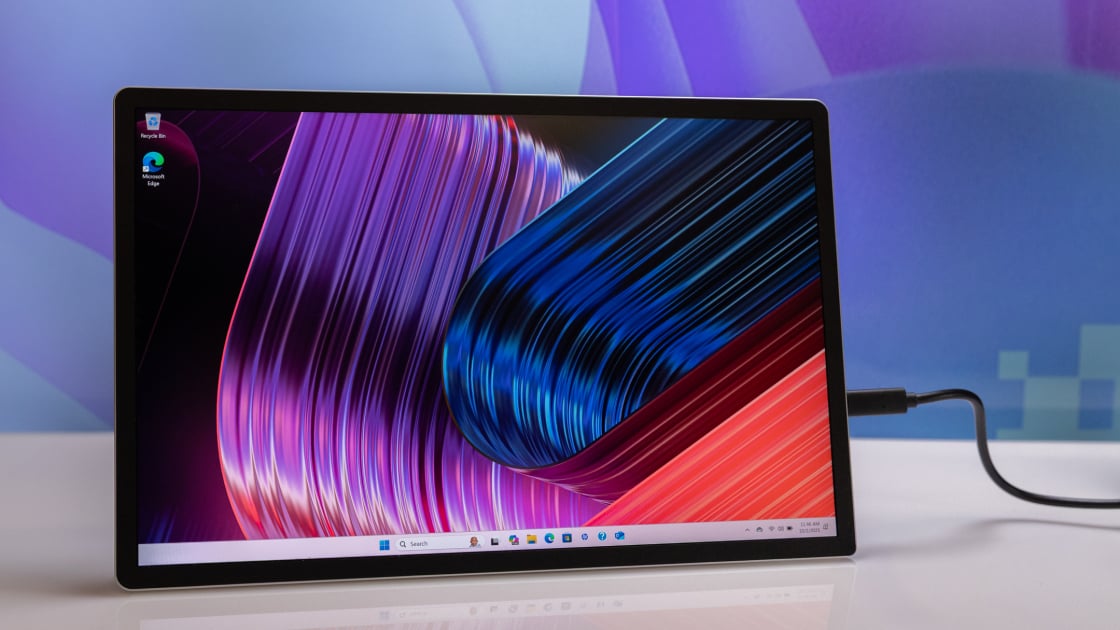
The HP Series 5 Pro 514pn distinguishes itself in the crowded portable monitor market through an exceptionally refined physical form factor that prioritizes travel convenience without sacrificing structural integrity. Measuring just 0.35 inches thick and weighing a mere 1.38 pounds, the display is engineered to slip effortlessly into a standard laptop sleeve or backpack compartment, adding negligible bulk to a commuter’s load. XDA Developers highlighted this ultra-light aluminum chassis as a key selling point, noting that the device feels premium rather than flimsy, a common complaint with budget portable displays. The inclusion of a built-in, variable-angle kickstand eliminates the need for external props or unstable surface balancing, allowing users to adjust the viewing angle for ergonomic comfort on desks, airplane tray tables, or hotel nightstands. Furthermore, the monitor ships with a magnetic hard screen cover that doubles as a protective shield during transit, addressing a frequent pain point for portable display owners who worry about scratches in crowded travel environments.
Display Technology and Image Quality
At the heart of the 514pn is a 14.3-inch IPS Black panel with Neo:LED backlighting, delivering a resolution of 2560x1600 in a 16:10 aspect ratio. This combination provides exceptional sharpness and pixel density, making text rendering crisp for productivity tasks. PCWorld praised the excellent sharpness and very wide color gamut, noting that the display achieves 100% coverage of both Adobe RGB and DCI-P3 color spaces. This level of color accuracy is rare in the portable segment and makes the monitor a viable secondary screen for photo and video editors who need reliable color fidelity on the go. The IPS Black technology improves upon standard IPS panels by offering a higher contrast ratio of 2000:1, which results in deeper blacks and richer colors compared to traditional LCDs. XDA Developers observed that while an OLED panel would still outperform it in direct side-by-side comparisons, the 514pn offers a stunning middle-ground that avoids the burn-in risks and high cost of OLED alternatives while maintaining vibrant visuals for media consumption and creative work.
However, the image quality is not without its limitations, particularly when compared to the latest OLED portable monitors. PCWorld explicitly noted that the IPS-LCD display cannot match the infinite contrast and perfect blacks of OLED alternatives, which is a significant drawback for users who prioritize cinematic viewing experiences or dark-room editing. Additionally, XDA Developers reported a minor visual artifact when connecting the monitor to a MacBook, describing the visuals as slightly grainy until the display resolution was manually adjusted to match the host device’s native resolution. This issue appears to be specific to macOS scaling behavior and was not observed when connecting to Windows devices, suggesting a software compatibility nuance rather than a hardware defect. Despite this, the matte coating on the 400-nit panel effectively minimizes glare from indoor lighting, ensuring readability in most office and travel environments, though direct sunlight may still pose challenges.
Connectivity and Power Delivery
The HP Series 5 Pro 514pn simplifies the connection process by relying exclusively on USB-C for both video input and power delivery, a design choice that aligns with the modern ultrabook ecosystem. The monitor features two USB-C ports, both supporting up to 65W of USB Power Delivery. This pass-through charging capability allows users to plug a single cable into their laptop, which then powers the monitor while simultaneously delivering sufficient wattage to keep the laptop charged, effectively reducing cable clutter. XDA Developers emphasized this feature as ideal for travel, noting that no secondary power adapter is required for typical use cases. However, this USB-C-only approach is a double-edged sword. PCWorld listed the lack of an HDMI port as a significant con, limiting compatibility with older laptops, gaming consoles, or desktop PCs that lack USB-C video output. Users with devices that only have HDMI or DisplayPort outputs will need additional adapters, which undermines the monitor’s promise of plug-and-play simplicity.
Furthermore, the absence of Adaptive Sync technology, such as G-Sync or FreeSync, was noted by PCWorld as a limitation for users who might attempt to use the monitor for light gaming or video playback with variable frame rates. While the 75Hz refresh rate is adequate for general productivity, the lack of synchronization technology can lead to screen tearing in scenarios where the frame rate fluctuates. The USB-C connection also relies on DisplayPort Alt Mode 1.2, which is widely supported but may require verification for older USB-C ports that do not support video output. Shoppers must ensure their primary device supports USB-C video out and can provide at least 65W of power if they wish to utilize the pass-through charging feature effectively, otherwise, they may need to power the monitor separately or accept reduced charging speeds for their laptop.
Performance and Refresh Rate
With a 75Hz refresh rate, the HP Series 5 Pro 514pn is firmly positioned as a productivity tool rather than a gaming peripheral. XDA Developers explicitly stated that the refresh rate is not ideal for gamers, categorizing the monitor as a device for work travel and home office use. For most users, 75Hz provides a smoother experience than the standard 60Hz found on many budget portable monitors, resulting in more fluid cursor movement and scrolling. This slight increase in refresh rate contributes to a more responsive feel during everyday tasks like web browsing, document editing, and video conferencing. However, for competitive gaming or fast-paced action titles, the 75Hz cap is a significant bottleneck. Tom’s Hardware, in its broader coverage of portable monitors, often highlights that premium portable displays are increasingly adopting higher refresh rates, making the 514pn’s 75Hz specification feel somewhat conservative for a device priced at $299 to $339.
No one has published input-lag or response-time numbers for this panel. The combination of the high-resolution panel and the 75Hz refresh rate ensures that text remains sharp and animations are smooth, which is critical for professionals who spend long hours reading and writing. The lack of adaptive sync means that while the monitor is responsive, it may not handle variable frame rates as gracefully as monitors with G-Sync or FreeSync. For users who primarily use their portable monitor for extending their desktop workspace, coding, or multitasking with multiple windows, the performance is more than sufficient. The focus on image quality and color accuracy over raw speed suggests that HP has targeted creative professionals and business travelers who value visual fidelity and portability over gaming performance.
Value and Pricing
The HP Series 5 Pro 514pn retails for approximately $299 to $339, placing it in the mid-to-high tier of the portable monitor market. PCWorld acknowledged that while the most inexpensive portable monitors can be found for less than $100, they often come with significant compromises in build quality, resolution, and color accuracy. HP justifies the higher price tag with the monitor’s attractive, lightweight design, superior IPS Black panel, and comprehensive feature set including the magnetic cover and kickstand. XDA Developers rated the monitor 9/10, suggesting that the value proposition is strong for users who prioritize portability and display quality. The inclusion of recycled materials, with 90% post-consumer recycled plastic and 55% recycled aluminum, also adds an environmental value proposition that may appeal to eco-conscious consumers.
However, the value assessment depends heavily on the user’s specific needs. For a casual user who only needs a second screen for basic tasks, a $100 monitor might suffice, making the 514pn feel expensive. Conversely, for a professional who requires color accuracy, high resolution, and a durable, travel-friendly design, the 514pn offers a compelling package that avoids the premium pricing of OLED alternatives. Tom’s Hardware’s coverage of the portable monitor market suggests that premium performance often comes with a premium price, and the 514pn sits in a sweet spot where it offers high-end features without reaching the prohibitive costs of flagship OLED models. Shoppers should weigh the cost against the benefits of the USB-C pass-through charging and the included accessories, which add tangible value compared to bare-bones competitors.
Full DCI-P3 coverage without an HDMI port
The HP Series 5 Pro 514pn is best suited for business travelers, remote workers, and creative professionals who require a reliable, high-quality secondary display that is easy to transport. Its lightweight design, USB-C connectivity, and excellent color accuracy make it an ideal companion for laptop users who frequently work in different environments, such as coffee shops, airports, or client offices. The 100% DCI-P3 and Adobe RGB coverage is particularly valuable for photographers, graphic designers, and video editors who need to ensure color consistency across devices. The built-in kickstand and magnetic cover further enhance its appeal for users who value convenience and protection during transit. If you have a modern ultrabook with USB-C video output and need a seamless, cable-light setup, this monitor is a strong fit.
Conversely, this monitor is not recommended for gamers, users with older hardware, or those who prioritize OLED-level contrast. The 75Hz refresh rate and lack of adaptive sync make it unsuitable for gaming, and the absence of an HDMI port limits compatibility with devices that do not support USB-C video out. Users who frequently work in direct sunlight may also find the 400-nit brightness insufficient, despite the matte coating. If your primary device is a desktop PC or a gaming console, or if you require the deepest blacks and highest contrast for media consumption, you should look elsewhere. The 514pn is a productivity-focused tool, and shoppers whose needs align with gaming or high-contrast media viewing should consider OLED alternatives or monitors with HDMI inputs and higher refresh rates.
Strengths
- +Features an attractive, luxurious design with a built-in kickstand and magnetic display cover
- +Extremely slim and lightweight form factor ideal for portability
- +Delivers excellent sharpness and detail on its 14-inch 2560x1600 WQXGA display
- +Offers very wide color gamut and great color accuracy for professional work
Watch-outs
- −IPS Black panel lacks the deep contrast and black levels of OLED alternatives
- −Connectivity is limited to USB-C only, with no HDMI port included
- −Does not support Adaptive Sync technology
Rating sources
Our 4.3 score is the average of these published ratings. More about methodology.