The AceMagic K1 offers a compact form factor and triple 4K display support via HDMI, DisplayPort, and USB-C, making it ideal for users needing extensive screen real estate in a small footprint. TechRadar noted its solid build quality despite the all-plastic chassis, while IT Pro highlighted the aesthetic appeal of its clean design. However, minipc-review found that single-channel RAM limits integrated GPU performance by up to 68 percent, and michaelstinkerings.org identified the base SATA SSD as a significant bottleneck with speeds around 81 MB/s. Internal upgrades are also difficult due to delicate antenna cables and hidden screws. This unit fits remote workers and digital signage operators who prioritize connectivity over graphics or storage speed, but gamers and upgraders should look elsewhere.
Full review
Design and port layout
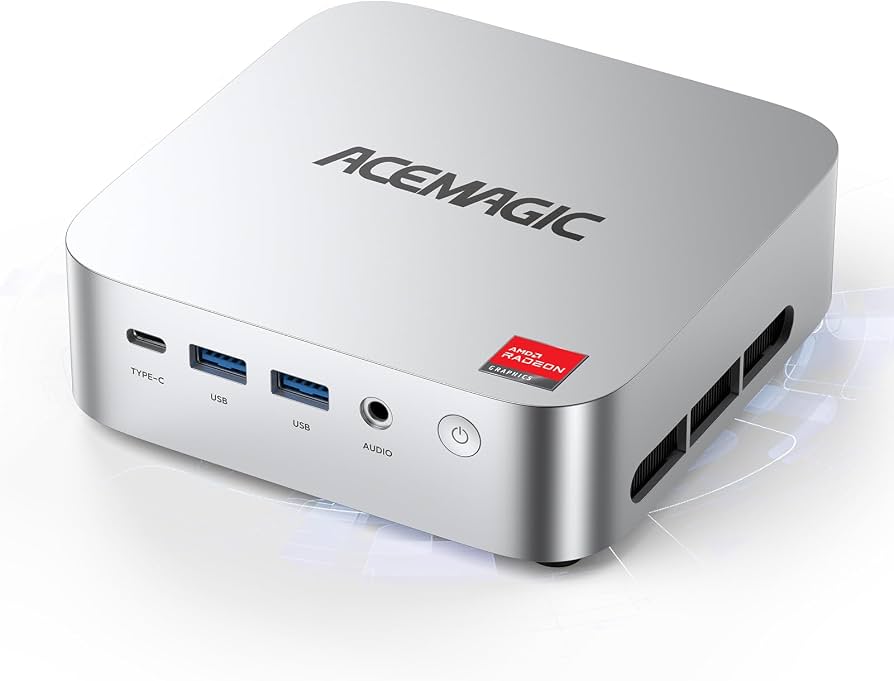
The AceMagic K1 arrives in a compact square chassis measuring 128.2 by 128.2 millimeters with a depth of just 41 millimeters, weighing between 392 grams for the AMD model and up to 515 grams depending on the configuration. TechRadar noted that despite its small footprint, the unit feels solidly built, though it relies entirely on an all-plastic body rather than metal construction. The exterior features a matte black finish with large perforated ventilation holes along the sides to exhaust heat from the internal components. IT Pro highlighted the aesthetic appeal of this stripped-back design, comparing its rounded corners and clean lines favorably against more aggressive gaming chassis or corporate gray boxes.
Port connectivity is split between two distinct panels on the device. The front face houses a single USB-C 3.2 Gen 2 port running at 10 Gbps alongside two USB-A 3.2 Gen 2 ports, providing quick access for peripherals without reaching behind the machine. IT Pro pointed out that while six total USB-A ports are available across the rear and front panels, the reliance on older Type-A connectors over additional modern options is a missed opportunity. Notably absent from this comprehensive list is an SD card reader, meaning users transferring media files must rely on external adapters or docks.
Triple display output capability
A standout feature of the K1 is its ability to drive three simultaneous displays at 4K resolution. The unit supports a triple 4K@60Hz setup utilizing the HDMI 2.0 port, the DisplayPort 1.4b, and the front-facing USB-C 3.2 Gen 2 output. This configuration makes it an ideal candidate for traders, remote workers, or editors who require extensive screen real estate without investing in a bulky workstation tower. The inclusion of VESA mount brackets allows users to attach the K1 directly to the back of a compatible monitor, completely freeing up desk space and creating a clean, minimalist workspace.
The flexibility of this display setup is particularly valuable for specific professional workflows. Minipc-review emphasized that running three 4K monitors simultaneously is seamless for office applications, web browsing, video conferencing, and photo editing in tools like GIMP. The integrated graphics handle the heavy lifting required to push pixels across multiple high-resolution panels without stuttering during desktop navigation or media playback. This capability ensures that even users with demanding visual multitasking needs can utilize a single compact box rather than juggling multiple devices.
Single-channel RAM limits graphics
The most significant bottleneck in the AceMagic K1's performance comes from its memory configuration. The base model ships with a single 16GB stick of DDR4-3200 RAM, running in single-channel mode rather than dual-channel. Michaelstinkerings.org found that this limitation severely restricts the integrated Radeon Vega 7 GPU, which relies heavily on system memory bandwidth to function effectively. In graphics benchmarks like GFXBench and Unigine Heaven, the performance difference between API tests was not as pronounced as expected because low memory bandwidth capped the overall frame rates at mediocre levels around 46 fps.
Minipc-review quantified this penalty precisely, noting that single-channel RAM limits integrated GPU performance by up to 68 percent compared to a dual-channel configuration. This means that while the AMD Ryzen 5 7430U processor itself is capable of handling office tasks and light content creation with ease, any workload that demands significant graphical throughput will be throttled by the memory architecture. For users planning to do anything beyond basic video playback or very light photo editing, this single-channel limitation becomes a glaring constraint on the system's potential.
SATA SSD storage speeds
Storage performance is another area where the K1 struggles to meet modern standards. The base configuration includes a 512GB M.2 SATA SSD, which Michaelstinkerings.org identified as one of the weakest components in an otherwise capable unit. During Crystal Disk Mark tests, this drive scored less than 2000 points on Passmark, heavily constrained by both its SATA interface and the single-channel RAM bottleneck. The reviewer recommended upgrading to a PCIe 4.0 NVMe SSD immediately for optimal performance.
YouTube reviewers confirmed these slow speeds in practical usage scenarios. One teardown video running OCCT benchmarks recorded an average read/write speed of only 81.37 megabytes per second, describing it as hands-down one of the slowest drives tested. Another reviewer noted that while loading times for games like Battlefield V were sluggish at over two minutes, the drive was still functional for digital signage or point-of-sale systems where extreme throughput is not required. The K1 does include a second M.2 slot supporting both NVMe and SATA formats, allowing users to upgrade storage up to a total capacity of 4TB across two drives.
Internal upgrade access difficulty
While the K1 offers expandability on paper, gaining physical access to its internal components is more difficult than in many competing mini PCs. To open the case, users must first pry off four rubber feet located on the bottom of the chassis to reveal hidden Phillips screws. Michaelstinkerings.org noted that once the screws are removed and clips released, the top housing separates from the bottom, but extreme care is required due to delicate internal cabling.
The teardown process reveals a complex web of connections that can deter casual upgraders. YouTube reviewers warned that the power jack cable connects directly to the motherboard assembly, requiring additional screw removal before the board can be lifted out. Furthermore, coaxial cables for the Wi-Fi and Bluetooth antennas are soldered or clipped in ways that risk damage if pulled too hard. One reviewer explicitly stated they would not call this upgrade-friendly due to these fragile connections and the difficulty of realigning the IO panel slide during reassembly. Users seeking easy RAM or storage swaps might find themselves better off purchasing a higher-spec model initially rather than risking hardware damage during maintenance.
Emulation and light gaming
Despite the memory and storage limitations, the K1 proves surprisingly capable in emulation scenarios. Retro Handhelds tested the 7430U model running Hyperspin Arcade and found that systems up to the PlayStation 2 and GameCube era run smoothly, with opportunities for two-times upscaling on sixth-generation consoles. The reviewer noted that while demanding titles might not hit perfect frame rates, the system handles a vast library of retro games without significant stuttering.
Specific gaming performance varies by title but remains viable for casual play. However, heavier AAA games like Cyberpunk 2077 struggled significantly even on the lowest presets, confirming that this machine is not built for modern triple-A gaming. The Radeon Vega 7 graphics handle older titles and indie games well enough to serve as a compact family PC or digital signage display, provided users manage their expectations regarding graphical fidelity.
Power consumption efficiency
Energy efficiency is one of the K1's strongest attributes, making it suitable for continuous operation as a home server or always-on media device. Minipc-review measured standby power consumption at approximately 6 watts, with average load hovering around 35 watts and peak draw reaching just 47 watts during initial boosts. For context, running a full Cinebench test consumed only 9 watt-hours of electricity, translating to an incredibly low annual cost compared to traditional desktop towers.
This low power envelope allows the K1 to run silently in the background without generating excessive heat or noise. The internal fan assembly is designed to exhaust hot air through side vents and a bottom intake, maintaining stable temperatures during sustained workloads like video conferencing or light rendering. For users looking to deploy the machine 24/7 for network-attached storage, home automation hubs, or Plex media serving, the minimal electricity draw makes it a financially sensible choice that does not compromise on core processing capabilities.
Wi-Fi 6E connectivity
Networking performance in the K1 is bolstered by the inclusion of a MediaTek MT7902 Wi-Fi 6E module, which Michaelstinkerings.org highlighted as a game-changer at this price point. In transfer tests paired with a high-end Tri-Band Wi-Fi 7 Access Point, the unit achieved download speeds of 824 Mbps (103 MB/s), reaching near-wired Ethernet levels in line-of-sight conditions. This robust wireless capability ensures that users do not need to run physical cables across their desks for fast internet access.
The K1 also includes Bluetooth 5.2 support, which is slightly behind the latest 5.4 standard but fully adequate for connecting peripherals like keyboards, mice, and headphones. IT Pro noted that while Wi-Fi 6E is present in some units, others may only feature standard Wi-Fi 6 depending on the specific batch received. Regardless of the exact wireless generation, the connectivity options provide a reliable foundation for modern office environments where stable, high-speed internet access is critical for productivity.
Strengths
- +Compact square form factor (128.2 x 128.2 x 41 mm) with VESA mount support to free up desk space
- +Triple display output capability via HDMI, DisplayPort, and USB-C supporting simultaneous 4K resolution
- +Expandable storage with two M.2 slots allowing upgrades up to 4TB total capacity
- +Low power consumption (~6W standby) making it suitable for continuous operation as a home server
Watch-outs
- −Pre-installed single-channel RAM configuration significantly limits integrated graphics performance
- −Base storage uses slow SATA-based M.2 SSDs with read/write speeds around 81 MB/s
- −Internal upgrade access requires removing rubber feet and dealing with delicate antenna cables
How it compares
The AceMagic K1 offers a more compact square form factor (128.2 x 128.2 mm) compared to the rectangular dimensions of the Geekom A5 2025 Edition, but its single-channel RAM configuration limits integrated graphics performance by up to 68 percent relative to dual-channel setups like those in the GMKtec NucBox M6 Ultra. While it supports triple 4K displays via HDMI, DisplayPort, and USB-C, its base SATA SSD speeds of around 81 MB/s are significantly slower than the NVMe drives found in both the Geekom A5 and the NucBox M6.
Rating sources
“With minor optional upgrades, it becomes a hard buy to beat for under €300.”
Our 3.7 score is the average of the 3 scored reviews above; 3 more reviewed it without printing a score and are not in the average. Ratings marked * were derived from the reviewer’s written analysis or video transcript — the publisher didn’t print an explicit numeric score, so we inferred one from their own words. Click through to verify. More about methodology.