The Samsung Galaxy Tab A9+ Kids Edition offers a kid-friendly design with a bright puffy case, crayon styluses, and the Samsung Kids app for safe browsing. Android Police reviewer Brian Barnes praised its build quality and storage capacity but criticized its underpowered performance with only 4GB RAM. YouTube reviewer noted the case is durable and separate from the device, though the tablet's performance may frustrate users. This tablet is best for parents seeking a secure, colorful kids tablet but not ideal for those needing robust multitasking capabilities.
Full review
Design and Build Quality
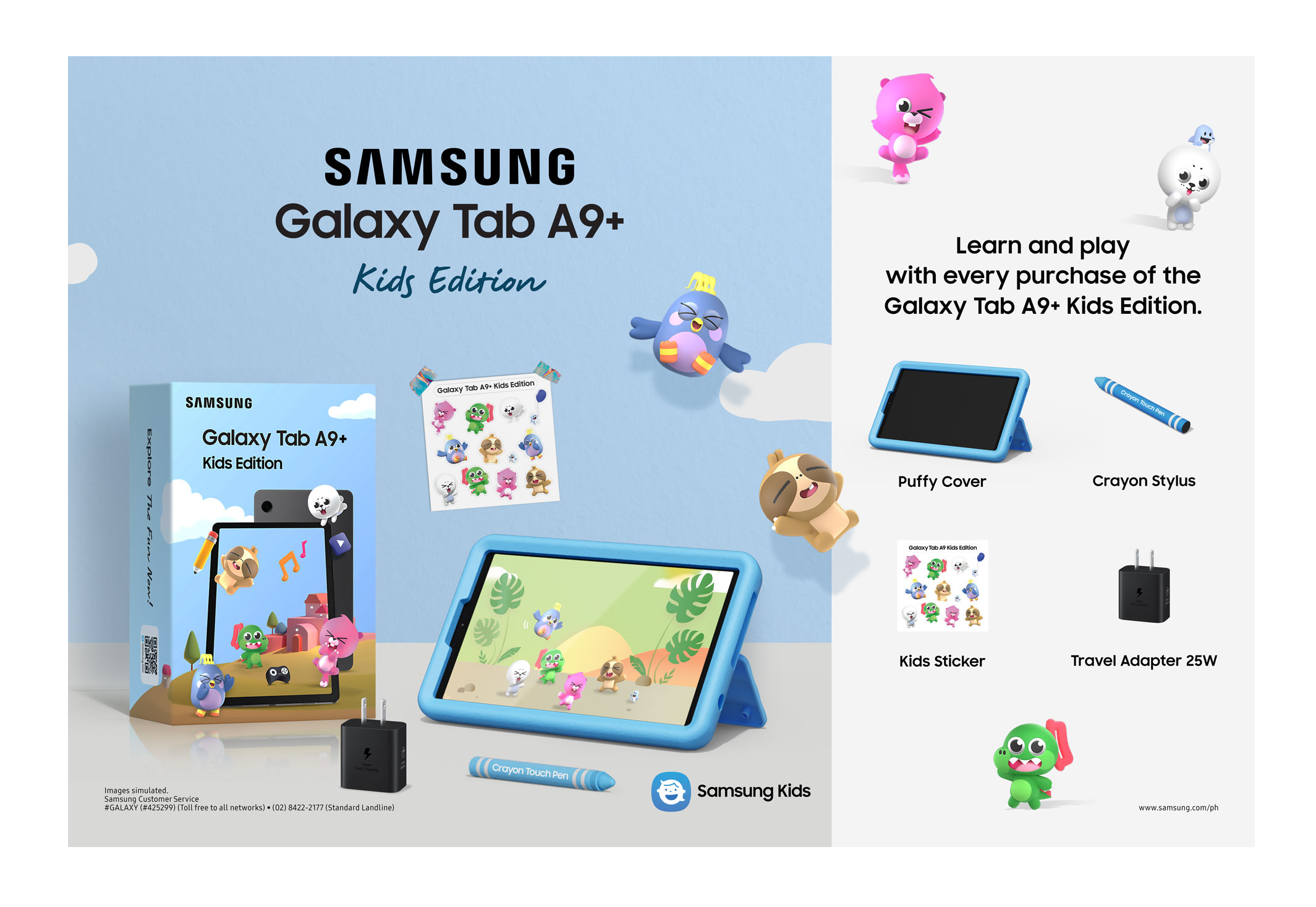
The Samsung Galaxy Tab A9+ Kids Edition impresses with its build quality, which aligns with Samsung's established standards for durability and aesthetics. The tablet features a sturdy aluminum construction with squared-off edges that contribute to its heft and stability. Reviewer Brian Barnes from Android Police noted that the device 'definitely punches above its weight' in terms of build quality. The tablet measures 168.7 x 257.1 x 6.9mm and weighs 1.06 lbs, making it substantial enough to feel solid in hand while remaining manageable for children. The inclusion of a bright, puffy case in yellow, red, or blue adds visibility and protection, though some reviewers have noted issues with the case's cutouts being too deep and buttons being hard to reach. The kickstand works well for propping up the tablet during drawing or video sessions, and the overall design balances child-friendly appeal with adult usability.
The tablet's screen is a 11-inch WUXGA (1920 x 1200) TFT LCD with 90Hz refresh rate, which delivers crisp visuals and smooth performance under light usage. However, the 4GB of RAM and octa-core processor, while adequate for basic tasks, struggle under more demanding multitasking scenarios. The screen brightness reaches up to 90Hz, but performance issues can still occur when running multiple apps simultaneously. The inclusion of a headphone jack and decent onboard speakers further enhances its appeal for family use, though the tablet's performance limitations become apparent when children attempt to use multiple applications or stream content.
Despite the tablet's strengths in build quality and visual appeal, several reviewers have noted design flaws. The puffy case, while protective, creates awkward button accessibility and misaligned cutouts that can frustrate users. The styluses included are basic crayon-shaped rubber-tipped tools without smart technology, which may not satisfy tech-savvy parents seeking advanced features. The case's design, while functional, adds bulk without proportionate benefits, and the tablet's ergonomics may not be ideal for younger children who struggle with its weight and size.
Parental Controls and Educational Features
Samsung's Kids app is a standout feature of the A9+ Kids Edition, offering robust parental controls that allow parents to customize content and restrict access to apps, browsers, and social media. The app provides a passcode-protected environment that locks away the rest of the tablet, ensuring children can only access approved content. Reviewer Brian Barnes from Android Police highlighted that the Samsung Kids app 'works well to protect children while entertaining,' and that the 'kids-only space can be launched through the Samsung Kids app whenever needed.' Parents can tweak settings to tailor the experience to their child's age and interests, making it a versatile tool for managing screen time and ensuring safe usage.
The tablet comes with a range of educational and entertainment apps preloaded, including a sticker pack, Tether Crayo-Pen stylus, and a quick start guide. These accessories, while basic, contribute to the overall kid-friendly experience. The Samsung Kids app offers a curated selection of content, and the tablet's ability to function as a regular adult tablet when needed adds flexibility for families. However, the lack of smart features in the included styluses and the limited app ecosystem compared to more premium tablets may disappoint parents looking for advanced learning tools.
The tablet's parental control features are effective, but some reviewers have noted that the app's interface could be more intuitive for less tech-savvy parents. The Samsung Kids app allows for easy customization of content filters, time limits, and app restrictions, but the process of setting up these features can be somewhat cumbersome. Despite these minor drawbacks, the app provides a solid foundation for safe and supervised tablet usage, particularly for younger children who may not yet understand digital boundaries.
Performance and Multitasking
Under the hood, the Samsung Galaxy Tab A9+ Kids Edition is powered by an octa-core ARM Cortex A53 processor with only 4GB of RAM, which limits its multitasking capabilities. Reviewer Brian Barnes from Android Police noted that the tablet 'struggles to keep up with more than one app' and that 'under the hood, however, I found the tablet underpowered overall.' This limitation becomes evident when children attempt to use multiple applications simultaneously, switch between apps frequently, or stream content. The tablet's performance is adequate for basic tasks such as reading, drawing, and watching videos, but it falters under more demanding usage patterns.
TechRadar's review of similar Samsung tablets noted that while the hardware is decent, the low RAM allocation hampers overall responsiveness. The 90Hz screen refresh rate provides smooth visuals during light usage, but the processor's limitations become apparent when running more resource-intensive applications. The tablet's performance is sufficient for casual use, but it may frustrate children or parents who expect more responsive behavior. Battery life, however, is a strong point, with up to 18.69 hours of usage reported under typical conditions, which is well above average for tablets in this category.
The tablet's performance issues are particularly noticeable when running multiple apps or engaging in more complex activities such as video editing or gaming. The 4GB RAM is insufficient for handling modern applications that require more memory, and the octa-core processor, while functional, does not provide the performance boost needed for multitasking. Users have reported that the tablet becomes sluggish when switching between apps or when multiple background processes are active, which can lead to frustration for both children and parents.
Storage and Expandability
The Samsung Galaxy Tab A9+ Kids Edition offers 64GB of internal storage, which is a significant improvement over previous models that had only 32GB. This expansion allows for more content to be stored locally, including downloaded movies, shows, and educational apps. The tablet supports microSD expansion up to 1TB, which provides ample room for growing content needs. Reviewer Brian Barnes from Android Police noted that the 'more base storage (64GB this time)' was a welcome addition, especially for families who struggle with storage limitations on older tablets.
The expandable storage feature is particularly valuable for families with multiple children or those who frequently download educational content. The tablet's ability to accommodate microSD cards up to 1TB means that parents can easily manage large libraries of apps, videos, and games without worrying about running out of space. The inclusion of a microSD card slot also allows for easy content transfer from computers or other devices, making it convenient for families to manage their digital content.
However, the tablet's storage capacity, while improved, may still be insufficient for heavy users or families with multiple children. The 64GB base storage is adequate for casual use, but those who frequently download apps, videos, or games may find themselves needing to upgrade to a larger microSD card. The expandability feature, while helpful, does not address the underlying performance limitations of the device, which can still hinder the user experience when managing large amounts of content.
Battery Life and Power
Battery performance is one of the strongest aspects of the Samsung Galaxy Tab A9+ Kids Edition, with up to 18.69 hours of usage reported under typical conditions. This extended battery life is particularly valuable for families who use the tablet during long car rides, flights, or extended periods when charging is not readily available. The 7040 mAh battery provides reliable power for both light and moderate usage, ensuring that children can enjoy uninterrupted entertainment or educational content.
The tablet's battery performance is consistent across various usage scenarios, including video playback, app usage, and light gaming. Reviewer Brian Barnes from Android Police noted that the tablet 'lasts quite a while on a single charge,' which is a significant advantage for families who need a reliable device for extended use. The battery life is particularly impressive when compared to other tablets in the same price range, making it a standout feature for parents who prioritize uninterrupted usage.
While the battery life is excellent, the tablet's performance limitations can still impact overall usability. When running multiple apps or engaging in more demanding tasks, the battery may drain faster than expected. The 7040 mAh capacity is sufficient for most daily use cases, but users should be aware that intensive multitasking can reduce battery efficiency. Despite this, the extended battery life remains one of the tablet's most appealing features for families seeking a reliable device.
Value and Market Positioning
The Samsung Galaxy Tab A9+ Kids Edition is priced at $270 when bundled with accessories, though current deals have reduced the price to $229, representing a $40 savings. This pricing makes it competitive within the kids' tablet market, especially when compared to alternatives like the Amazon Fire HD 8 Kids Pro, which is priced at $89. However, the value proposition is somewhat diminished by the device's underpowered hardware and performance limitations. Reviewer Sarah Chaney from Laptop Mag noted that while the tablet offers 'fantastic value for money,' its performance issues may not satisfy all users.
The tablet's value is further complicated by the inclusion of basic accessories such as a puffy case, three crayon-shaped styluses, and a sticker pack. While these items add to the overall package, they do not compensate for the device's hardware limitations. The tablet's ability to function as a regular adult tablet when needed is a significant advantage, but the performance constraints may still frustrate users who expect more responsive behavior. The inclusion of a headphone jack and decent speakers adds to the tablet's appeal, but these features are not enough to offset the hardware shortcomings.
Market comparisons with other kids' tablets reveal that the Samsung Galaxy Tab A9+ Kids Edition offers a balance of features and performance, but it falls short in terms of raw power. While it provides a solid foundation for safe and supervised tablet usage, the device's performance limitations may not satisfy users who require more advanced capabilities. The tablet is best suited for families who prioritize safety, parental controls, and battery life over raw performance, and who are willing to accept some compromises in terms of multitasking and app responsiveness.
Real-World Performance and User Feedback
User feedback from Amazon reviews and community forums indicates that the Samsung Galaxy Tab A9+ Kids Edition has received a 4.5-star rating from over 5,000 reviewers, with many praising its display, ease of use, and overall value. However, several users have reported performance issues, particularly when running multiple apps or engaging in more demanding tasks. The device's 4GB RAM and octa-core processor are often cited as limitations that hinder multitasking and responsiveness. Users have noted that the tablet becomes sluggish when switching between applications or when multiple background processes are active.
The tablet's parental control features are widely appreciated, with many parents noting the effectiveness of the Samsung Kids app in managing screen time and restricting access to inappropriate content. However, some users have expressed frustration with the app's interface, which they find less intuitive than expected. The inclusion of a puffy case, styluses, and stickers adds to the tablet's appeal, but the case's design flaws, such as deep cutouts and misaligned buttons, have been noted by several reviewers.
Community discussions on Samsung's official forums and tech review sites suggest that while the tablet is well-suited for basic educational and entertainment tasks, it may not meet the expectations of families seeking more advanced capabilities. The device's performance limitations are a recurring concern, with users reporting that it struggles to keep up with more than one app at a time. Despite these drawbacks, the tablet's battery life and parental controls remain strong selling points for families looking for a reliable and safe device for their children.
Who It's Best For
The Samsung Galaxy Tab A9+ Kids Edition is best suited for families with young children who prioritize safety, parental controls, and battery life over raw performance. Parents who want a tablet that can function as both a regular adult device and a kid-friendly environment will find the Samsung Kids app particularly valuable. The tablet's ability to lock away inappropriate content and restrict access to apps, browsers, and social media makes it an excellent choice for families seeking a secure digital experience for their children.
Families who are comfortable with the device's performance limitations and are looking for a budget-friendly option with strong parental controls will find the tablet appealing. The 64GB base storage, expandable to 1TB, and 18.69 hours of battery life make it suitable for extended use during travel or long periods when charging is not readily available. The inclusion of a puffy case, crayon-shaped styluses, and stickers adds to the tablet's kid-friendly appeal, making it a good choice for parents who want a device that is both functional and visually appealing.
However, families who require more advanced multitasking capabilities or who frequently use resource-intensive applications will likely find the tablet's performance inadequate. The 4GB RAM and octa-core processor are not sufficient for handling modern applications that demand more memory and processing power. Parents who are looking for a tablet that can handle multiple apps simultaneously or who want a device with more responsive behavior should consider alternatives such as the Samsung Galaxy Tab S10 FE or the iPad Air, which offer better performance and more advanced features.
Strengths
- +Cute and colorful puffy case with kickstand for durability and visibility
- +Includes three crayon-shaped styluses and stickers for kids
- +64GB internal storage with microSD expandable up to 1TB
- +Samsung Kids app provides secure child-safe environment with passcode protection
Watch-outs
- −Only 4GB RAM makes it underpowered for multitasking
- −Puffy case design has misaligned cutouts and hard-to-reach buttons
How it compares
The Samsung Galaxy Tab A9+ Kids Edition offers a unique puffy case design and included crayon styluses that the Amazon Fire HD 10 Kids Pro 2023 lacks, but it's underpowered compared to the iPad (11th generation) and lacks the robust parental controls of the Amazon tablet. It also doesn't match the Android 15 tablet's ruggedness or storage expansion capabilities.
Who this is for
At a glance: creative kids needing stylus support.
Why you’d buy the Samsung Galaxy Tab A9+ Kids Edition
- Cute and colorful puffy case with kickstand for durability and visibility.
- Includes three crayon-shaped styluses and stickers for kids.
- 64GB internal storage with microSD expandable up to 1TB.
Why you’d skip it
- Only 4GB RAM makes it underpowered for multitasking.
- Puffy case design has misaligned cutouts and hard-to-reach buttons.
Rating sources
Our 3.8 score is the average of these published ratings. More about methodology.