The OmniBook 5 14 is the battery-life champion: an ARM-based ultraportable that PCWorld and TweakTown measured at over 25 and 28 hours respectively, paired with a gorgeous 2K OLED touchscreen. PCWorld called it "a strong contender if you want a Windows laptop with great battery life," and TechRadar praised its display and endurance. The catch is the Snapdragon platform's app-compatibility quirks.
Full review
Battery Life and Power
Battery life is the OmniBook 5 14's defining strength and the reason it earns a place in this ranking. PCWorld reported the laptop "managed to exceed 25 hours in a video playback test," and TweakTown went further, measuring "28 hours and 19 minutes" from its 59Wh battery. HP rates it up to 34 hours; even discounting that marketing figure, the independently verified numbers put it in a different league from every x86 laptop here.
Fast charging backs up the endurance: PCWorld noted a "fast charge mode that can add up to 50 percent capacity in 30 minutes." For anyone who works untethered, commutes, or simply hates carrying a charger, this is the standout machine in the category — you can genuinely leave the power adapter at home for a full day.
Display Quality
The 14-inch 2K OLED touchscreen is the second pillar of the OmniBook's appeal. PCWorld confirmed "the panel looks great" as "an OLED display" that "provides the advantages typical of the panel type, including a wide color gamut and high contrast ratio." TechRadar's headline summed it up as "a top-tier display at an affordable price."
For a sub-$700 laptop, an OLED panel with deep blacks and vivid color is genuinely rare, and it makes the OmniBook the best choice here for watching media, browsing and casual photo viewing. It is a clear cut above the IPS panels on the IdeaPad Slim 5, Aspire 5 and Pavilion 15.
Real-World Performance
The Snapdragon X Plus delivers adequate everyday performance. PCWorld judged that "the HP OmniBook 5's performance is ok but not exceptional" while remaining "plenty quick for a wide range of productivity tasks." For browsing, office apps, email and streaming, the ARM chip is responsive and runs cool and quiet thanks to its efficiency.
It is not the machine for heavy multitasking or demanding creative work — the Acer Swift Go 14's Ryzen 7 is meaningfully faster in multi-core workloads. But for the mainstream productivity user who values silence and battery over raw throughput, the OmniBook's performance is more than sufficient.
Build Quality and Design
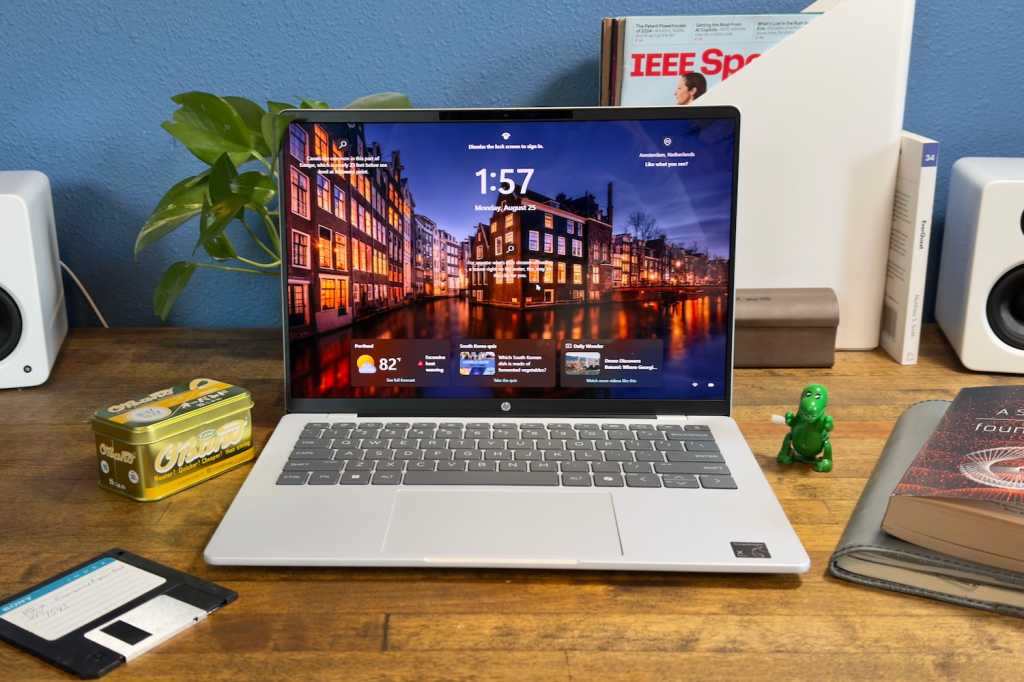
The OmniBook 5 14 is a slim, light 14-inch ultraportable in a tidy Glacier Silver finish that looks more expensive than its price. The efficient ARM platform means it largely avoids the fan noise that plagues budget x86 laptops, contributing to a calm, premium feel in daily use.
A 1080p IR webcam supports Windows Hello face sign-in, and the laptop carries the Copilot+ PC badge with an on-device NPU for AI features. It is a well-judged design for the mobile professional who wants a quiet, light, long-lasting companion.
Where It Falls Short
The biggest caveat is the platform. Because the Snapdragon X Plus is an ARM chip, some Windows applications run through emulation and a few — particularly certain games, drivers and niche professional tools — may run poorly or not at all. Most mainstream apps now work, but buyers with specialized x86 software should verify compatibility before choosing it over an Intel or AMD rival.
Tom's Guide also flagged thermals on the OmniBook 5 family, noting the laptops "can get uncomfortably hot," reaching as much as 108 degrees Fahrenheit on the rear underside under load. Base configurations are also fairly minimal on ports. None of this undermines the core pitch, but it is why a battery-and-screen champion lands at third rather than higher.
How It Compares to Alternatives
The OmniBook 5 14 is the endurance specialist of this group. It dramatically outlasts the Acer Swift Go 14 and every other x86 pick on battery, and its OLED screen beats the IPS panels on the Lenovo IdeaPad Slim 5, Acer Aspire 5 and HP Pavilion 15. What it gives up is the full, no-asterisks app compatibility of those x86 machines and the raw multi-core speed of the Swift Go 14's Ryzen 7. It is a deliberate trade: battery and screen quality in exchange for platform flexibility.
Value at This Price
The OmniBook 5 14's value comes from delivering two things that almost never appear together at this price: a true OLED screen and class-leading battery life. TechRadar's verdict said it directly — "incredible battery life and a top-tier display at an affordable price." A 25-to-28-hour battery and a 2K OLED panel for around $699 is a combination the IPS-screened rivals here simply cannot offer.
The catch that tempers the value is the ARM platform: you are betting that your software runs well on Snapdragon, which for mainstream apps it now does, but for niche or legacy x86 tools it may not. For the right buyer — someone whose needs are web, office and media — it is exceptional value. For someone with specialized software, the x86 picks are the safer spend.
Who It's Best For
Choose the OmniBook 5 14 if all-day unplugged battery life and a beautiful OLED screen are your top priorities and your software needs are mainstream — web, office, streaming and light creative work. It is ideal for students, commuters and travelers who want to forget about the charger. Look elsewhere if you rely on specialized x86 applications or need heavier sustained performance, in which case the IdeaPad Slim 5 or Swift Go 14 are safer x86 choices.
Strengths
- +Outstanding battery life, exceeding 25 hours in independent video tests
- +Vivid 2K OLED touchscreen with wide color gamut and deep contrast
- +Light, portable 14-inch design built for all-day mobile use
- +Fast charging adds about 50% capacity in 30 minutes
- +Quiet, efficient operation thanks to the low-power Snapdragon chip
Watch-outs
- −Snapdragon X Plus is an ARM chip, so some Windows apps run emulated or not at all
- −Performance is adequate but not exceptional for heavy workloads
- −Can run warm on the rear underside under sustained load
- −Base configurations are fairly minimal on ports
How it compares
The endurance and screen-quality pick: its battery comfortably outlasts every x86 rival here, including the Acer Swift Go 14, and its OLED panel beats the IPS screens on the Lenovo IdeaPad Slim 5, Acer Aspire 5 and HP Pavilion 15. The trade-off is the ARM Snapdragon platform's app-compatibility limits, which the x86 machines avoid.
Who this is for
At a glance: Mobile users who prioritize all-day battery life and a vivid OLED screen over maximum app compatibility and raw horsepower.
Why you’d buy the HP OmniBook 5 14
- Outstanding battery life, exceeding 25 hours in independent video tests.
- Vivid 2K OLED touchscreen with wide color gamut and deep contrast.
- Light, portable 14-inch design built for all-day mobile use.
Why you’d skip it
- Snapdragon X Plus is an ARM chip, so some Windows apps run emulated or not at all.
- Performance is adequate but not exceptional for heavy workloads.
- Can run warm on the rear underside under sustained load.
Rating sources
“The laptop still managed to exceed 25 hours in a video playback test, and the OLED display provides the advantages typical of the panel type, including a wide color gamut and high contrast ratio.”
“Incredible battery life and a top-tier display at an affordable price.”
“The OmniBook 5's 59Wh battery enabled it to last 28 hours and 19 minutes in our testing.”
Our 4.3 score is the average of these published ratings. Ratings marked * were derived from the reviewer’s written analysis or video transcript — the publisher didn’t print an explicit numeric score, so we inferred one from their own words. Click through to verify. More about methodology.