Verdict
Head-to-head · Best Laptop Cooling Pads

Kootek Laptop Cooling Pad vs Razer Laptop Cooling Pad

Which is the better buy? Side-by-side on rating, price, strengths, and watch-outs — with the published ratings we averaged to get there.

Verdict is reader-supported. As an Amazon Associate we earn from qualifying purchases. Some links on this page are affiliate links — if you click through and buy, we may earn a small commission at no extra cost to you. Our ratings are sourced from independent publications, not sponsors.
The short answer

Razer Laptop Cooling Pad comes out ahead by a clear margin (4.0 vs 3.7). Razer Laptop Cooling Pad is best for: tech-savvy users seeking smart cooling integration. Read the strengths below before deciding.

Kootek Laptop Cooling Pad
Ranked #5 in Best Laptop Cooling Pads
Kootek Laptop Cooling Pad
1 source$29.99as of Oct 11

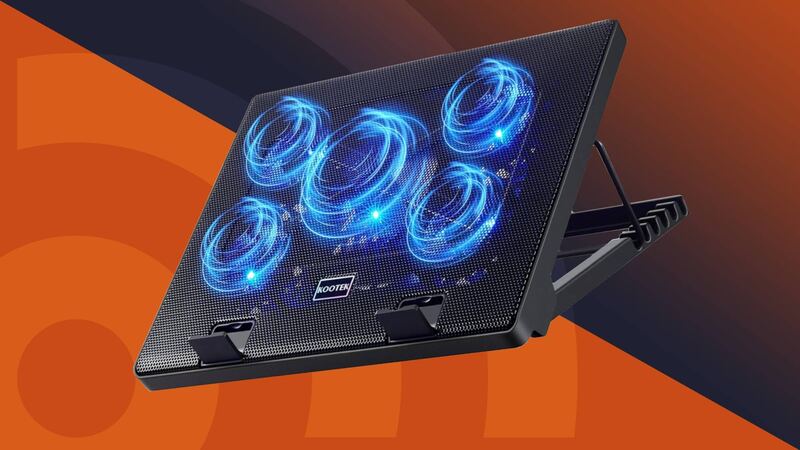
The Kootek Laptop Cooling Pad (model LCP04) is a USB-powered pad with one large and four small fans, six tilt positions and two USB 2.0 ports. Android Authority said it has more customization options than virtually any other laptop cooler, and in its tests the pad cut CPU temperature by 7C at idle and in a CPU stress test and prevented thermal throttling. Under a heavy game the CPU dropped only 3C, which the outlet called a below-average result, and it criticized the cheap-feeling plastic and fan lights that cannot be switched off while the fans run.

Strengths
  • — Six tilt positions, more than nearly all competitors according to Android Authority
  • — Centre fan and four corner fans switch separately, so one, four or five fans can run
  • — Two usable USB 2.0 pass-through ports
Watch-outs
  • — Only a 3C CPU drop during heavy gaming, a below-average result per Android Authority
  • — Plastic design feels a little cheap and inelegant, Android Authority said
  • — Fan lights cannot be turned off unless the fans are turned off
Razer Laptop Cooling Pad
Higher ratedRanked #3 in Best Laptop Cooling Pads
Razer Laptop Cooling Pad
3 sources$125.99as of Sep 27

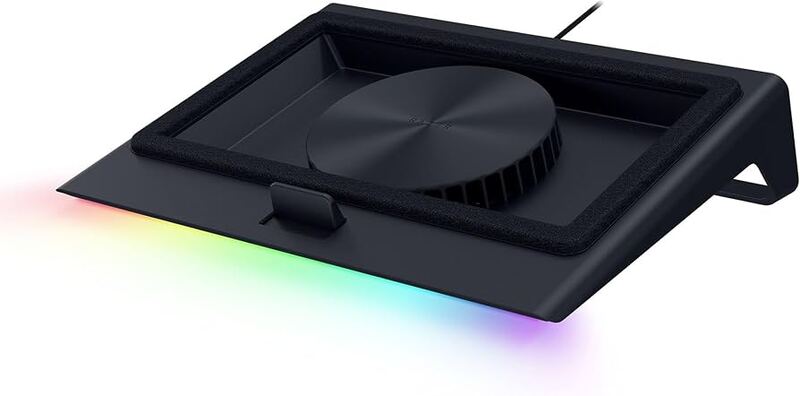
G Style Magazine called the Razer Laptop Cooling Pad 'one of the smartest and most refined laptop cooling solutions available right now.' The pad uses a pressure system with magnetic frames and memory foam to create an airtight seal, improving airflow into laptops. It integrates with Razer Synapse for automatic fan speed adjustment based on CPU/GPU temperatures, offering three preset curves and custom fan curves. The device also includes a 3-port USB-A hub and supports laptops from 14" to 18". While reviewers praised its smart features and performance, some noted the plastic build quality doesn't match the premium price point. It's best suited for users seeking an intelligent cooling solution over basic airflow.

Strengths
  • — Intelligent temperature-responsive fan control via Razer Synapse integration
  • — Airtight seal with magnetic frames and memory foam lining for optimized airflow
  • — 3-port USB-A hub built into the rear for peripheral expansion
Watch-outs
  • — Hard-plastic shell feels less premium than the price suggests
  • — Very loud at high fan speeds; GamingTrend says it "can sound like a jet engine"

How they stack up

Kootek Laptop Cooling Pad

Like the Havit HV-F2056, the Kootek is USB-powered and has no fan speed control, but it carries five fans to the Havit's three and lets the centre fan and the four corner fans be switched separately. The KLIM Everest offers six fan speeds and the Llano V12 a single 5.5-inch, 2,800rpm fan that needs its own power adapter; the Kootek costs far less than either.

Razer Laptop Cooling Pad

The Razer Laptop Cooling Pad stands out with its Razer Synapse integration for intelligent fan control, a feature not found in competitors like the Kootek or Havit models. Its plastic construction falls short compared to the aluminum-mesh design of the Klim Everest.

Specs side-by-side

SpecKootek Laptop Cooling PadRazer Laptop Cooling Pad
Laptop Compatibility12-17 inch14" to 18"
USB Ports2 x USB 2.03x USB-A
Power SourceUSB-powered (attached USB-A cable)—
Adjustable Height6 settings—
ModelLCP04—
Fans5 (one 4.72-inch, four 2.76-inch), blue LEDs—
Fan ControlTwo on/off switches: 1, 4 or 5 fans; no speed control—
MaterialMetal MeshPlastic
Weight2.56 lb5.75 lb
Dimensions14.96"L x 11.81"W x 1.38"H15.6"L x 11.5"W x 4.49"H
Fan Speed—Up to 3000 RPM
Fan Size—140 mm
Noise Level—can sound like a jet engine
Air Flow—sealed airflow system
← See the full ranking of best laptop cooling pads