Verdict
Head-to-head · Best Laptop Cooling Pads

Kootek Laptop Cooling Pad vs Llano V12 Laptop Cooling Pad

Which is the better buy? Side-by-side on rating, price, strengths, and watch-outs — with the published ratings we averaged to get there.

Verdict is reader-supported. As an Amazon Associate we earn from qualifying purchases. Some links on this page are affiliate links — if you click through and buy, we may earn a small commission at no extra cost to you. Our ratings are sourced from independent publications, not sponsors.
The short answer

Llano V12 Laptop Cooling Pad comes out ahead by a clear margin (4.4 vs 3.7). Llano V12 Laptop Cooling Pad is best for: gamers wanting advanced cooling and lighting. Read the strengths below before deciding.

Kootek Laptop Cooling Pad
Ranked #5 in Best Laptop Cooling Pads
Kootek Laptop Cooling Pad
1 source$29.99as of Oct 11

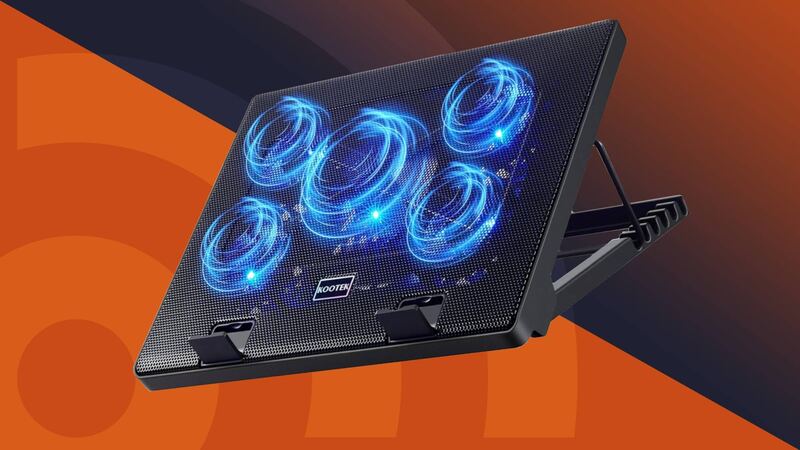
The Kootek Laptop Cooling Pad (model LCP04) is a USB-powered pad with one large and four small fans, six tilt positions and two USB 2.0 ports. Android Authority said it has more customization options than virtually any other laptop cooler, and in its tests the pad cut CPU temperature by 7C at idle and in a CPU stress test and prevented thermal throttling. Under a heavy game the CPU dropped only 3C, which the outlet called a below-average result, and it criticized the cheap-feeling plastic and fan lights that cannot be switched off while the fans run.

Strengths
  • — Six tilt positions, more than nearly all competitors according to Android Authority
  • — Centre fan and four corner fans switch separately, so one, four or five fans can run
  • — Two usable USB 2.0 pass-through ports
Watch-outs
  • — Only a 3C CPU drop during heavy gaming, a below-average result per Android Authority
  • — Plastic design feels a little cheap and inelegant, Android Authority said
  • — Fan lights cannot be turned off unless the fans are turned off
Llano V12 Laptop Cooling Pad
Higher ratedRanked #2 in Best Laptop Cooling Pads
Llano V12 Laptop Cooling Pad
1 source$91.19as of Oct 11

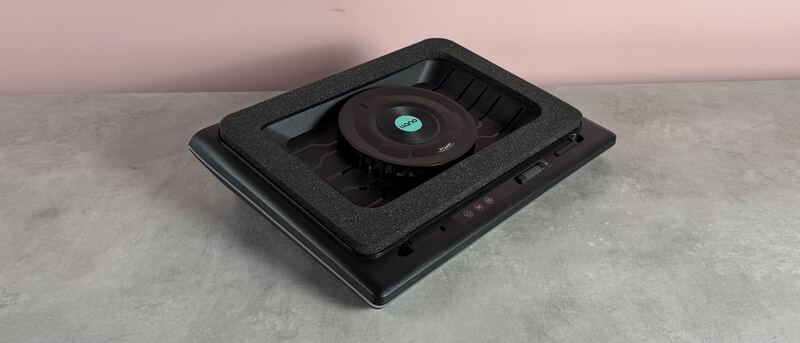
The Llano V12 is a mains-powered cooling pad built around a single 5.5-inch (140mm) fan that spins at up to 2,800rpm. TechRadar, which reviewed it as the Llano RGB Laptop Cooling Pad, recorded only a 15F / 8C temperature rise on its test laptop after a 15-minute 3DMark stress test with the pad at full speed, and called that one of the most impressive results it had seen from a cooling pad. The same review measured 64dB from head height and 79dB from a few inches away at maximum speed, found the power cable a little short, and listed the price as a reason to avoid it.

Strengths
  • — TechRadar measured only a 15F / 8C rise in a 15-minute 3DMark stress test at 2,800rpm
  • — Three height settings and a memory foam pad that TechRadar said keep the laptop firmly in place
  • — RGB limited to a single bar around the edge, a design TechRadar called subtle
Watch-outs
  • — Loud at full speed: TechRadar measured 64dB from head height and 79dB from a few inches away
  • — TechRadar found the power cable a little short, and it plugs in on the right-hand side
  • — Expensive for a cooling pad: $119.99 list price per TechRadar

How they stack up

Kootek Laptop Cooling Pad

Like the Havit HV-F2056, the Kootek is USB-powered and has no fan speed control, but it carries five fans to the Havit's three and lets the centre fan and the four corner fans be switched separately. The KLIM Everest offers six fan speeds and the Llano V12 a single 5.5-inch, 2,800rpm fan that needs its own power adapter; the Kootek costs far less than either.

Llano V12 Laptop Cooling Pad

The Llano V12 pairs a single 5.5-inch, 2,800rpm fan with RGB lighting, which sets it apart from the more basic Havit or Targus models. However, its bulky design and high price point make it less portable and cost-effective than the Kootek or Havit, which offer simpler, more affordable solutions for general use.

Specs side-by-side

SpecKootek Laptop Cooling PadLlano V12 Laptop Cooling Pad
Laptop Compatibility12-17 inch15.6-19 inch laptops
USB Ports2 x USB 2.03 x USB 2.0 (peripherals only, not charging)
Power SourceUSB-powered (attached USB-A cable)36W power adapter (included)
Adjustable Height6 settings3 tilt angles (3°/12°/15°)
ModelLCP04—
Fans5 (one 4.72-inch, four 2.76-inch), blue LEDs—
Fan ControlTwo on/off switches: 1, 4 or 5 fans; no speed control—
MaterialMetal MeshAcrylonitrile Butadiene Styrene (ABS)
Weight2.56 lb3.97 lb
Dimensions14.96"L x 11.81"W x 1.38"H16.9"L x 12.9"W x 2.7"H
Fan Speed—Up to 2,800 RPM
Fan Size—5.5-inch (140mm) single turbo fan
Noise Level—64dB at head height, 79dB at a few inches (TechRadar, max speed)
Lighting—RGB light bar, 10 modes
← See the full ranking of best laptop cooling pads