Verdict
Head-to-head · Best Thunderbolt 4 Docks

Kensington SD5780T vs OWC Thunderbolt 4 Dock

Which is the better buy? Side-by-side on rating, price, strengths, and watch-outs — with the published ratings we averaged to get there.

The short answer

OWC Thunderbolt 4 Dock comes out ahead by a narrow margin (4.3 vs 4.4). The gap is mostly about Creative professionals who daisy-chain Thunderbolt drives and need fast UHS-II card transfers without paying flagship prices. — read the strengths below before deciding.

Kensington SD5780T
Ranked #4 in Best Thunderbolt 4 Docks
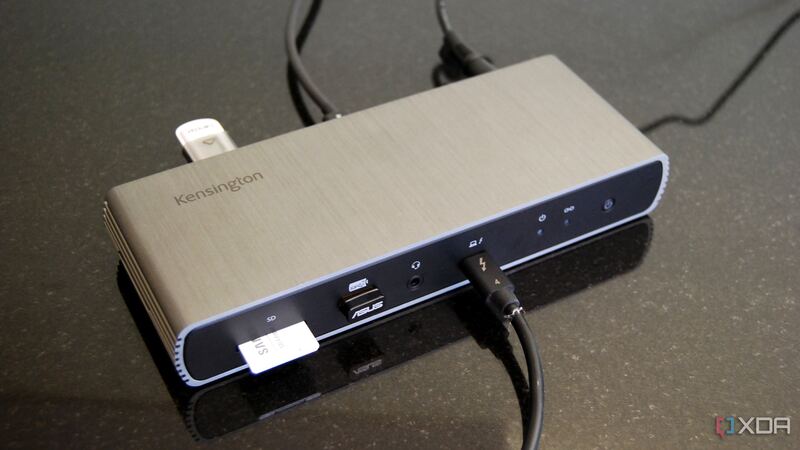
Kensington SD5780T
$244.55as of Jun 7

The SD5780T is the display-focused dock: HDMI 2.1 plus Thunderbolt outputs drive dual 4K or 6K monitors, backed by 96W charging and a three-year warranty. Windows Central called it Kensington's best dock yet and XDA marked it Recommended, noting it is well worth it around $300 or less. Its horizontal footprint and original high price are the drawbacks, but recent discounts make it a strong dual-display option.

Strengths
  • Dual 4K/6K display support with HDMI 2.1 and Thunderbolt outputs
  • Up to 96W charging for the host laptop
  • Built-in SD card reader and broad port selection
Watch-outs
  • Horizontal design takes up more desk space
  • Originally launched at a high $350-plus price
  • Fewer total ports than the CalDigit TS4 or Plugable TBT4-UDZ
OWC Thunderbolt 4 Dock
Higher ratedRanked #3 in Best Thunderbolt 4 Docks
OWC Thunderbolt 4 Dock
$229.99as of Jun 7

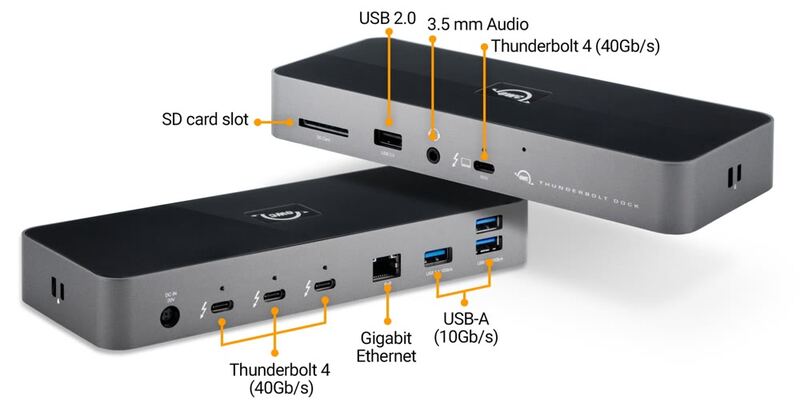
The OWC Thunderbolt 4 Dock is the daisy-chainer's pick: three downstream Thunderbolt 4 ports and a UHS-II card reader make it a favorite for creative workflows, at a price that meaningfully undercuts the CalDigit TS4. docking-stations.info scored it 8/10 and TechRadar praised its construction and flexibility. The lack of HDMI is the main caveat, but for Thunderbolt-heavy setups it is excellent value.

Strengths
  • Three downstream Thunderbolt 4 ports for daisy-chaining drives and displays
  • UHS-II SD card reader prized by photographers and videographers
  • 96W host charging through a single cable
Watch-outs
  • No HDMI port, so displays need DisplayPort or Thunderbolt
  • Fewer total ports than the CalDigit TS4 or Plugable TBT4-UDZ
  • USB 2.0 port is a dated inclusion among faster connections

How they stack up

Kensington SD5780T

Leans on display flexibility, pairing HDMI 2.1 with Thunderbolt outputs for dual 4K/6K screens — a step beyond the dual-4K HDMI of the Plugable TBT4-UD5. It carries fewer total ports than the CalDigit TS4 and Plugable TBT4-UDZ, and lacks the downstream Thunderbolt daisy-chaining of the OWC Thunderbolt 4 Dock, but its three-year warranty and higher display ceiling set it apart.

OWC Thunderbolt 4 Dock

Sits between the value Plugable TBT4-UD5 and the flagship CalDigit TS4: it adds three downstream Thunderbolt 4 ports for daisy-chaining that the Plugable TBT4-UD5 lacks, while undercutting the TS4 on price. Like the TS4 it has no HDMI, where the Plugable TBT4-UD5 and Kensington SD5780T include it, and it carries fewer total ports than the Plugable TBT4-UDZ.

Specs side-by-side

SpecKensington SD5780TOWC Thunderbolt 4 Dock
Ports11 total11 total
ThunderboltThunderbolt 4 (40Gb/s) host + downstream3x downstream Thunderbolt 4 (40Gb/s)
DisplaysDual 4K or 6K (HDMI 2.1 + Thunderbolt)Single 8K@60Hz or dual 4K
Host ChargingUp to 96W Power Delivery96W Power Delivery
Card ReaderSD card readerSD 4.0 UHS-II
NetworkingGigabit EthernetGigabit Ethernet
Warranty3-year2-year limited
CompatibilityWindows, Mac, USB4, Thunderbolt 3
USB3x USB-A (10Gb/s) + 1x USB 2.0
← See the full ranking of best thunderbolt 4 docks