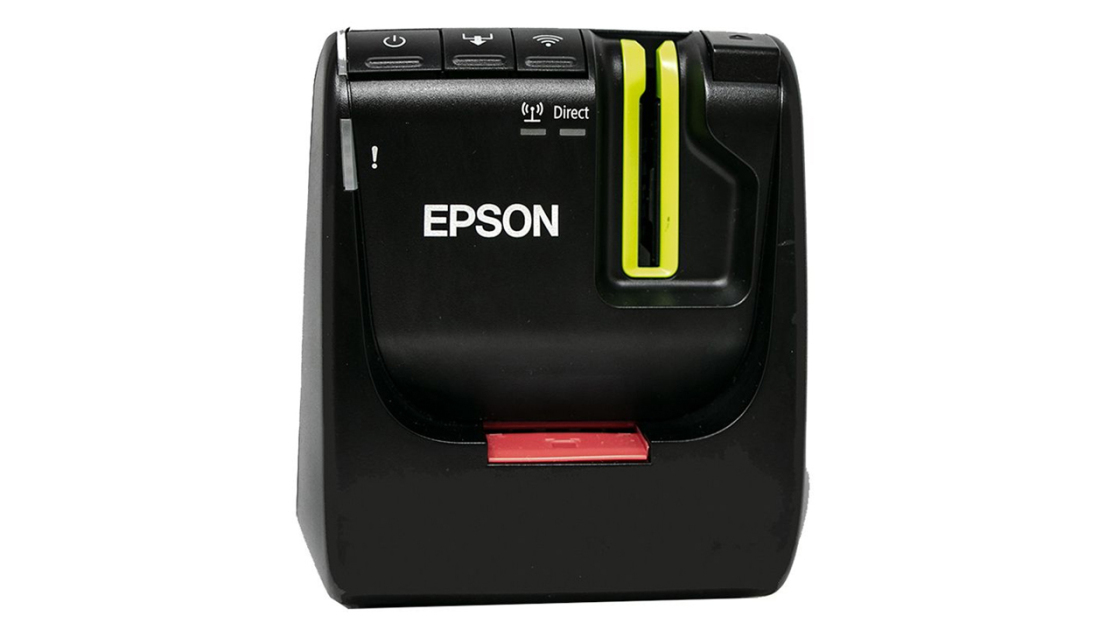
The Epson LabelWorks LW-PX800 is designed for users needing versatile labeling capabilities on tapes up to 1.5 inches wide. PCMag's review highlighted its built-in automatic full cutter and half cut option, along with support for multiple connection methods including USB, Wi-Fi, and wired LAN. While it offers solid performance for general labeling tasks, the LW-PX800 trails the LW-Z5000PX in print speed and resolution, and lacks the optional tape rewinder feature that some industrial users may require.
Full review
Network connectivity for office use
The Epson LW-PX800 supports both wired Ethernet and wireless connectivity, making it suitable for shared office environments where multiple users need access to a single printer. According to Hagensieker's review, the device connects via RJ-45 Ethernet jack, but notably lacks an Ethernet cable in the box, requiring users to purchase one separately. The network configuration process on Mac OS requires installing Epson Label Editor Lite, the driver, and enabling the Epson Network Configuration Tool. The reviewer documented a step-by-step process for setting up the printer over a wired LAN connection, including assigning static IP addresses and adding the printer through Mac's system settings. This setup process, while functional, is more complex than what users might expect from a plug-and-play device, particularly when compared to simpler handheld label makers.
The printer's ability to connect via WiFi or wired LAN allows for networked printing across multiple devices, which is beneficial in professional settings. However, the lack of an included Ethernet cable and the complexity of Mac OS setup may deter some users. The device's network capabilities are further enhanced by the availability of iOS and Android apps, which provide additional access points for mobile users. While the LW-PX800 is designed for office environments, the setup process requires some technical know-how, particularly for Mac users who must navigate the driver installation and network configuration steps manually.
Print quality and resolution specifications
The Epson LW-PX800 delivers a crisp 360 dpi resolution, which is sufficient for most labeling applications, including detailed text, barcodes, and simple graphics. PCMag's M. David Stone noted that the printer's resolution is adequate for professional labeling needs, particularly when combined with its ability to print on various materials. The device is capable of printing on materials up to 1.5 inches wide, which is suitable for most office and industrial applications. The printer's ability to handle multiple label types, including magnetic tape, heat shrink tubing, and standard labels, contributes to its versatility in different environments.
However, for general office labeling, the resolution is more than adequate. The printer's performance in terms of clarity and sharpness was consistent across different label materials, according to the review by Hagensieker. The device's ability to produce clean, professional-looking labels on a variety of surfaces, including heat shrink tubing and magnetic tape, demonstrates its adaptability to diverse labeling tasks.
Material compatibility and label types
The Epson LW-PX800 supports an extensive range of label materials, including more than 163 different types, which makes it suitable for both office and industrial applications. According to the discount-low-voltage.com review, the device can print on materials such as magnetic tape, heat shrink tubing, glow-in-the-dark labels, and industrial adhesive labels. The printer's compatibility with various materials is one of its strongest features, allowing users to customize labels for specific needs, such as identifying cables or components in technical environments.
Hagensieker's review emphasized the printer's ability to handle specialized materials like heat shrink tubing, which is particularly useful for cable management in technical environments. Additionally, the printer supports half-cut labels, which is useful for creating serial numbers or batch identifiers. The inclusion of a corner rounder (PeelGuard) helps prevent label edges from lifting, which is particularly beneficial for labels on frequently handled items.
Software and mobile app support
The Epson LW-PX800 comes with software support for both Windows and Mac operating systems, although the full version of the Epson Label Editor is Windows-only. Hagensieker's review detailed the process of setting up the printer on Mac OS, which involves installing Epson Label Editor Lite, the driver, and enabling the Epson Network Configuration Tool. The Mac version requires additional steps to configure network settings, which may be challenging for users unfamiliar with network setup procedures. The Windows version of the software is more robust and offers greater customization options.
Mobile support is provided through iOS and Android apps, which allow users to print labels directly from their smartphones or tablets. These apps provide a simplified interface for label creation and printing, making it convenient for users who need to print labels on the go. The availability of these apps extends the printer's usability beyond traditional desktop environments. Additionally, Epson offers online training videos that help users understand advanced features, which is a valuable resource for those new to label printing.
Power management and operational features
The Epson LW-PX800 includes an automatic power-off feature that activates after approximately 8 hours of inactivity, which helps conserve energy but may be inconvenient for users who need continuous access. Hagensieker noted that this feature cannot be disabled, which is a limitation for users who require constant operation. The device also features a built-in corner rounder (PeelGuard) that helps prevent label edges from lifting, enhancing the longevity of printed labels. This feature is particularly useful for labels that are frequently handled or exposed to harsh conditions.
The printer's power management system includes an AC adapter and battery compartment, allowing for both wired and portable operation. The inclusion of a hard case in the full kit provides protection for the device during transport and storage, which is beneficial for users who need to move the printer between locations. The device's compact design and top-loading cartridge system make it easy to use and maintain, even in tight spaces. The printer's ability to operate without a constant power source, thanks to its battery compartment, adds to its flexibility in various environments.
Warranty and customer support
This warranty covers the device against defects and includes expert one-on-one customer service, which is a unique selling point for the product. According to discount-low-voltage.com, Epson's commitment to customer support is one of the most appealing aspects of the printer, particularly for users who value long-term reliability. The lifetime warranty provides peace of mind for users who plan to use the device extensively over time.
Hagensieker's review highlighted the durability and reliability of Epson's warranty, which includes replacement services for broken units. This level of support is rare in the label printer market and sets the LW-PX800 apart from other models. The warranty's coverage extends beyond just the device itself, encompassing the support services that users receive. This comprehensive warranty, combined with Epson's reputation for quality, makes the LW-PX800 a strong choice for users who require a reliable labeling solution.
Design and build quality
The Epson LW-PX800 features a compact design that is suitable for desktop use, with a top-loading cartridge system that simplifies maintenance. The device includes a QWERTY keyboard, which enhances usability for users who need to input text directly into the printer. Hagensieker's review noted that the printer's build quality is solid, with a finish that appears durable and professional. The inclusion of a bumper guard helps protect the device from damage, particularly in environments where it might be subject to frequent handling.
The printer's design allows for easy access to internal components, including the battery compartment and cartridge system. The detachable back panel facilitates access for battery changes and cartridge replacements, which is a practical feature for users who need to maintain the device regularly. The device's overall footprint is compact, making it suitable for small workspaces or desks where space is limited. The inclusion of a hard case in the full kit provides additional protection for the printer during transport and storage, which is beneficial for users who need to move the device between locations.
Strengths
- +Prints on Epson PX tapes up to 1.5 inches wide
- +Built-in automatic full cutter with half cut option
- +Prints at up to 35 mm per second
- +Supports USB, Wi-Fi, and wired LAN connections
Watch-outs
- −No optional tape rewinder feature
- −Automatic power off after 8 hours of inactivity
How it compares
The Epson LW-PX800 offers superior connectivity with Wi-Fi and LAN support compared to the Brother QL-800, but it lacks the optional tape rewinder feature that some industrial users may require. It also trails the Nelko P21 in terms of portability and app integration, though it provides faster print speeds and a built-in cutter.
Rating sources
“We recommend the LWZ 5000 PX for higher volume industrial users printing from a Windows PC. The 2-in capability is great for facility marking and safety labels.”
Our 4.5 score is the average of the 3 scored reviews above; 1 more reviewed it without printing a score and is not in the average. Ratings marked * were derived from the reviewer’s written analysis or video transcript — the publisher didn’t print an explicit numeric score, so we inferred one from their own words. Click through to verify. More about methodology.