Verdict
Head-to-head · Best Laser Engravers

Creality Falcon A1 Pro vs xTool P2

Which is the better buy? Side-by-side on rating, price, strengths, and watch-outs — with the published ratings we averaged to get there.

Verdict is reader-supported. As an Amazon Associate we earn from qualifying purchases. Some links on this page are affiliate links — if you click through and buy, we may earn a small commission at no extra cost to you. Our ratings are sourced from independent publications, not sponsors.
The short answer

xTool P2 comes out ahead by a clear margin (4.9 vs 4.4). The gap is mostly about Serious makers needing industrial-grade power for thick material cutting in fixed workshops — read the strengths below before deciding.

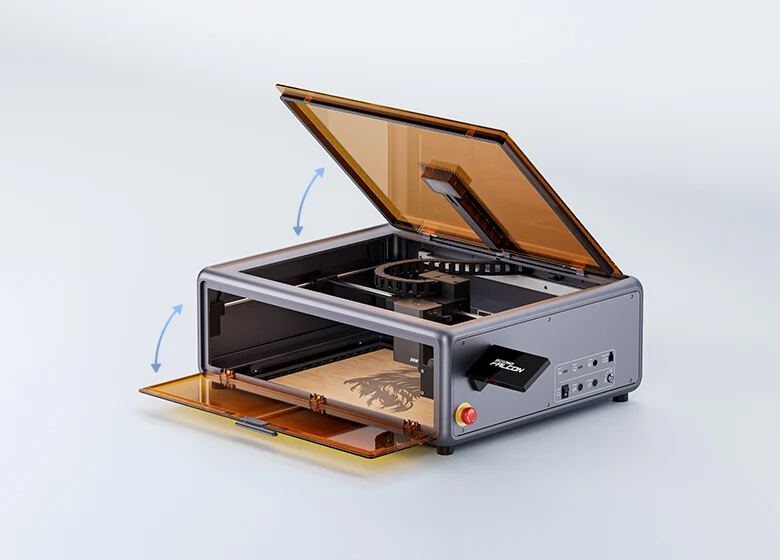
Creality Falcon A1 Pro
Ranked #5 in Best Laser Engravers
Creality Falcon A1 Pro
7 sources1 derived$1,099as of Oct 1

The Creality Falcon A1 Pro utilizes a CoreXY motion system to achieve engraving speeds up to 600 mm/s, which Laserbuying found is approximately three times faster than traditional belt-driven competitors. Its AI-powered visual autofocus automatically adjusts the Z-height in about three seconds with less than 0.3mm accuracy, though CNX Software notes this may require manual fine-tuning for thick material cuts. The enclosed chassis provides robust safety features but lacks sufficient internal power to clear smoke from heavy cutting, necessitating a separate high-capacity extraction system as Grouchyfarmer warned. While the hot-swappable laser head adds versatility, the fixed side-mounted touchscreen obstructs workspace access and limited height clearance restricts thicker objects, making this machine best for flat-sheet crafting rather than bulky item engraving.

Strengths
  • — CoreXY motion system enables engraving speeds up to 600 mm/s, significantly faster than traditional belt-driven gantry designs.
  • — AI-powered visual autofocus automatically measures material thickness and adjusts Z-height in approximately 3 seconds with less than 0.3mm accuracy.
  • — Class 1 FDA-rated fully enclosed chassis provides an eight-layer safety suite including flame detection, emergency stop, and lid auto-stop without requiring protective goggles.
Watch-outs
  • — The built-in exhaust fan lacks sufficient power to clear smoke and fumes from thick material cutting, necessitating a separate high-capacity extraction system.
  • — Fixed side-mounted touchscreen can obstruct workspace access when placing materials next to the machine.
  • — Height clearance is limited for flat materials unless the base plate is removed.
xTool P2
Higher ratedRanked #2 in Best Laser Engravers
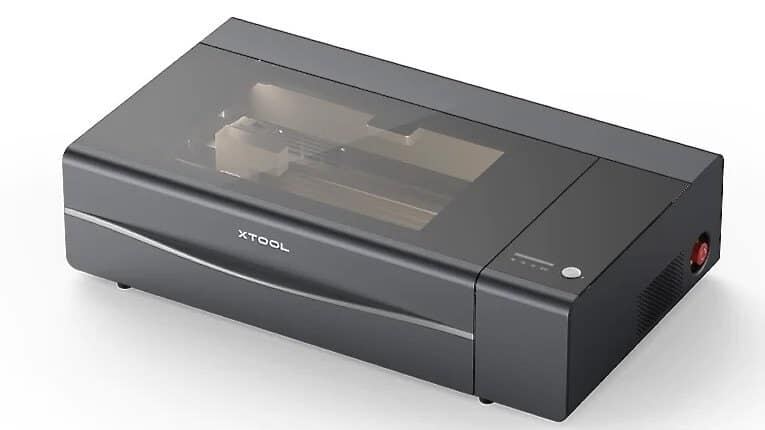
xTool P2
6 sources$139as of Oct 1

The xTool P2 delivers high-power 55W CO2 laser cutting capable of slicing through 20mm wood and acrylic in a single pass, as uniquecreationsbyanita found it handles thick substrates cleanly. Its fully enclosed design with a pneumatic lid and 145CFM exhaust fan effectively manages fumes, while dual cameras aid precise positioning. However, the machine is heavy at 45kg, requiring a permanent dedicated workspace that cannot be easily moved or stored away. Additionally, advanced features like curved surface mapping are exclusive to the native xTool Creative Space software, limiting users who prefer third-party tools like LightBurn. This model fits serious makers needing industrial-grade power and safety for fixed workshops, but it is unsuitable for those with limited space or a preference for portable setups.

Strengths
  • — 55W CO2 glass laser tube delivers high power capable of cutting up to 20mm thick wood and acrylic in a single pass, per Unique Creations by Anita.
  • — Fully enclosed safety design with a locked pneumatic lid prevents fume leaks and laser exposure during operation.
  • — Comes standard with built-in air assist and a powerful 145CFM exhaust fan to manage smoke and improve cut quality, per MakerHacks.
Watch-outs
  • — Heavy at 45kg (99 lbs) and large in footprint, requiring a permanent dedicated workspace or heavy-duty table.
  • — Requires manual filling of the water-cooling system with distilled water and antifreeze before initial use, MakerHacks notes.
  • — Exclusive advanced features like curved surface mapping are only available when using the native xTool Creative Space software, per Unique Creations by Anita.

Derived means the reviewer published no score, so one was inferred from their written verdict. Everything else is a number the publisher printed. How we rank.

How they stack up

Creality Falcon A1 Pro

The Creality Falcon A1 Pro achieves engraving speeds up to 600 mm/s, which is significantly slower than the xTool F1 Ultra's galvo-driven 4,000 mm/s and vastly outpaced by the xTool F2 Ultra UV at 15,000 mm/sec. However, its CoreXY motion system allows for a larger physical working area compared to the Wainlux K10’s tiny 80mm x 80mm carving space, making it more suitable for flat-sheet crafting than handheld engraving.

xTool P2

The xTool P2 delivers high-power 55W CO2 cutting capable of slicing through 20mm wood, significantly outperforming the lower-wattage diode lasers in the Xtool S1 40W or Glowforge Aura. However, its heavy 45kg weight and large footprint require a dedicated permanent workspace, making it unsuitable for those seeking the portability of the Wainlux K10.

Specs side-by-side

SpecCreality Falcon A1 ProxTool P2
Laser Power20W Blue Diode55W CO2 Glass Laser Tube
Laser Type20W blue diode + Optional 2W IRCO2
Working Area14094 x 10551 in23622 x 12008 in
Max Speed600 mm/s600mm/s
Machine Dimensions567 x 468 x 211 mm1000 x 639 x 268mm
Machine Weight16.8 kg45kg (99 lbs)
ConnectivityWi-Fi, USB, TF card, App (iOS/Android)Wi-Fi, USB-C, Ethernet
Engraving Area500mm * 500mm23.6" x 12"
Accuracy0.012"0.001 inches
← See the full ranking of best laser engravers